20 • Questions? Call or Text +1-801-658-0015
SUNSTONE CDDP-A USERS GUIDE
Auto With Timing
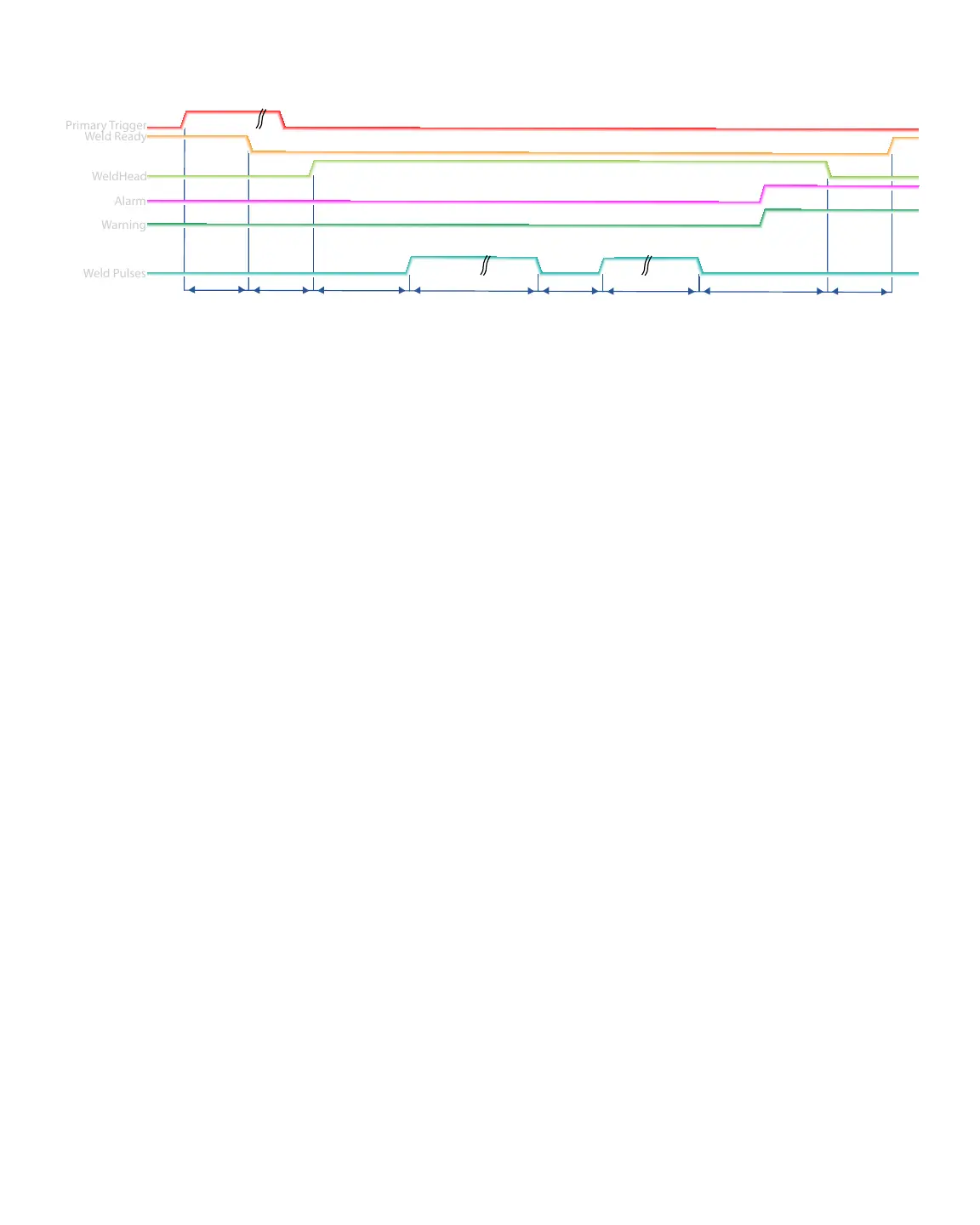
Refer to Figure 20.1.
D1: A delay that occurs from the time primary trigger is triggered and the weld ready signal changes to a low
value. Typical time for this is between 1 and 50 milliseconds.
Pre-Weld: An operator-dened delay that happens before the signal to the weld head is sent. This delay can be
set between 1 and 10,000 milliseconds. Use the Pulse Settings tab on the Home Screen to control Pre-Weld.
Squeeze Time: An operator-dened delay that occurs from the time the weld head signal is sent and the
beginning of pulse 1.
Pulse 1: The duration of this delay is dependent on the energy programmed on welder for pulse 1. This is
controlled on the Pulse Settings tab on the Home Screen.
Cool: The duration of this delay is dependent on the time programmed on welder for time between pulses. The
operator can select between 1 and 100 milliseconds. This time will be ignored if either pulse is disabled. Use the
Pulse Settings tab on the Home Screen to set the cooling delay.
Pulse 2: The duration of this delay is dependent on the energy programmed on welder for pulse 2, controlled on
the Pulse Settings tab on the Home Screen.
Hold Time: An operator-dened delay that occurs from the time pulse 2 ends and the weld head begins to
return to home position.
D2: After this delay the Weld Ready signal will return to a high position. This delay will depend on the time need-
ed to charge to the desired energy, but will typically be between 50 and 5,000 milliseconds minus the length of
the hold time.
Figure 20.1. Sample timing diagram for Auto with Timing and Auto with Trigger scenarios.
Primary Trigger
Weld Ready
WeldHead
Alarm
Warning
Weld Pulses
Pulse 1
D1
Pre-Weld
D2
Cool
Pulse 2
Hold
D3















 To Next Page