50 • Questions? Call or Text +1-801-658-0015
SUNSTONE CDDP-A USERS GUIDE
WRITING TO A SINGLE REGISTER
To write to a single register, follow these instructions:
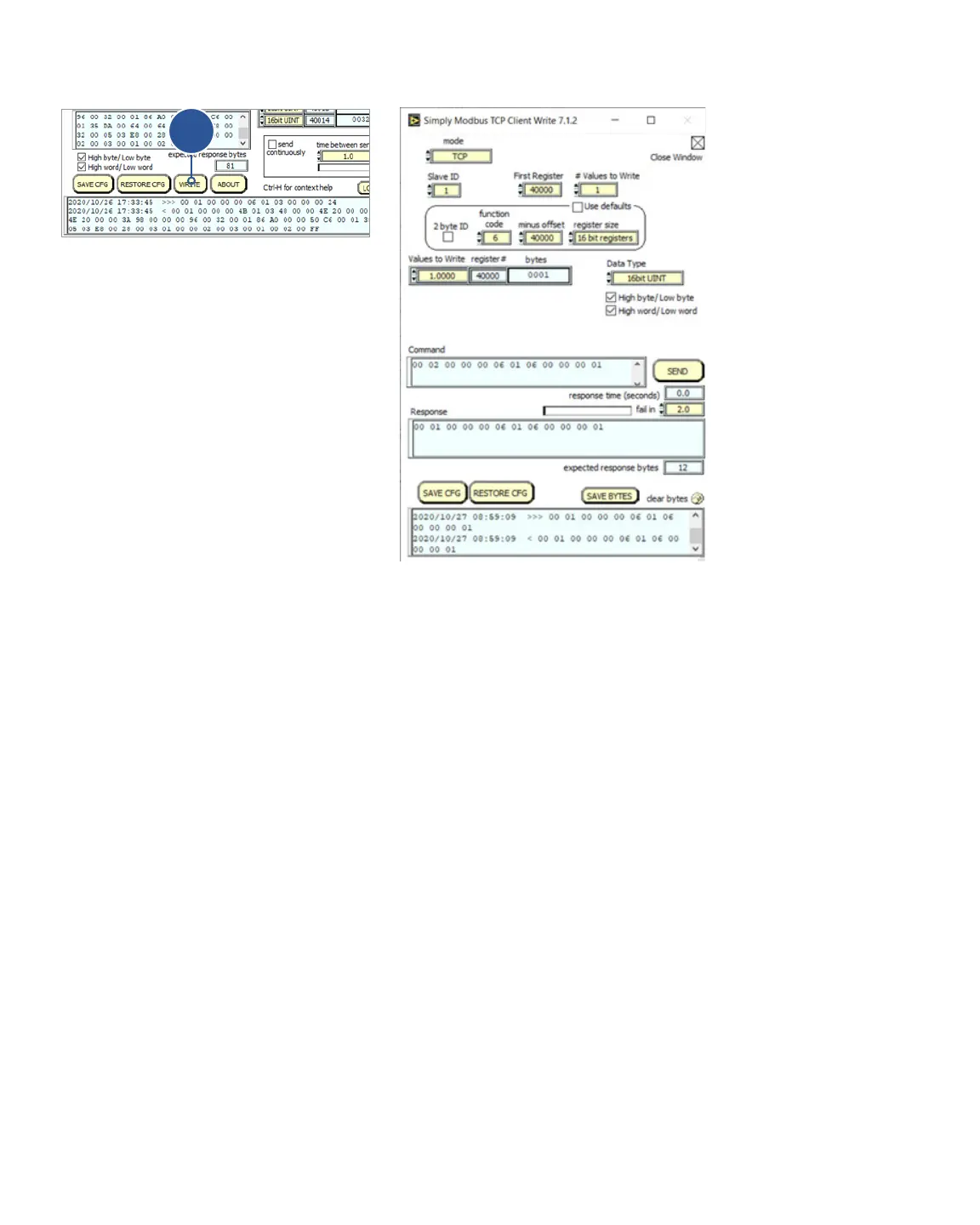
• On the main screen click the Write button (A) near the bottom of the window as shown in Figure 50.1.
• A new window will appear. See Figure 50.2. In this new window, make sure Mode is set to TCP.
• Set the function code to 6.
• Adjust the register size to 16 bit registers.
• Adjust the Values to Write to 1.000.
• Adjust the Data Type to 16bit UINT.
• Click on the Send button.
In this example, notice the response ends in 01. The CDDP-A will adjust the Remote Schedule Select Mode to 1
which is Basic.
If you change the values to write to 0.0000 and click on the Send button, the response ends in 00 and the re-
mote schedule select mode on the CDDP-A is “OFF” or disabled.
Figure 50.1.
A
Figure 50.2.















 To Next Page