44 • Questions? Call or Text +1-801-658-0015
SUNSTONE CDDP-A USERS GUIDE
data for coils 0 through 9. Coil 10 starts on the next column and
Coil 20 on the third column. On the CDDP-A Home screen (see
Figure 43.3), notice that the Pulse 1 Power Comparator is OFF.
READING HOLDING REGISTERS
A holding register is used to designate a WORD reference
that can be assigned to an output address or to an internal
reference address. Holding registers are usually comprised of
16-bit words containing a decimal value between 1 and 65535.
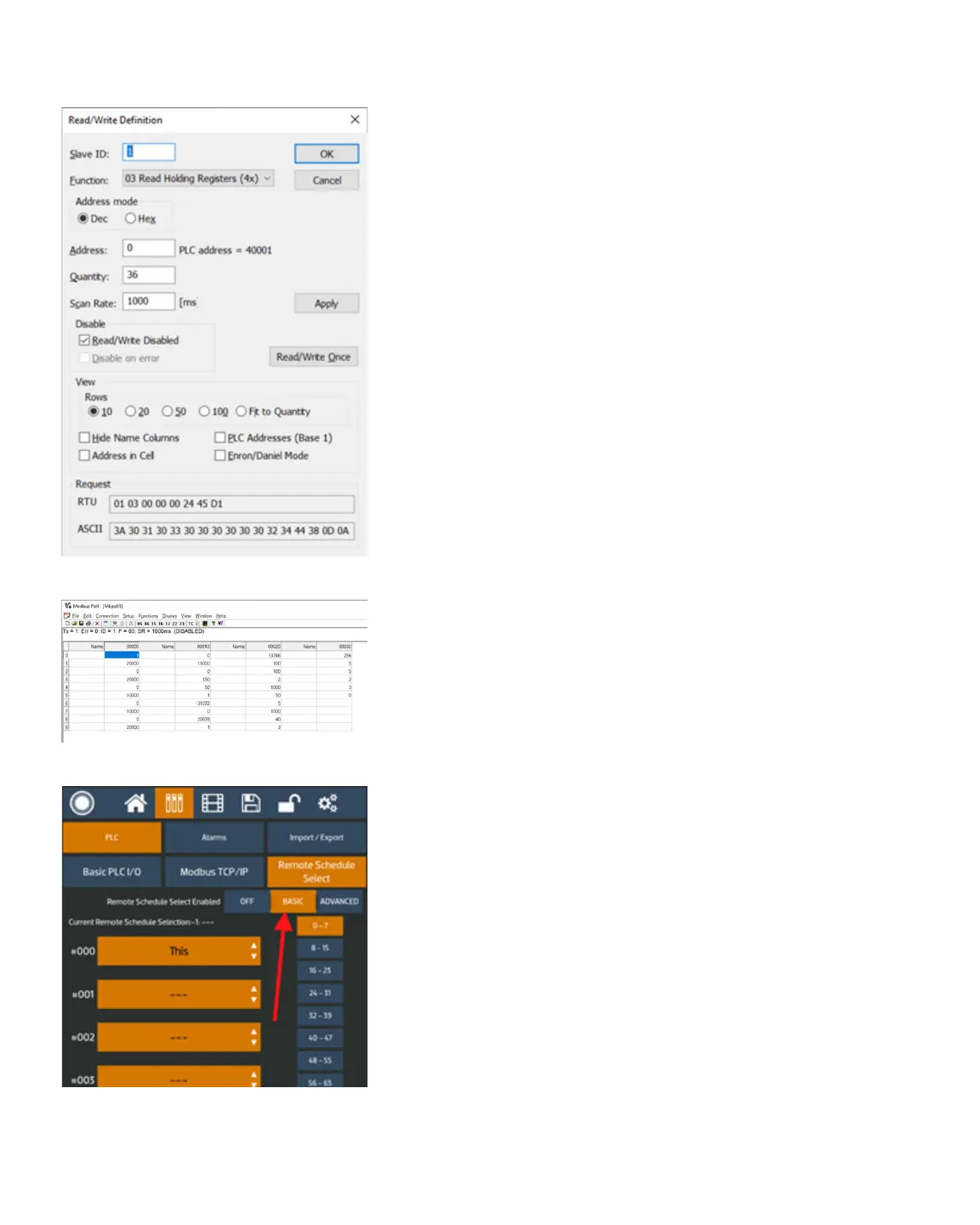
Use the following instructions to read holding registers:
• Click on the Setup menu and choose Read/Write Deni-
tion. The Read/Write Denition window will appear.
• As shown in gure 44.1, in the Read/Write Denition
window, click on 03 Read Holding Registers in the Func-
tion drop down menu box.
• Enter 0 in the Address box.
• Enter 36 in the Quantity box.
• Check the Read/Write Disabled box.
• Click the Apply button.
• Click the Read/Write Once button.
• Click on OK to save all settings.
Changes you’ve made to the holding registers can now viewed
in the main table, as shown in Figure 44.2. Column “00000” and
row “0” is Remote Schedule Select Mode and it is “1” so it is in
Basic mode. All registers can be see on the table. On the CDDP-
A Communication screen that Remote Schedule Select Mode is
se to the Basic mode, as shown in Figure 44.3.
WRITE SINGLE COIL
To write a single coil, follow these instructions:
• Click on the Setup menu and choose Read/Write Deni-
tion. The Read/Write Denition window will appear.
• As shown in Figure 45.1, Click on 05 Write Single Coil in
the Function drop down menu box.
• Enter 0 in the Address box.
• Enter 1 in the Quantity box.
Figure 44.1. Read/Write Denition window.
Figure 44.2.
Figure 44.3.















 To Next Page