Questions? Call or Text +1-801-658-0015 • 47
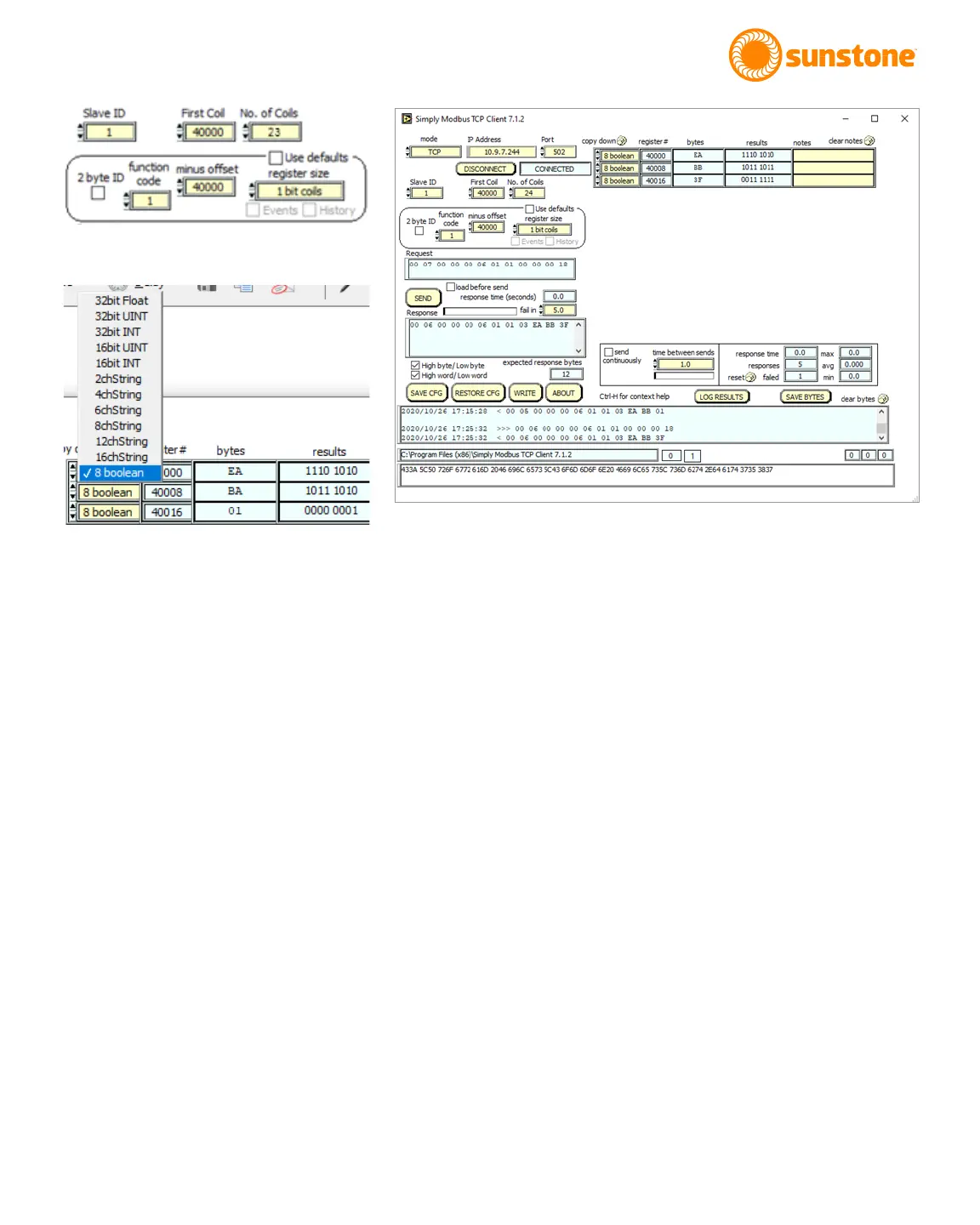
• Set the No. of Coils to 23.
• Change Function code to 1.
• Change the Register Size to 1 bit coils.
• In the Copy Down cell (labeled as (F) in Figure 46.1), change the input to 8 boolean. See Figure 47.2.
• Click Send to send the instructions to the CDDP-A.
The code will appear as displayed in Figure 47.3. Notice in the row with register 40000 the results cell has 1110
1010, which represents the rst eight coil states. The least signicant bit is coil 0, so Pulse 1 Power Compara-
tor Enable is O “0b0”. The next row has the next eight coil states and starts with register 40008 which is coil
8 Comparator Action after Pulse 1 and it is also O “0b0”. The next row starts with register 40016, coil 16, or
Alarm – Trigger Enable.
Discrete inputs are accomplished in the same manner as described for coils; however, you must change the
Function Code to 2.
READING A HOLDING REGISTER
To read from a holding register, and with the CDDP-A connected, refer to Figure 48.1 and follow these instruc-
tion:
• Change the No. of Reg to 36.
• Change Function Code” to 3.
Figure 47.1.
Figure 47.2.
Figure 47.3.















 To Next Page