48 • Questions? Call or Text +1-801-658-0015
SUNSTONE CDDP-A USERS GUIDE
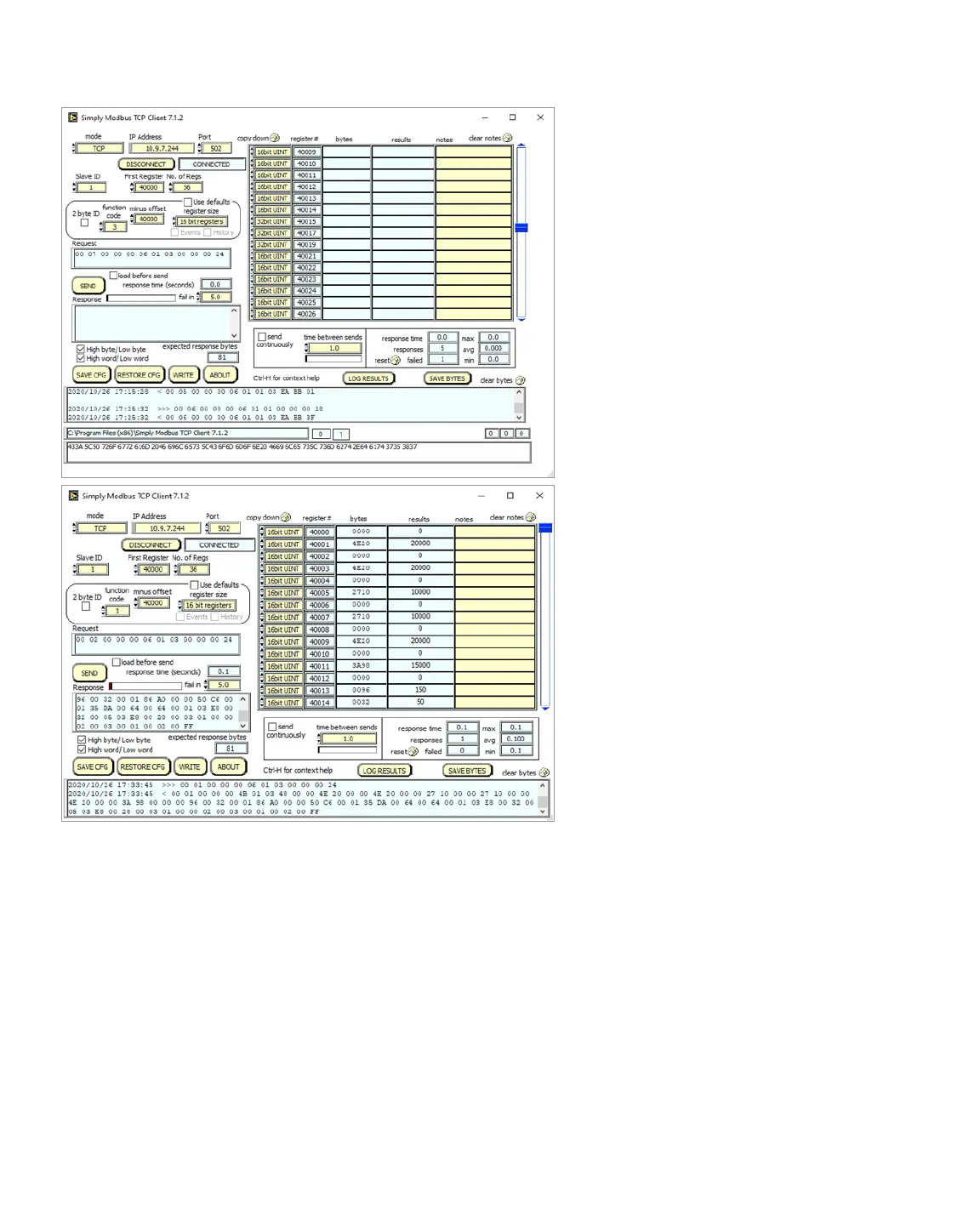
• Change Register Size to 16 bit registers.
• Go to register 15 on the output spreadsheet and change to 32bit UINT.
• Change register 17 and 19 to 32bit UINT as well. All other registers should be 16bit UINT.
• Click on the Send button.
Notice that the output spreadsheet reects the instructions sent to the CDDP-A, as shown in Figure 48.2. At
Register 40000 (which is the same as Holding Register 0x0000) the value is 0 which correlates to the Remote
Schedule Select Mode being “Disabled”, as noted in the Holding Register Table on page 68.
If you scroll down to Register 40015 (or Holding Register 0x000F) you’ll see a value of 100000, which is 100,000
milliwatt seconds. The energy total is 100 WS.
Figure 48.1. How the software inputs appear
BEFORE you click on the Send button.
Figure 48.2. After you click on the Send button, the
output spreadsheet reects the instructions sent
to the CDDP-A.















 To Next Page