TELOS TWOX12 USER’S MANUAL
INSTALLATION
CHAPTER 2 9
ISDN
(PSTN)
CONTRO
BLOCK
INTEGRA
TELOS
TWO
HYBRID
TELCO
INTERFAC
&
MATRIX
BLOCK
TWOx12 Telephone Interfac
SEND
to Caller
(AES)
1&2
SEND
to Caller
(Analog)
1
SEND
to Caller
(Analog)
2
CALLER
Out
(Analog)
1
CALLER
Out
(Analog)
2
CALLE
Out
(AES)
1&2
Ethernet 10 base-T WAN/LAN
Connection for Assistant Produce
and remote control
Program
on Hold
Source
KEY
Data
ISDN BR
Analog Audio
AES/EBU Audi
Parallel Outputs (Status &
Control) and Remote control
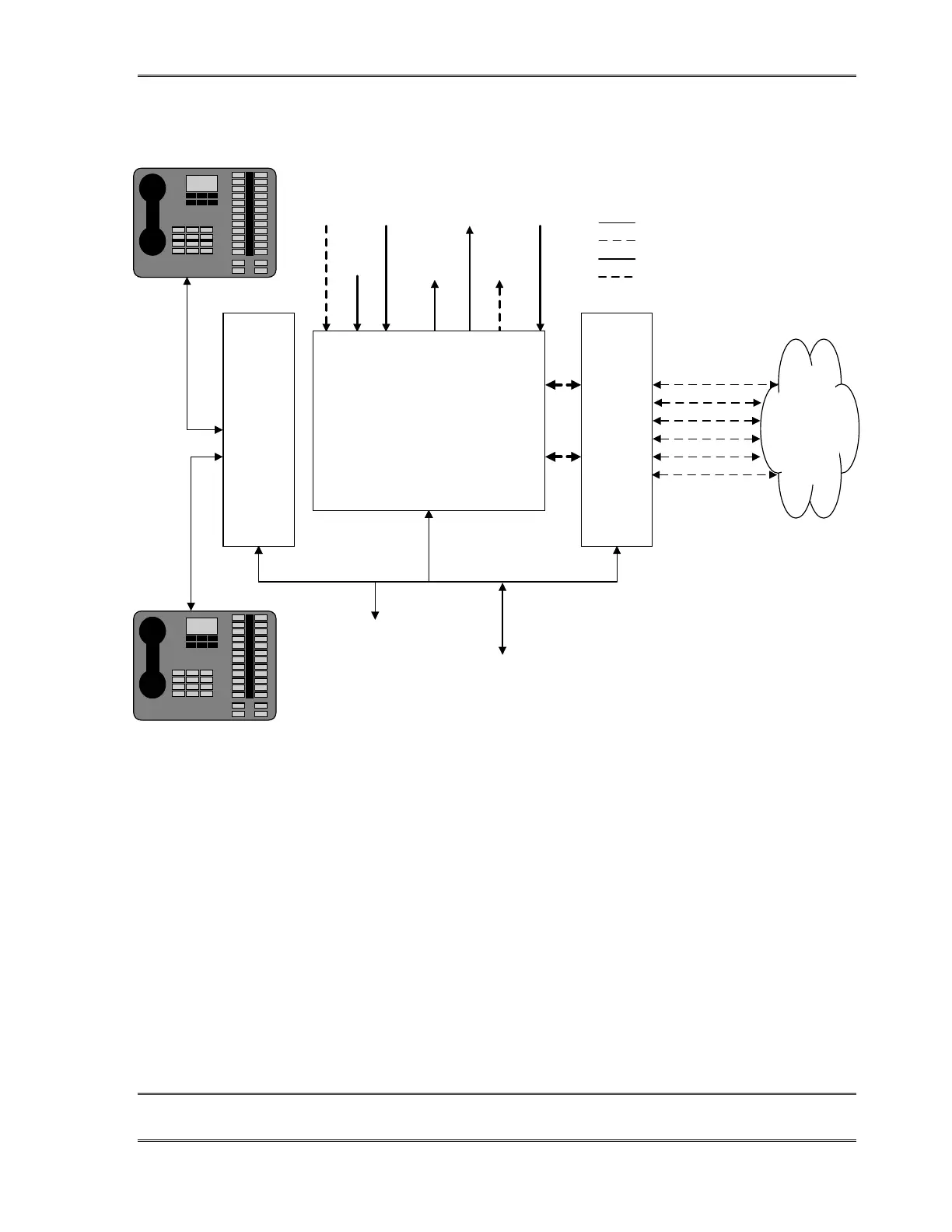
The input & output ports of the TWOx12 system.
Note that the system can easily be expanded to support up to four Desktop Directors™; Only one
of the input options (AES/EBU or Analog) can be selected at a given time; POTS TWOx12
systems substitute 12 analog POTS circuits for the ISDN circuits shown above.
Identifying your TWOx12 system – Analog or Digital?
You will need to identify whether your system is a POTS (Plain Old Telephone Service -
analog) or an ISDN version, since we will cover them separately in the following
instructions. If you are installing a mixed system you should read through both sets of
instructions. Towards the end of this section (section 2.5.4) we will specifically address
mixed POTS/ISDN systems.


 To Next Page