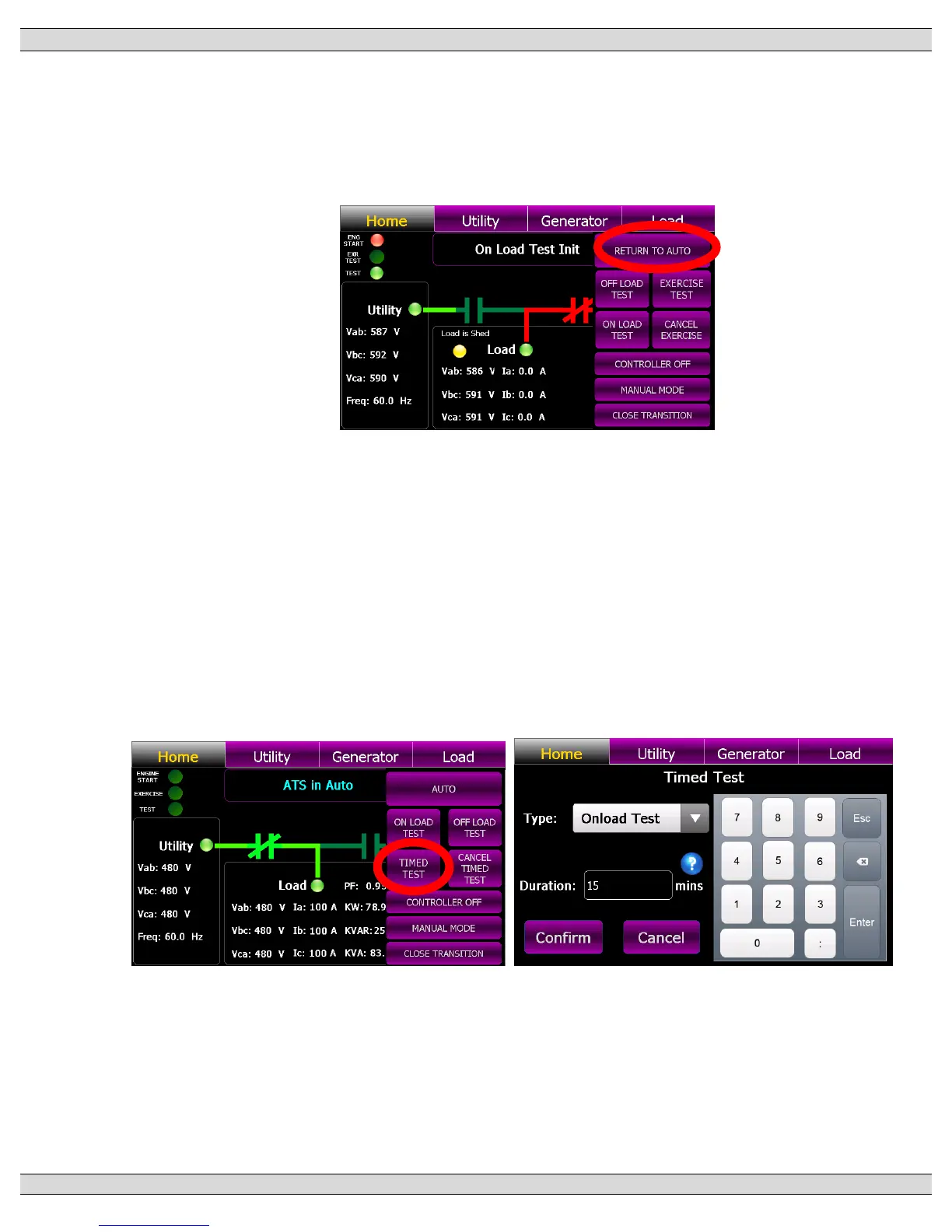
To cancel the “Off load” Test, press the “Change Mode” control button on the GHC Home Page
and select “RETURN TO AUTO” mode from the available list of modes as shown below. The
“Engine Start” light on the upper left-hand corner of the screen will go off and the generator set
will stop.
4.5. TIMED TEST INSTRUCTION
To perform a TIMED TEST, press the “Change Mode” control button on the GHC Home Page
and select “TIMED TEST” mode from the available list of modes as shown below. A Pop-up
screen will appear as shown below. Enter in desired type of test (i.e. ONLOAD or OFFLOAD)
and the duration time in minutes. Once the “Confirmed” button is pressed, the “TEST” light on
the upper left-hand corner of the screen will turn Yellow to indicate mode is activated and the
“ENGINE START” light will turn Red. The generator will start and if selected for On Load test,
the generator will transfer on load per automatic sequence and remain operating on load for the
duration of time entered, then will automatically re-transfer back to the utility supply.











 To Next Page