149
Chapter 17
Manage Your Mesh Device
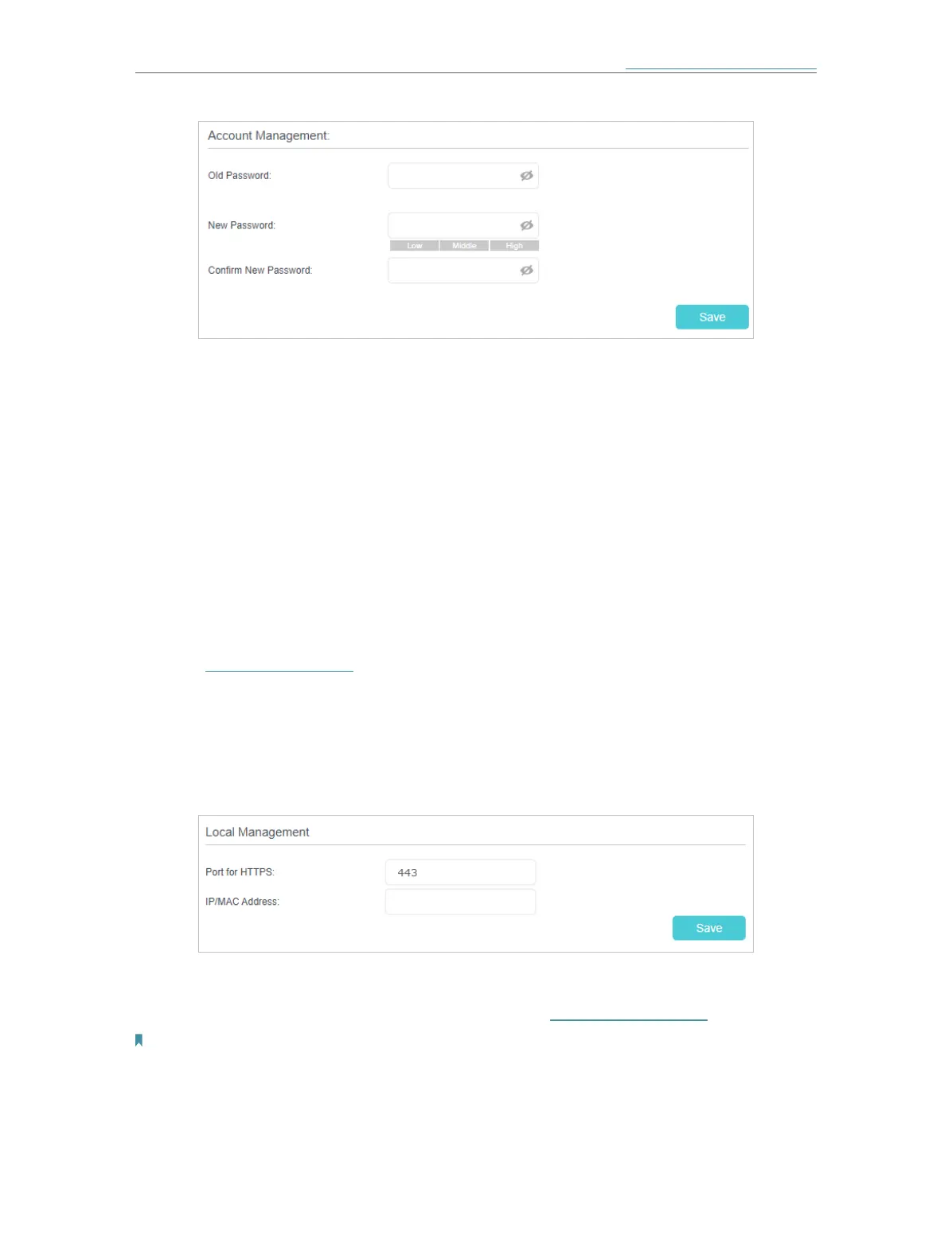
3. Enter the old password and a new password twice (both case-sensitive).
4. Click Save to make the settings effective.
17. 7. 2. Local Management
You can control the local devices’ authority to manage the mesh device via Local
Management feature. By default all local connected devices are allowed to manage the
mesh device. You can also specify one device to manage the mesh device and enable
local management over a more secure way, HTTPS.
Follow the steps below to allow only the specific device to manage the mesh device via
the local management over HTTPS.
1. Visit http://tplinkwifi.net and log in with the password you set for the mesh device.
2. Go to Setting > System Tools > Administration (AP Mode) or Advanced > System
Tools > Administration (Router Mode), and locate the Local Management section.
3. Keep the Port for HTTPS as the default settings. Enter the IP address or MAC
address of the local device to manage the mesh device.
4. Click Save.
Now, you can manage the mesh device over HTTPS (https://tplinkwifi.net).
Note:
If you want all local devices can manage the mesh device, just leave the IP/MAC Address field blank.














 To Next Page