7
Chapter 2
Connect the Device
2. 1. Position the Device
• The device should not be located in a place where it will be exposed to moisture or
excessive heat.
• Place the device in a location where it can be connected to multiple devices as well as
to a power source.
• Make sure the cables and power cord are safely placed out of the way so they do not
create a tripping hazard.
• Keep the device away from devices with strong electromagnetic interference, such
as Bluetooth devices, cordless phones and microwaves.
• The device can be placed on a shelf or desktop.
Generally, the device is placed on a horizontal surface, such as on a shelf or desktop.
2. 2. Connect Your Device
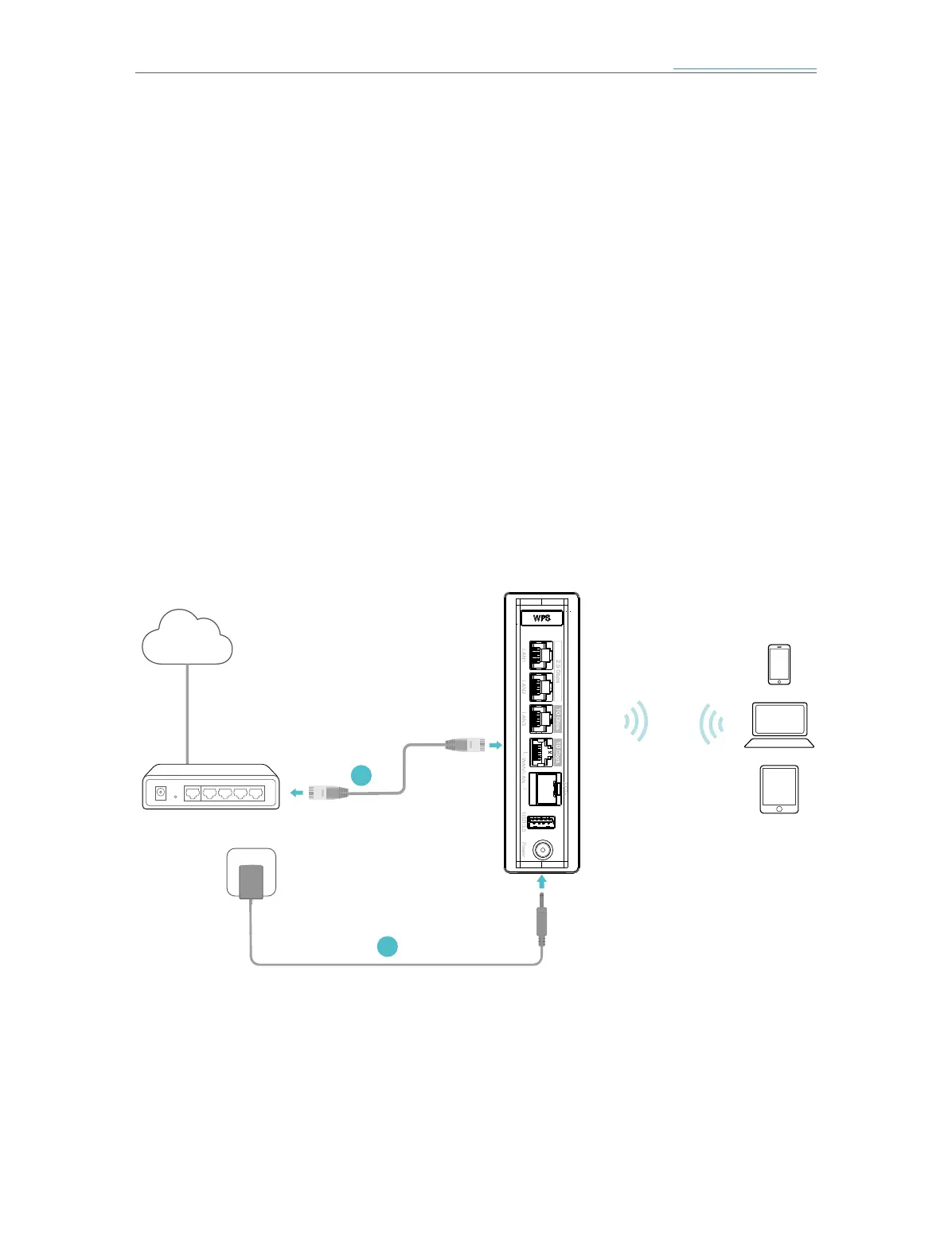
If you want to set up this device as a regular router or as the Main AP for Mesh Wi-Fi
system, follow the steps below to connect your device.
1
2
Modem/Router
Internet
Power Adapter
Main AP
1. Connect the power adapter to the AP.
2. Connect the WAN/LAN port of the AP to your wired router’s Ethernet port via an
Ethernet cable.
3. Verify the status LED (on the bottom of the device) is flashing blue before continuing
with the configuration.
4. Connect your computer to the AP.














 To Next Page