62
Chapter 6
Customize Your Network Settings
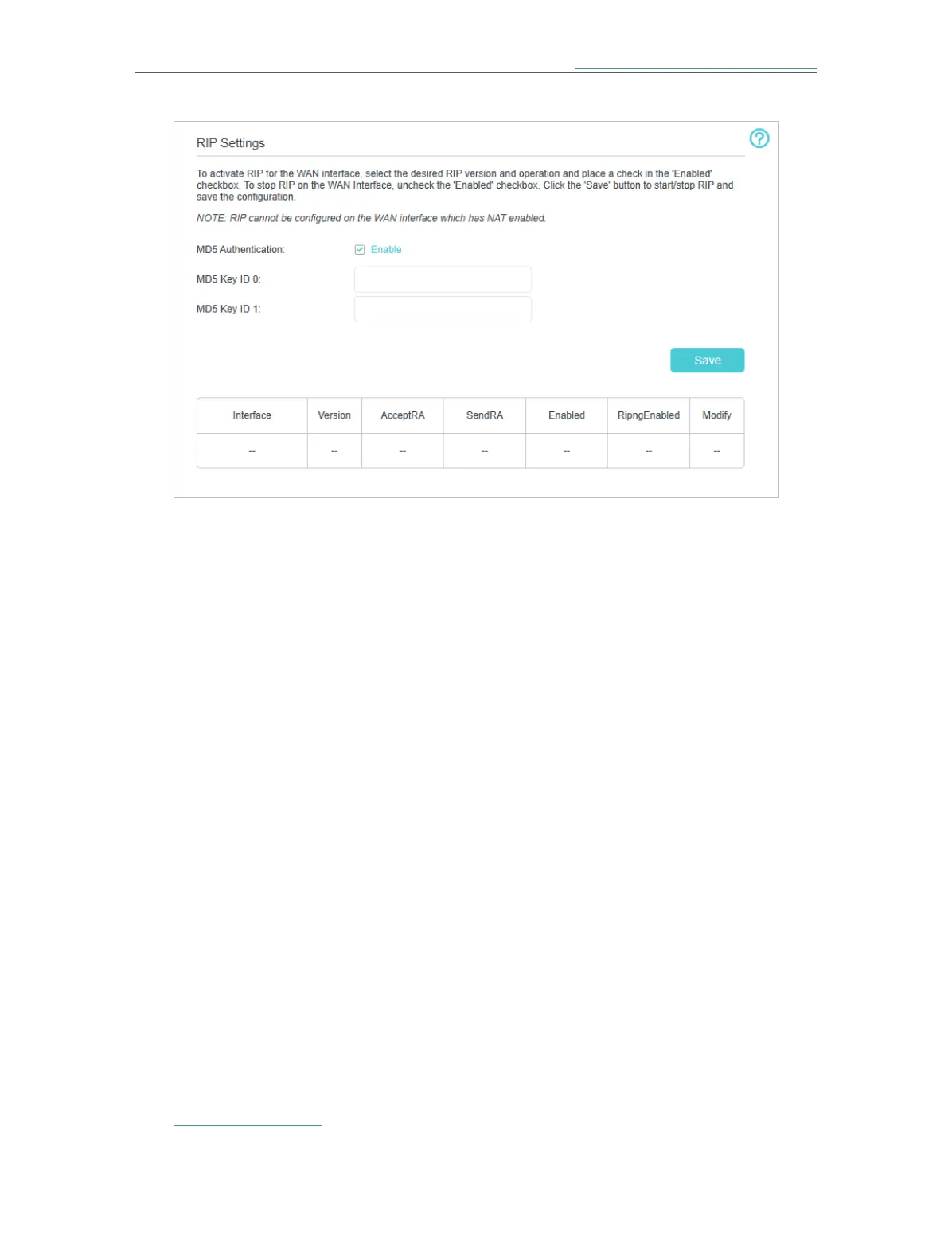
• MD5 Authentication - Enable MD5 Authentication to enhance the rip RA packets
security.
• MD5 Key ID 0 - Setting the MD5 Key ID 0 value.
• MD5 Key ID 1 - Setting the MD5 Key ID 1 value.
• Interface - The WAN interface name of the RIP rule table’s entry used in.
• Version - The RIP version (RIPv1/RIPv2) of the RIP rule table’s entry used.
• AcceptRA - Enable it to make the RIP rule entry can accept the mesh device
Advertisement.
• SendRA - Enable it to make the RIP rule entry can send the mesh device Advertisement.
• Enabled - Enable it to make the RIP rule entry active for IPv4.
• RipngEnabled - Enable it to make the RIP rule entry active for IPv6, which is also known
as Ripng.
• Modify - Click here to modify the RIP rule entry.
6. 6. Specify Wireless Settings
6. 6. 1. Change Basic Wireless Settings
The mesh device’s wireless network name (SSID) and password, and security option
are preset in the factory. The preset SSID and password can be found on the product
label. You can customize the wireless settings according to your needs.
Visit http://tplinkwifi.net and log in with the password you set for the mesh device.
¾ To enable or disable TWT:














 To Next Page