INSTALLATION
22
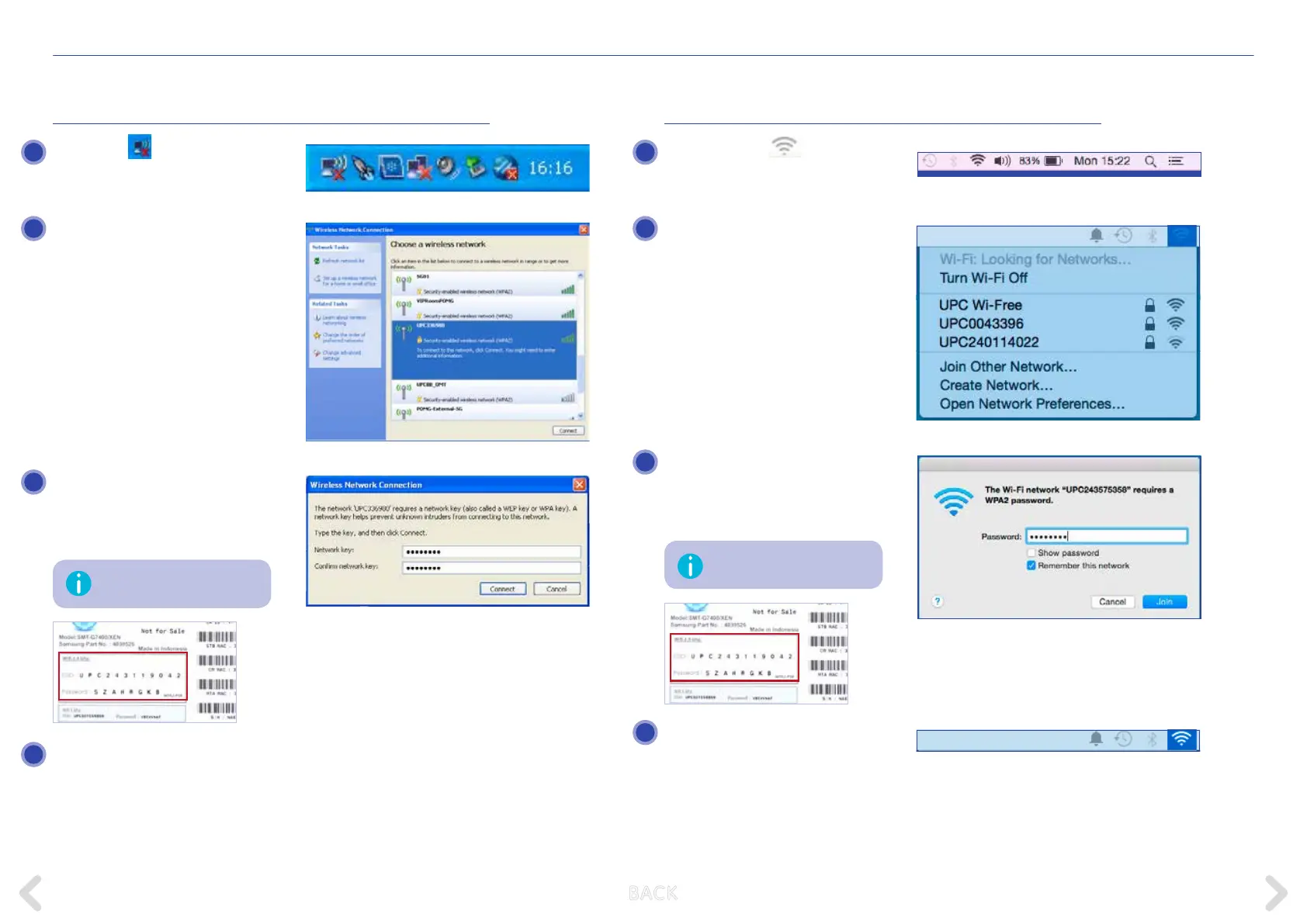
WINDOWS XP
Click on the icon in the taskbar
at the bottom of your computer
screen.
Select the wireless network con-
nection of your Horizon box (e.g.
UPC338980). This is the SSID on
the sticker on the underside of the
Horizon box.
Enter the security key (WPA2–PSK)
and conrm by pressing OK. You
can nd the key on the sticker on the
underside of the Horizon box.
Congratulations. You are now con-
nected to the Horizon WLAN net-
work. If you also ordered an Internet
subscription with your Horizon box,
you can now access the Internet.
MAC OS X
Click on the icon
in the status
bar at the top of your computer
screen and select Turn AirPort On.
Select the wireless network con-
nection of your Horizon box (e.g.
UPC0041743). This is the SSID on
the sticker on the underside of the
Horizon box.
Enter the security key (WPA2-PSK)
conrm by pressing OK. You can
nd the key on the sticker on the
underside of the Horizon box.
Congratulations. You are now con-
nected to the Horizon WLAN net-
work. If you also ordered an Internet
subscription with your Horizon box,
you can now access the Internet.
This key is case-sensitive.
This key is case-sensitive.
1 1
3
3
4
4
2 2
B ACK



 To Next Page