INTERNET & FIXED NETWORK
68
Listening to voicemail messages via the Internet
Log on to upc.ch/myupc and click on “My Products”.
With your PIN code, you can access the “Voicemail box” section of
“xed network” and listen to messages there.
Notification by SMS
Log on to upc.ch/myupc and click on “My Products”. With your PIN
code, you can access the “Voicemail box” section of “xed
network” and specify a mobile phone number that will receive an SMS
for every new voicemail message.
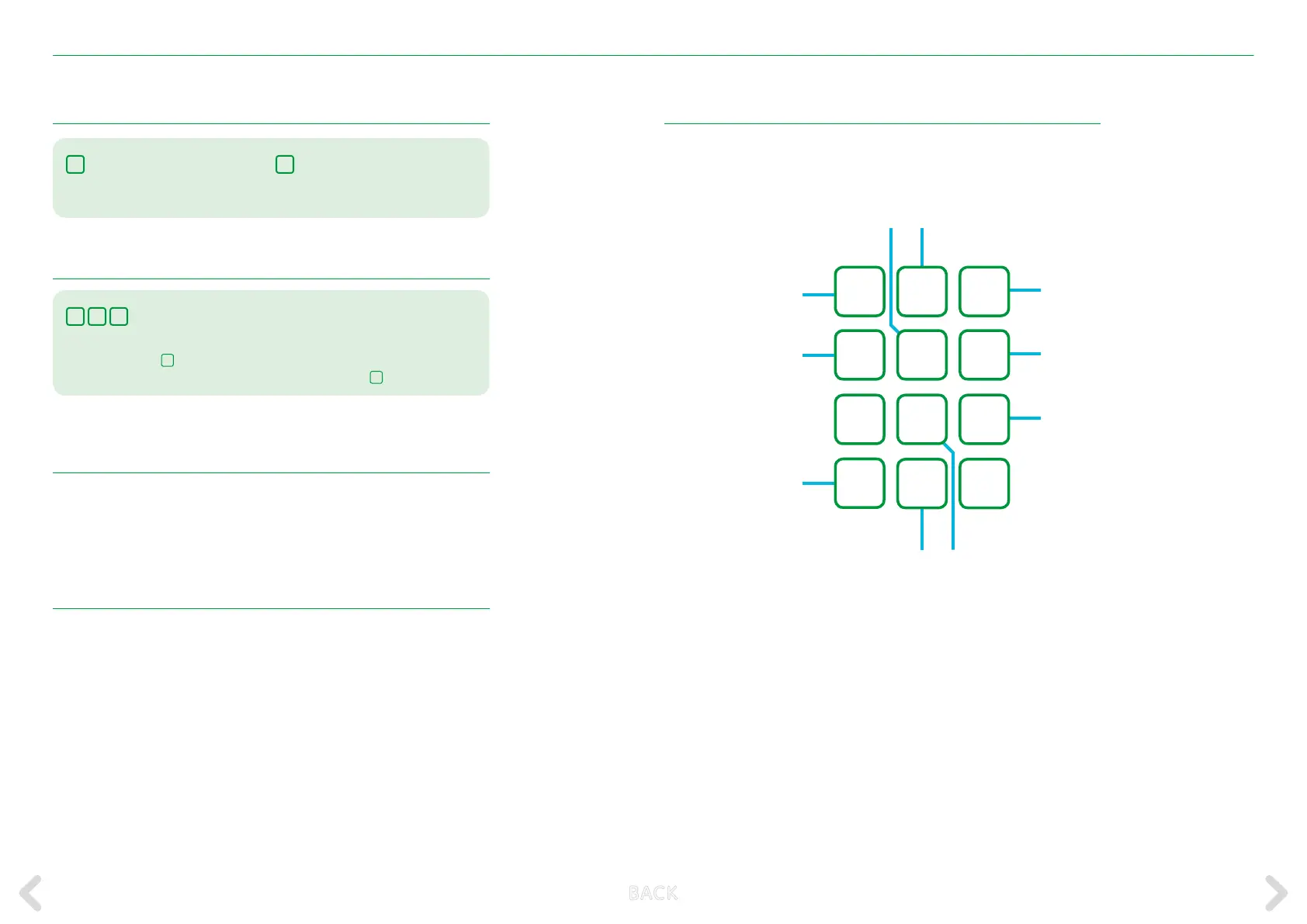
Features of the voicemail box
While listening to a voicemail message, you will have the following
options:
1
4
7
*
2
8
0
3
6
9
#
Pause
Cancel
Go back 10 seconds Go forwards 10 seconds
Save
Back
Replay
Help
Previous message
Delete
5
Listening to voicemail messages via any line
0
8
6
your telephone number
Dial 086 followed by your telephone number (for example, 086 044 123 45
67) and press the
*
button during the greeting
message. Now enter your pin and conrm with the button
#
.
Listening to voicemail messages via your own line
3
Dial 3 to listen to your voicemail
messages.
3
Once you have listened to them,
you can delete voicemail messa-
ges by pressing button 3.
B ACK



 To Next Page