THE HORIZON MAIN MENU
35
BY GENRE
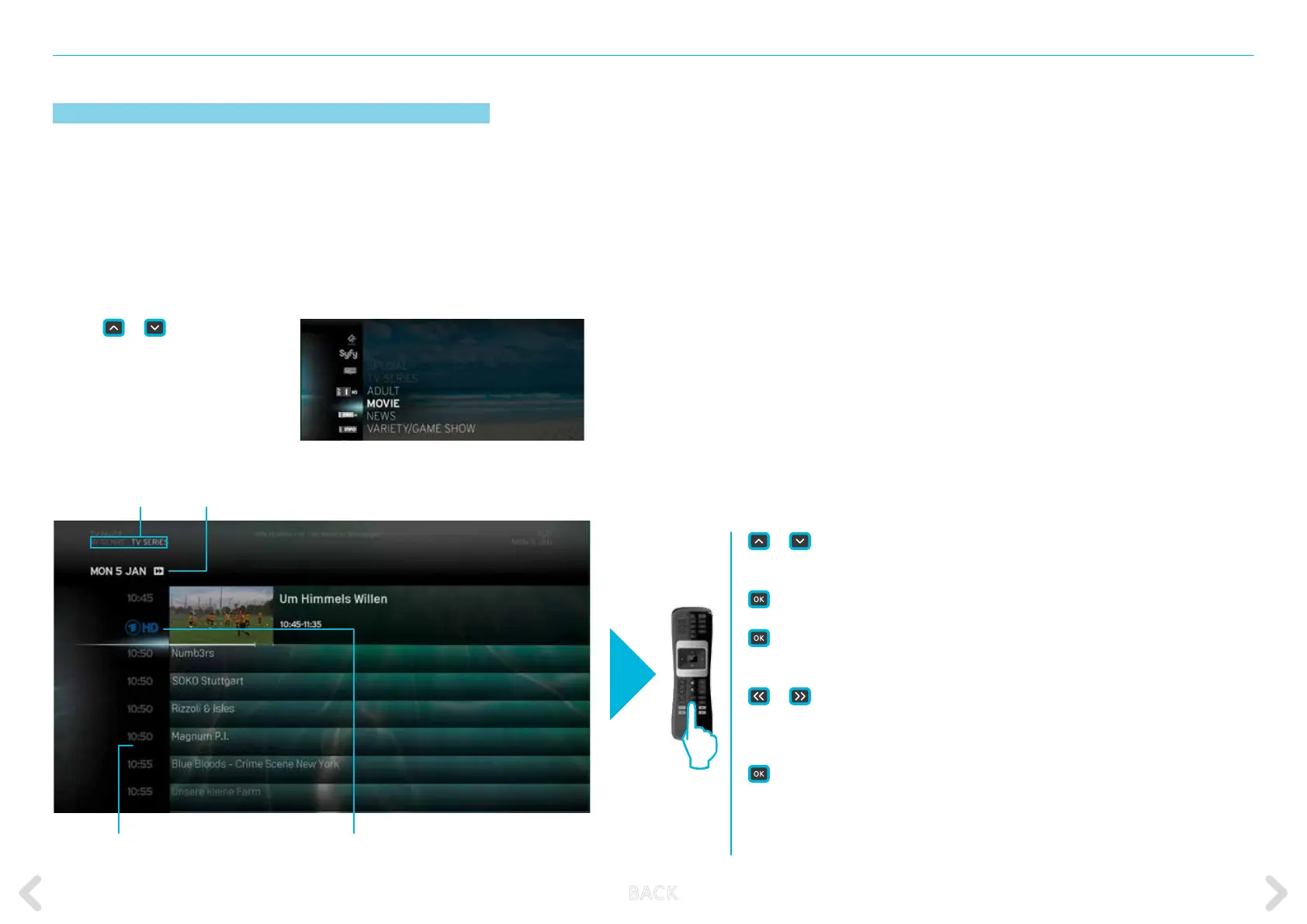
The BY GENRE option displays a programme list for all channels based
on their genre. It contains the following categories:
or
short press – selects the next/previous programme.
When current programme selected:
short press – displays the action menu with VIEW
highlighted.
long press – selects the channel and programme and
switches to full screen view of programme.
or
– jumps one day backwards or forwards
When any upcoming programme selected:
short or long press – displays the action menu with RECORD
highlighted.
BACK – returns to the TV GUIDE home screen.
MENU – retrieves the MAIN MENU.
0 – 9 – directly enter a channel number.
– MOVIE
– NEWS
– VARIETY & GAME SHOWS
– SPORT
– KIDS & YOUTH
– MUSIC & DANCE
– ARTS & CULTURE
– CURRENT AFFAIRS
– EDUCATIONAL
– LEISURE
– SPECIAL
– ENTERTAINMENT
– CRIME
– TV SERIES
– ADULT
Use the
or
keys to highlight
the genre you want and press OK to
access it.
Here is an example of the MOVIE genre screen:
Name of genre Date of broadcasting
Time of broadcast Channel broadcasting the programme of selected genre
B ACK



 To Next Page