EasyManua.ls Logo

Vitek VT-SRL - Page 20

Vitek VT-SRL
120 pages
Print Icon
To Next Page IconTo Next Page
To Previous Page IconTo Previous Page
Loading...
Installation
20
1.
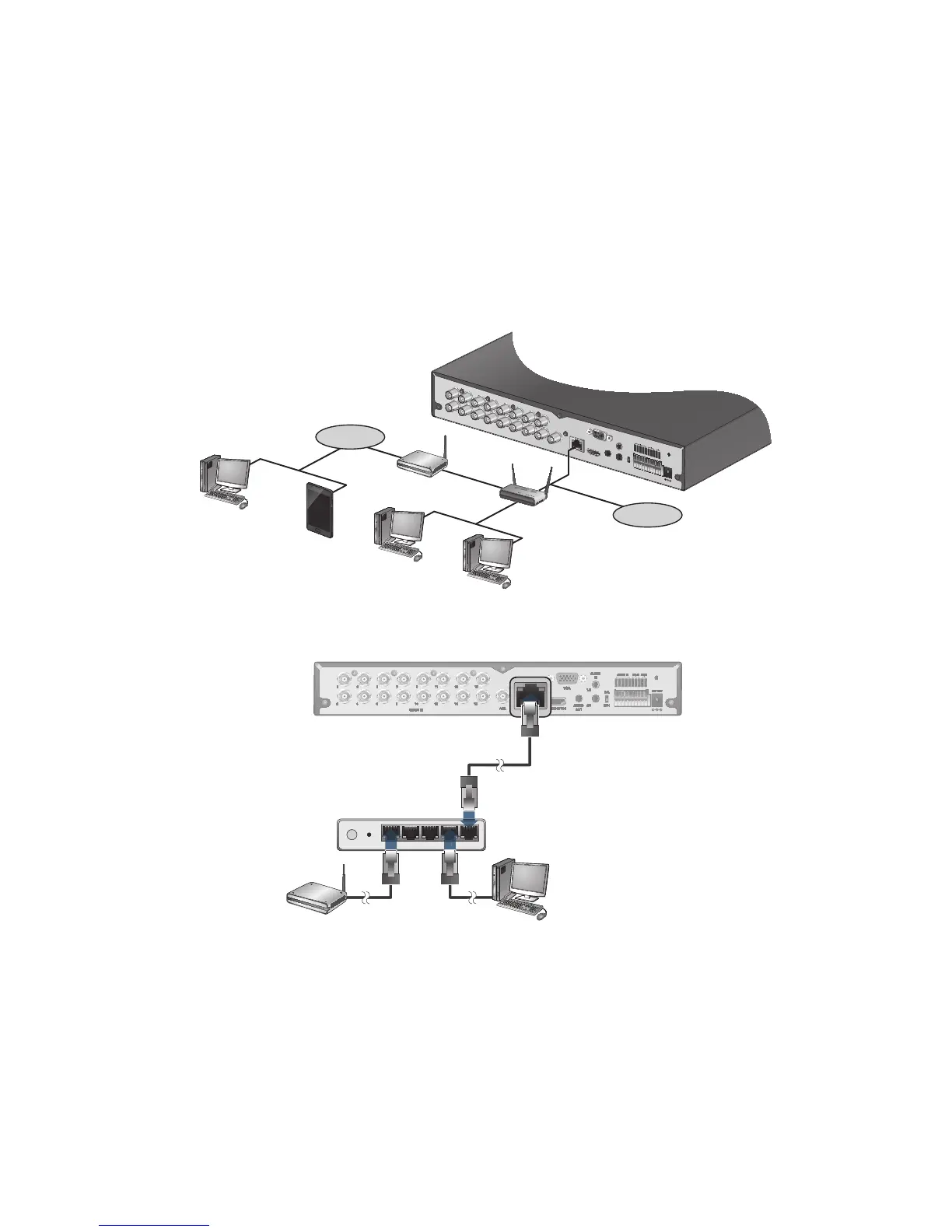
Connect a CAT-5 network cable to the DVR's [ETHERNET] port on the rear panel to a router or hub.
2.
Connect the [WAN(UPLINK)] port of the router directly to the fixed IP LAN cable, or connect it to the ADSL modem.
3.
If using a router, make sure BOTH the Web Service Port and RTSP Port have been port forwarded.
4.
You can remotely access your DVR in the following ways:
a. The DVR's MAC address
b. The DVR's DDNS Host Name aka DVR NAME
c. The external IP address of the network
NOTE: See page 74 for more details
HD MONITOR
VGA
AUX
DC 12V
ETHERNET
VIDEO IN
IN 1
IN 2
GND
IN 3
IN 4
NO
COM
NC
D+
D-
ALARM IN RELAY RS485
PAL
NTSC
3
1
7
5
11
9
15
13
4
2
8
6
12
10
16
14
AUDIO
IN
AUDIO
OUT
1/2
3/4

HD MONITOR
VGA
AUX
DC 12V
VIDEO IN
IN 1
IN 2
GND
IN 3
IN 4
NO
COM
NC
D+
D-
ALARM IN
RELAY
RS485
PAL
NTSC
3
1
7
5
11
9
15
13
4
2
8
6
12
10
16
14
AUDIO
IN
AUDIO
OUT
1/2
3/4

HD MONITOR
VGA
AUX
ETHERNET
VIDEO IN
IN 1
IN 2
GND
IN 3
IN 4
NO
COM
NC
D+
D-
ALARM IN RELAY
PAL
NTSC
7
5
11
9
15
13
8
6
12
10
16
14
AUDIO
IN
AUDIO
OUT
1/2
3/4
4WANRESETPWR 3 2 1
ETHERNET
2
WAN
ADSL modem
Local PC
Broadband router
VGA
DC 12V
ETHERNET
HD MONITOR
IN 1
IN 2
GND
IN 3
IN 4
NO
COM
NC
D+
D-
ALARM IN RELAY RS485
NTSC
PAL
AUDIO
IN
AUDIO
OUT
1/2
3/4
VIDEO IN
AUX
Local PC
Local PC
Remote PC
Internet
ADSL modem
Broadband router
Smart Phone
Direct Connection
Internet

Table of Contents