66
7.
If you want to stop playing and return to the search screen, press [EXIT] or [SEARCH] on the remote control.
You can also click <MENU> in the lower left corner and select a desired menu.
Thumbnail Search
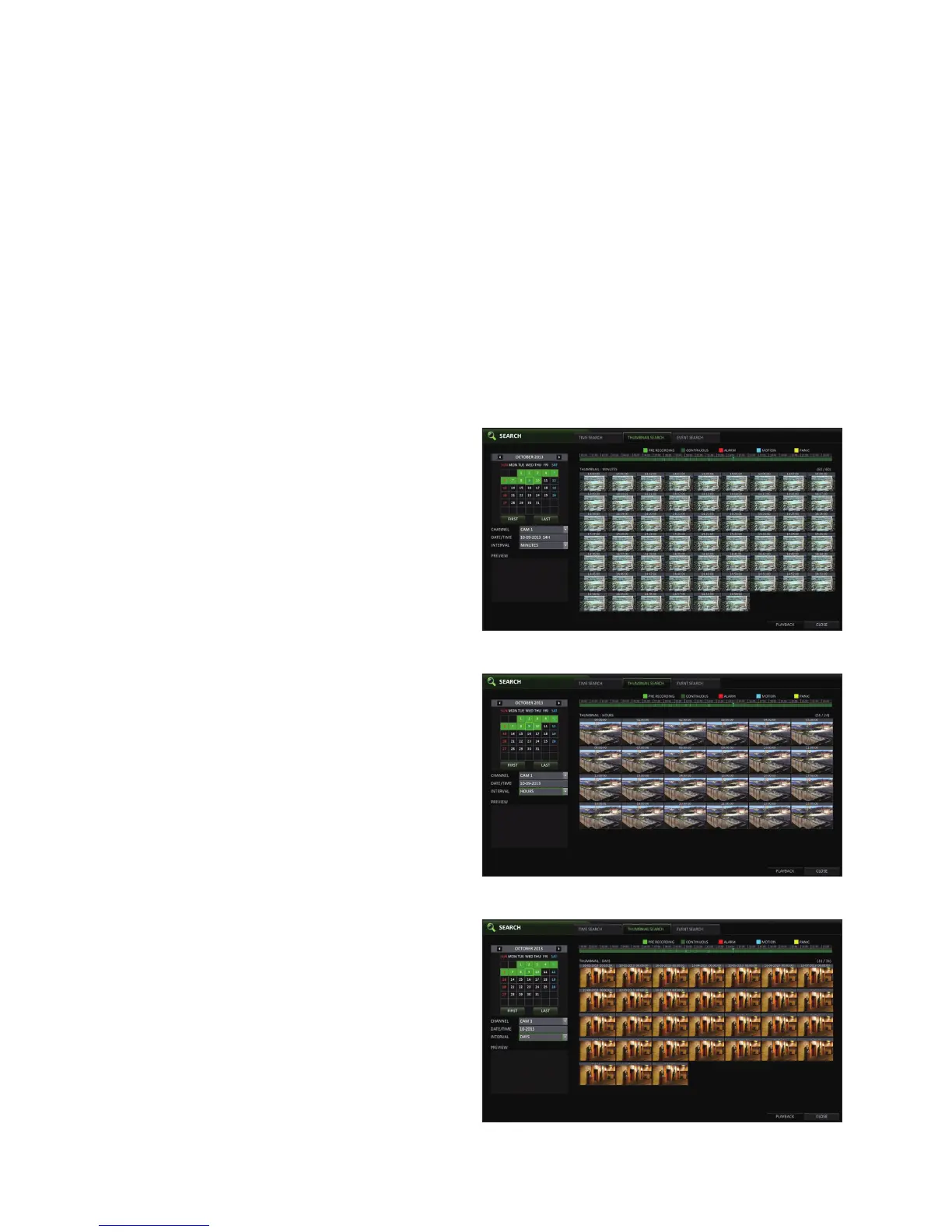
To improve your search, you will be provided with a list of thumbnails.
Select Day, Hour or Minute to narrow down the search results.
1.
From the <SEARCH> menu, select <THUMBNAIL SEARCH>.
2.
Use the [▲▼◀ ▶] buttons or use the mouse to specify the search date and time from the calendar in the left corner of the
thumbnail search screen.
FIRST : The first date of recording is automatically
selected.
LAST : The last date of recording is automatically
selected.
CHANNEL : Select a channel to search for.
DATE/TIME : Specify the search date and time.
The menus available differ depending on the selected
interval mode.
INTERVAL: Select a time interval of the thumbnail
view.
3.
Double-click a desired play time in the recording data
bar, or double-click a desired time image from the
thumbnail list.
You will move to the playback screen.
4.
If you want to stop playing and return to the search
screen, press [EXIT] or [SEARCH] on the remote
control. You can also click <MENU> in the lower left
corner and select a desired menu.
< "Minute" selection screen >
< "Hour" selection screen >
< "Day" selection screen >



 To Next Page