46
System Setting
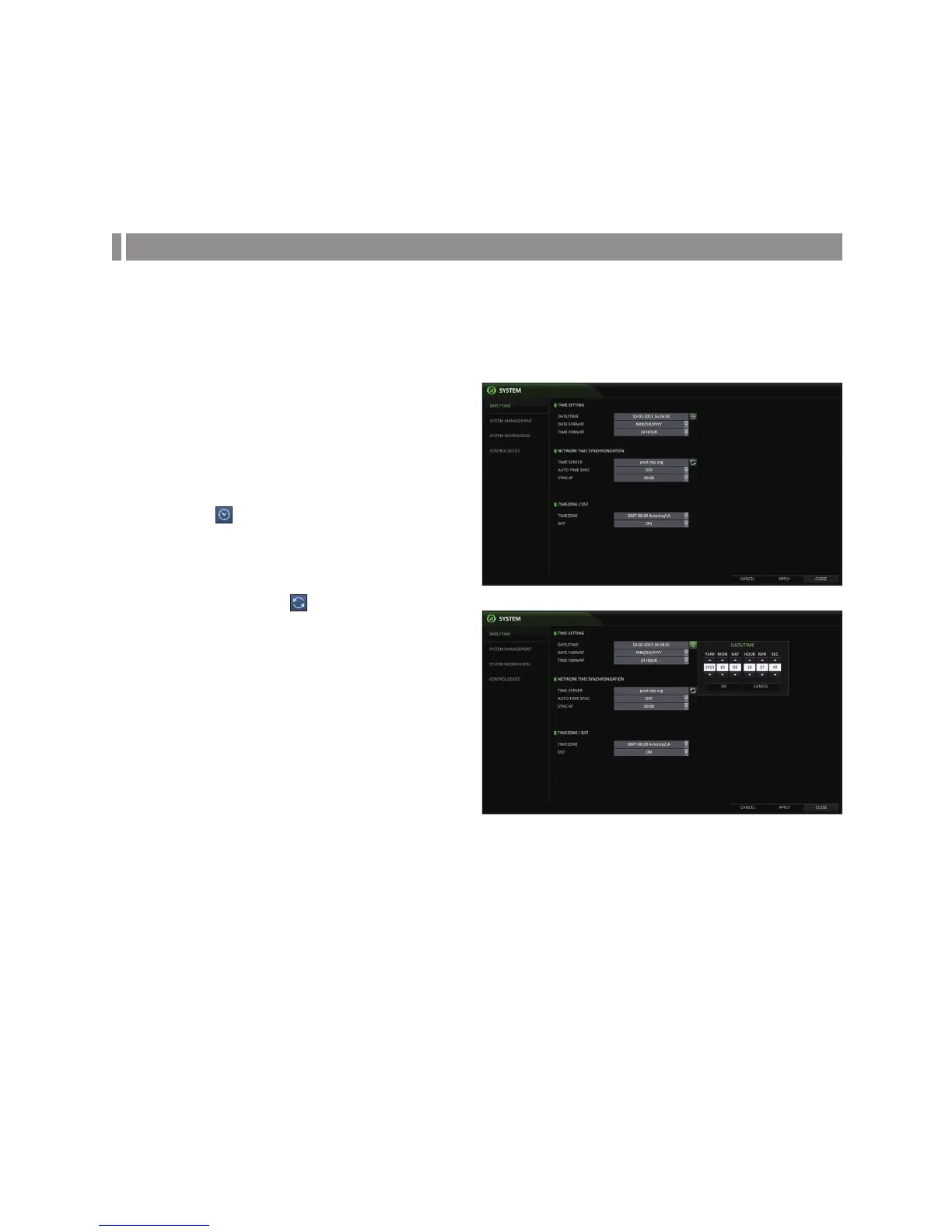
You can configure the date/time, system management, remote control ID, and keyboard controller.
Date/Time
Specify the current date and time.
1.
From <SYSTEM SETUP> - <SYSTEM>, select <DATE/
TIME>.
2.
Use the [▲▼◀ ▶/ENTER] buttons on the remote control
or use the mouse to change the time or set the options
as necessary.
DATE/TIME : Set the current time and date.
Click< > to adjust the time manually.
DATE FORMAT : specify the date format.
TIME FORMAT : specify the time format.
TIME SERVER : obtain the current time from the
time server. Click <
> to get the current time.
AUTO TIME SYNC : automatically synchronize the
time with the time server at a specific time.
SYNC AT : Set the time to sync with the time server.
TIMEZONE : specify the GMT standard time for
your local area.
DST : You can set up or release the DST (Daylight
Saving Time).
Both <TIME SERVER> and <TIME SYNC> will be
enabled only if the DVR is connected to the Internet.
3.
To apply the change, click <APPLY> in the bottom of
the screen.
4.
When done, press the [EXIT] button on the remote control or click <CLOSE> in the lower screen. The confirmation
message appears and you will return to the previous menu.



 To Next Page