VIVOTEK
User's Manual - 85
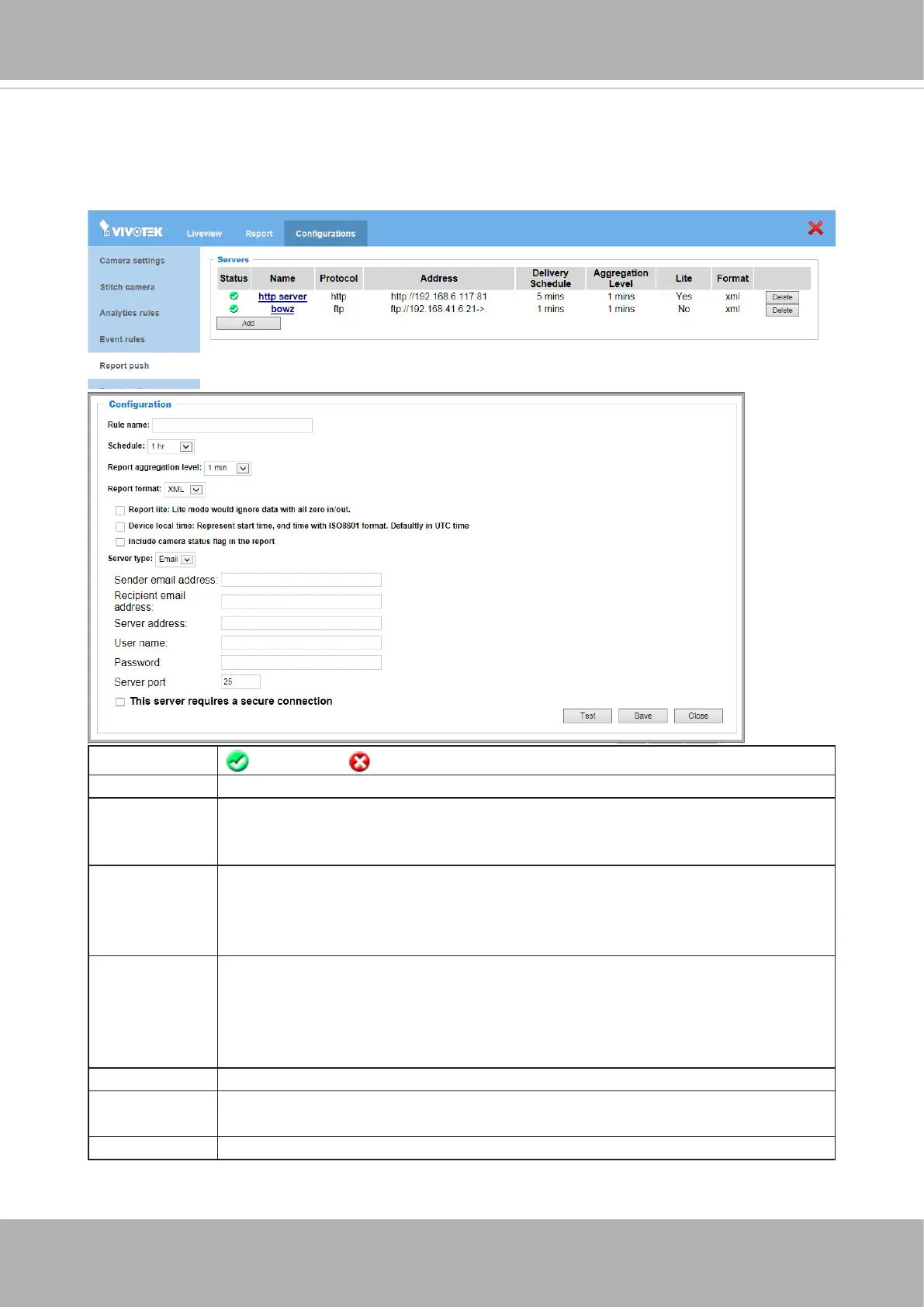
3-6. Report Push
Congure the report push protocols so that you can receive periodic counting reports. The
reports include camera information and aggregated counts by the congured intervals for
each counting rule. Click the
Add
button to begin.
Status
: success : failed [empty]: not yet executed
Name User dened name.
Address HTTP: http://IPaddress:portURI
FTP: ftp://APaddress:port -> destination
Email: ServerIPaddress:port
Delivery
Schedule
The duration between next pushed aggregated report. At the same time, it
is also the total duration of one report. This camera supports the delivery
schedule ranging from 1 min, 5 mins, 15 mins, 30 mins, 1 hr, 12 hrs, to 1
day. All schedule starts from 00:00.
Aggregation
level
This indicates the aggregation period for each data set in the reports.
Events in the same aggregation level will be accummulated as one data
set. This camera supports the same options as the Delivery schedule.
Note that the aggregation level must be shorter than the Delivery
schedule.
Report Type Log, Queue raw data, Queue aggregate data, Counting/Zone
Lite In the Lite mode, the period of time in which no data has been collected
will be ignored. This can reduce the size of each report.
Format XML, CSV, and JSON. The detailed contents will be introduced later.













 To Next Page