VIVOTEK
User's Manual - 99
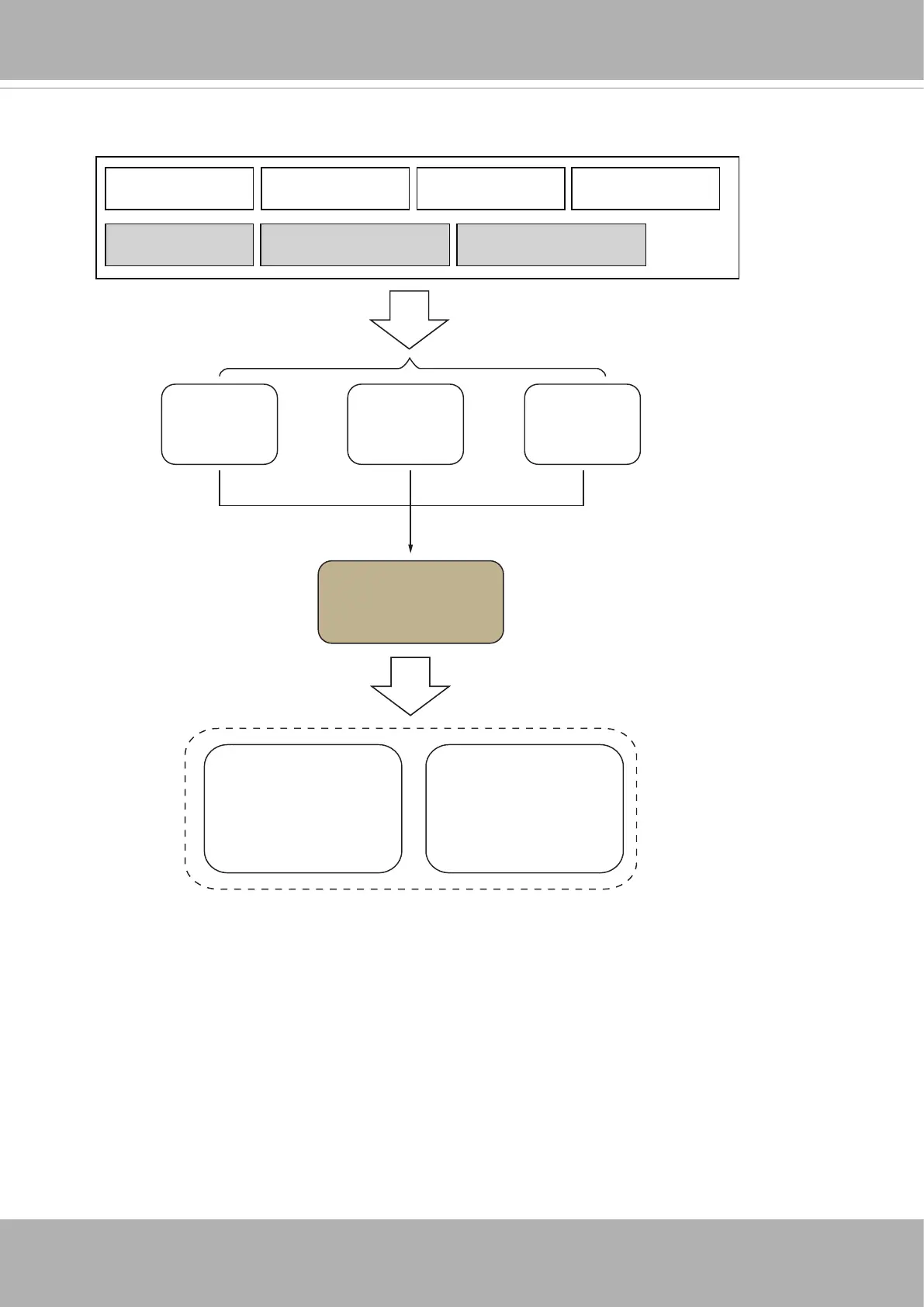
System Boot Digital input Periodic Recording notify
Counting1(IN) ≥10 FlowPath1(IN-OUT) ≥20 FlowPath2(OUT) ≥5
Event 1
Schedule
Event 2
Schedule
Event 3
Schedule
Event Manager
Actions:
1. Digital output (DO)
2. System log
3. Snapshot (pre-/post-)
4. Recording (pre-/post-)
Targets:
1. SD card
2. Email notification
3. FTP
4. Networked storage
3-8. Event Settings
The camera can respond to particular situations (event). A typical application is that when
a count result is reached, the camera sends buffered images to an FTP server or e-mail
address as notications. An event can be initiated by many triggering conditions, such as
counting results or digital inputs. When an event is triggered, you can specify what type of
action will be performed.













 To Next Page