Programming LCR Tables B-9
Appendix B - Least Cost Routing
STARPLUS STSe - Programming & Operations Manual August 2005
LCR COS Priority
A station should be assigned a class of service for LCR. The LCR COS can be between 0 and 6,
with 0 being unrestricted and 6 being the most restrictive. Within the time period route List
table, line groups are given an LCR COS Priority assignment between 0 and 6.
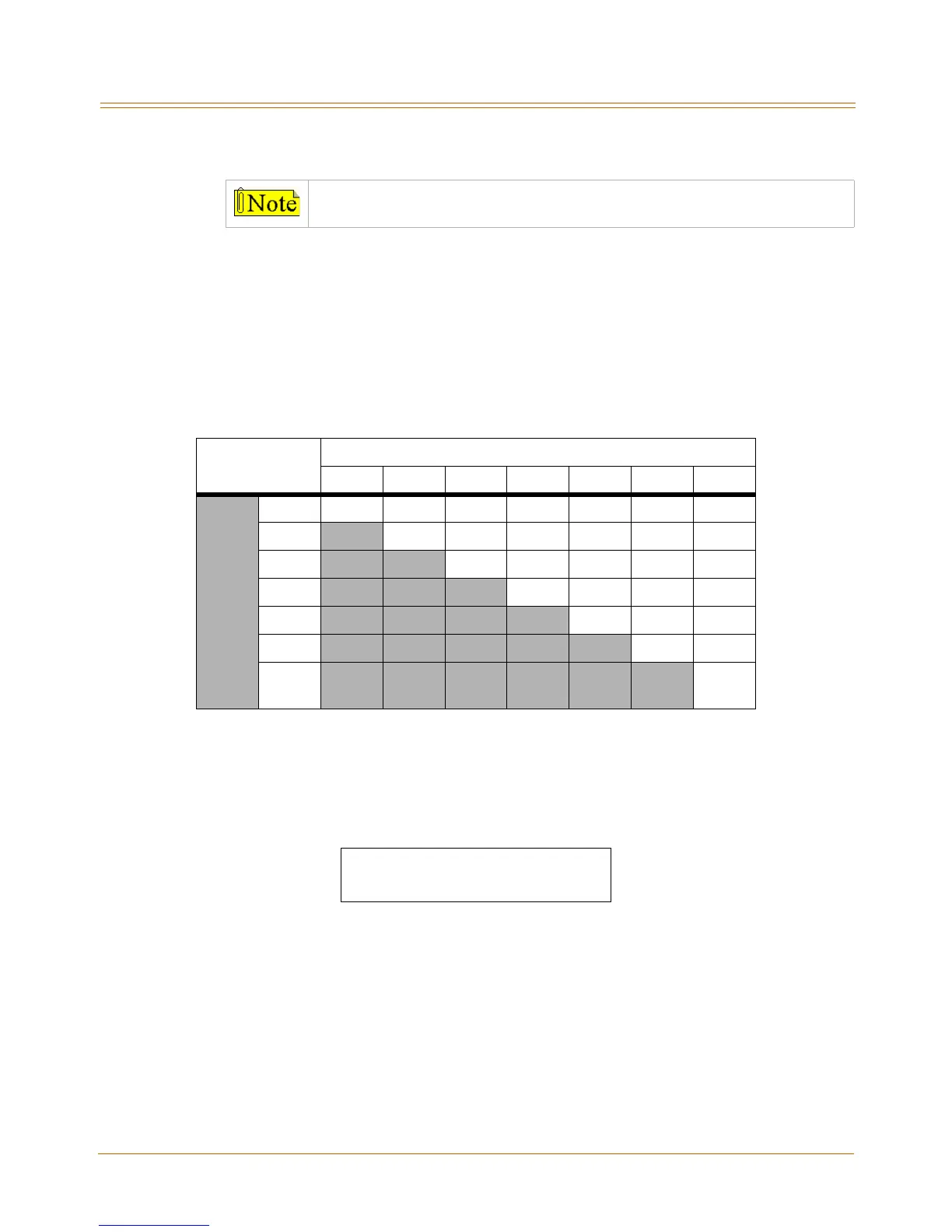
A station using LCR is able to use only those CO (outside) line groups with a priority
assignment of equal or higher value than the station’s LCR Class of Service (e.g., a station with
LCOS 3 can use line groups with a priority between 3 and 6).
Programming Steps
1. Press the ROUTE LIST TABLE flexible button (FLASH 75, Button #4). The following
message displays:
RR = Route List Table Number 00–15
T = Time Period Route List 1–4
GG = CO Line Group 00–23
DD = Insert/Delete Table reference 00-19 (## for none)
L = LCR Class of Service (LCOS)
2. To create an entry, dial [RR] + [T] + [GG] + [DD] + [L], then press HOLD to save the entry.
A confirmation tone sounds and the display updates.
3. To enter additional CO Line groups in the same Time Period Route List number,
dial [GG] + [DD] + [L], then press HOLD.
Make sure you made entries into all Time Period Route Lists referenced in the
weekly schedule table.
Table B-1: LCR Class of Service Table
Allow Access
To Route
LCR CO Line Group Priority
0123456
S
T
A
L
C
R
C
O
S
0YYYYYYY
1
NYYYYYY
2
N NYYYYY
3
N N NYYYY
4
N N N NYYY
5
N N N N NYY
6
N N N N N NY
N = Cannot Use Line Group
Y = Has Access to Line Group
ROUTE LIST TABLE
RR T GG DD L



 To Next Page