Calibration and settings
General
Auto configuration, lever calibration and initializing
of the EVC display must be done after installation is
completed.
Auto configuration means that the system detects
and defines all the components included in the sys-
tem and creates a data file.
NOTE! Auto configuration shall always be done when
there are any changes in the EVC system, e. g. the
system is extended or rebuilt.
Through the calibration routine the control lever
positions and the idle rpm are defined for the EVC
system. If a control lever has been replaced, the new
one must be calibrated.
NOTE! If auto configuration and control calibration is
not done, the engine cannot be started.
IMPORTANT! For all setting procedures:
Activate helm station by pushing the ACTIVE
STATION BUTTON on the EVC panel.
IMPORTANT! Always press the different buttons
firmly and at least for one second each time.
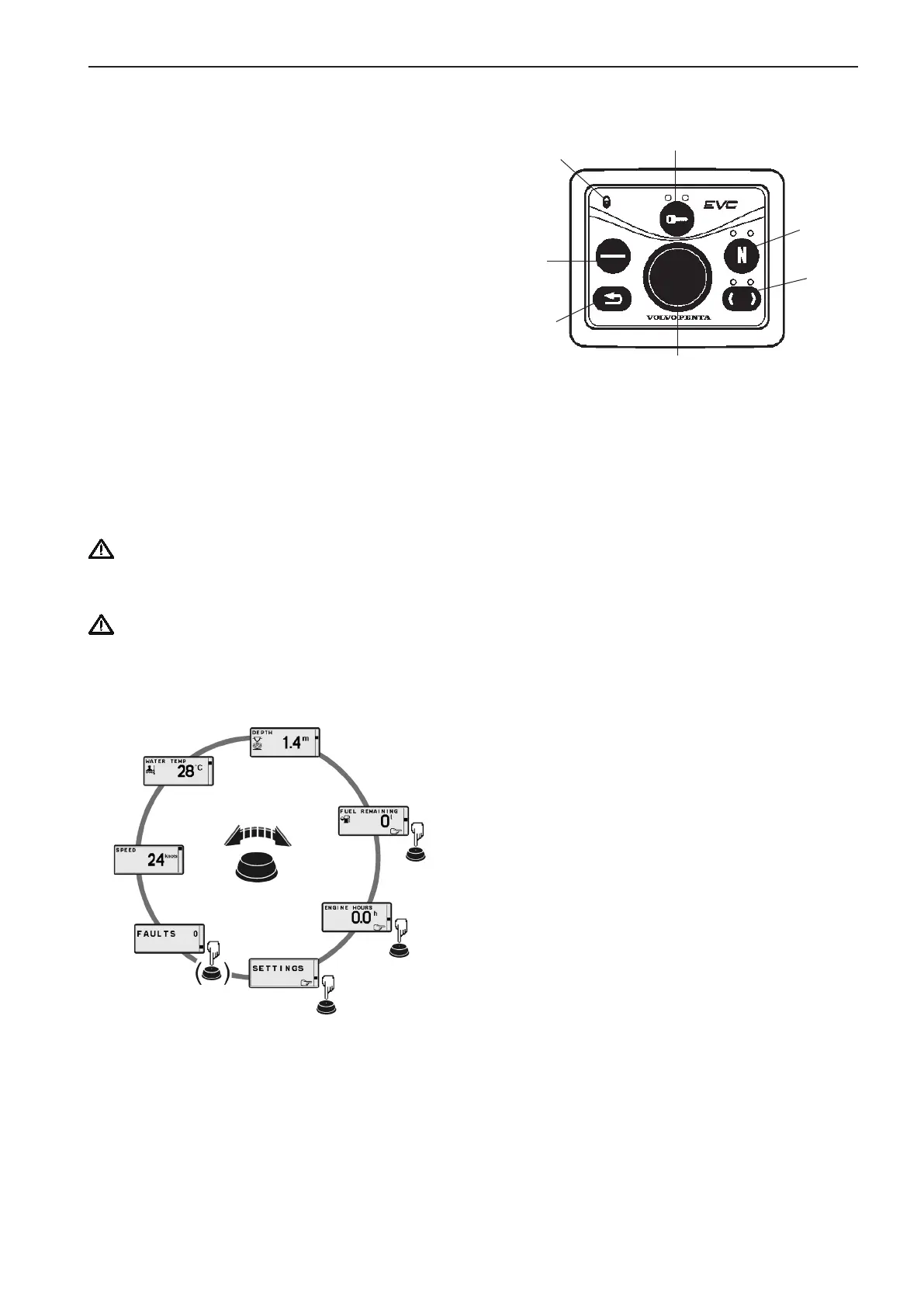
Menu system
(Twin engine is shown)
A. NAVIGATION WHEEL
Select: Turn navigation wheel to select sub menu
or select setting.
Enter: Push navigation wheel to reach selected
submenu.
Confirm: Push navigation wheel to confirm setting
B. TACHOMETER DISPLAY SELECTION
(twin installations, port/stb.)
Indication LEDs red/green
NOTE! LED(s) indicates which EVC system ta-
chometer/EVC system display the EVC control
panel controls, port or starboard side.
C. NEUTRAL BUTTON
Confirming
Volvo Penta Lowspeed
Powertrim override (DPH/DPR)
Warming up
Indication LED
- Constant light: Neutral
- No light: FWD/REV
- Flashing: Calibration mode or Warming up
mode
D. ACTIVE STATION BUTTON
Activate helm station
Indication LED(s) red
- Constant light: Active station
- No light: Inactive station
- Flashing: Attempt to take station permissible
E. STATION LOCK INDICATION
If lit, the system is locked and the engine can only
be controlled from the activated control panel
F. MULTIFUNCTION BUTTON
Push to increase or decrease the instrument’s and
panel’s backlighting
- Dimmer
- Auto configuration (together with BACK BUTTON)
- Montoring helm
G. BACK BUTTON
Push to step backwards in the menu
- Menu structure
- Auto configuration (together with MULTIFUNC-
TION BUTTON)
A
B
C
D
E
F
G
At power-up Volvo Penta logotype will be shown in
the display. After a few seconds MAIN MENU will ap-
pear.
Navigate MAIN MENU by turning NAVIGATION
WHEEL clockwise or counter clockwise. Views with
pointing hand-symbol indicates SUB MENU. Push
NAVIGATION WHEEL.
NOTE! If there are no faults registered, the FAULT
LIST will not be available in the MAIN MENU.
83



 To Next Page