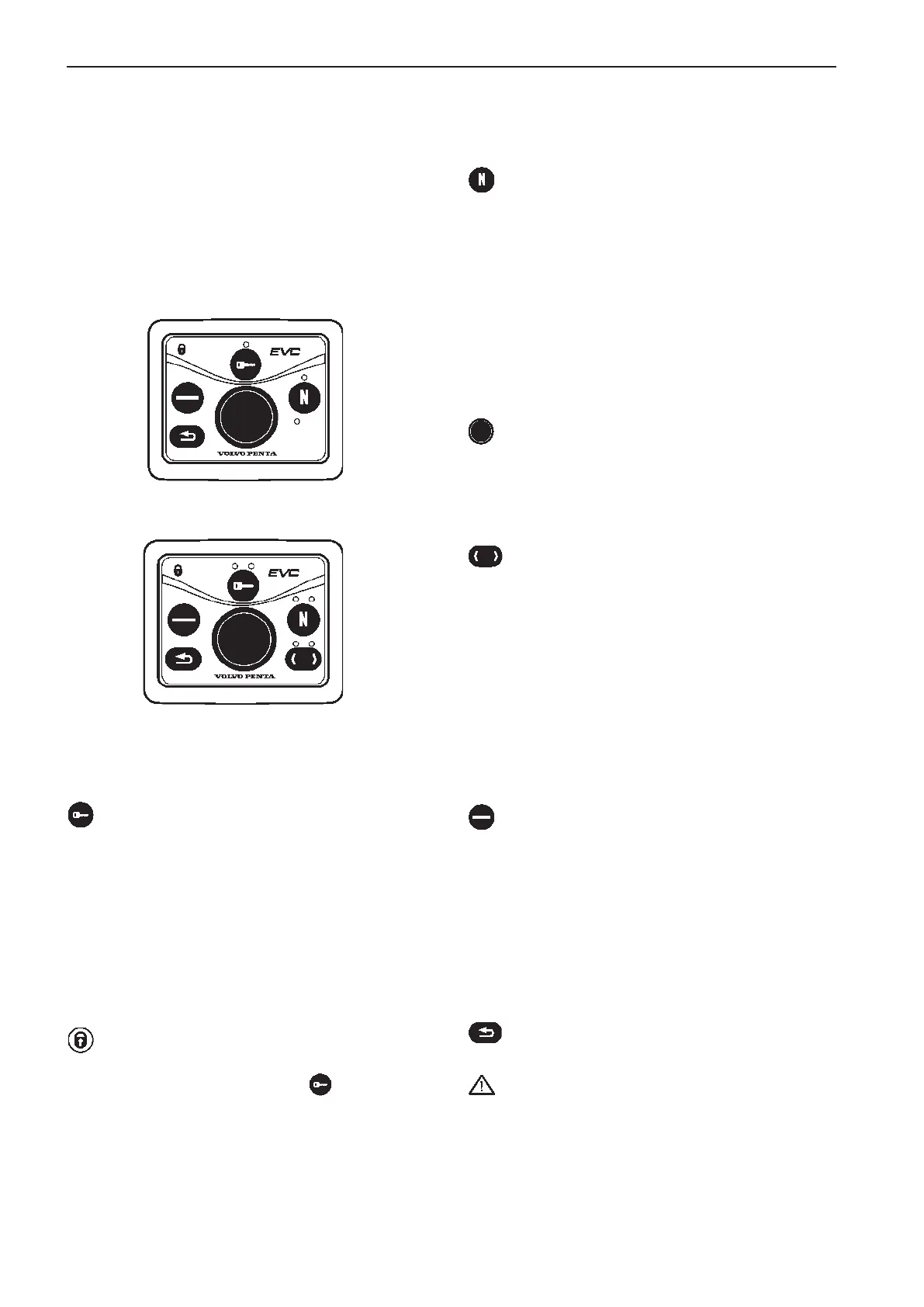
EVC control panels
NEUTRAL BUTTON
Used to activate "warming up mode" and increase
engine speed without engaging the gear.
Also used for activating the Volvo Penta Lowspeed
function (option).
Indication (green):
Off: Drive/reverse gear engaged.
Lit: Control lever in neutral.
Flashes: Drive/reverse gear disengaged or system in
calibration mode.
NAVIGATION WHEEL
Used to navigate through the menus shown on the
tachometer EVC system display. Navigate through
the menus by turning the wheel. Depress the wheel
to confirm a selection.
TACHOMETER DISPLAY SELECTION
(Twin installation, port or starboard tachometer)
Is used to select which of the engines menu systems
should be navigable from the control panel. The
menu is shown on the display of the corresponding
engines tachometer. Select port or starboard.
Indication (red/green):
Off: Not possible to navigate in menu.
Lit: Possible to navigate in menu for selected engine,
port (red), starboard (green).
Flashing: OEM mode activated.
MULTIFUNCTION BUTTON
Used to increase or decrease the instrument’s and
panel’s backlighting.
Depress the button for at least 1 second to turn the
backlighting on or off. The backlighting can be adjust-
ed in five stages by pressing the multifunction button.
If the button is pressed on a inactive control panel,
operating information is shown on the display(s) and
it is possible to navigate in the menus.
BACK BUTTON
Push to step backwards in the menu.
IMPORTANT! Always press the buttons firmly,
and for at least one second each time.
ACTIVE STATION BUTTON
Used to activate and lock the control panel and the
helm station.
Indication (red):
Off: Control panel not activated.
Lit: Control panel activated.
Flashing: Control panel not activated due to the con-
trol lever not being in neutral or the system has been
locked from another control panel.
STATION LOCK INDICATION
The padlock symbol lights if the control panel is
locked manually by depressing the -button.
Lit: The system is locked and the engine can only be
controlled from the activated control panel.
The control panel is used in combination with the
EVC system tachometer. The tachometer display
shows operating information and menus that can be
navigated from the control panel. EVC control panel
is available in two versions, for single or double en-
gine installations.
Single installation
Twin installation
82



 To Next Page