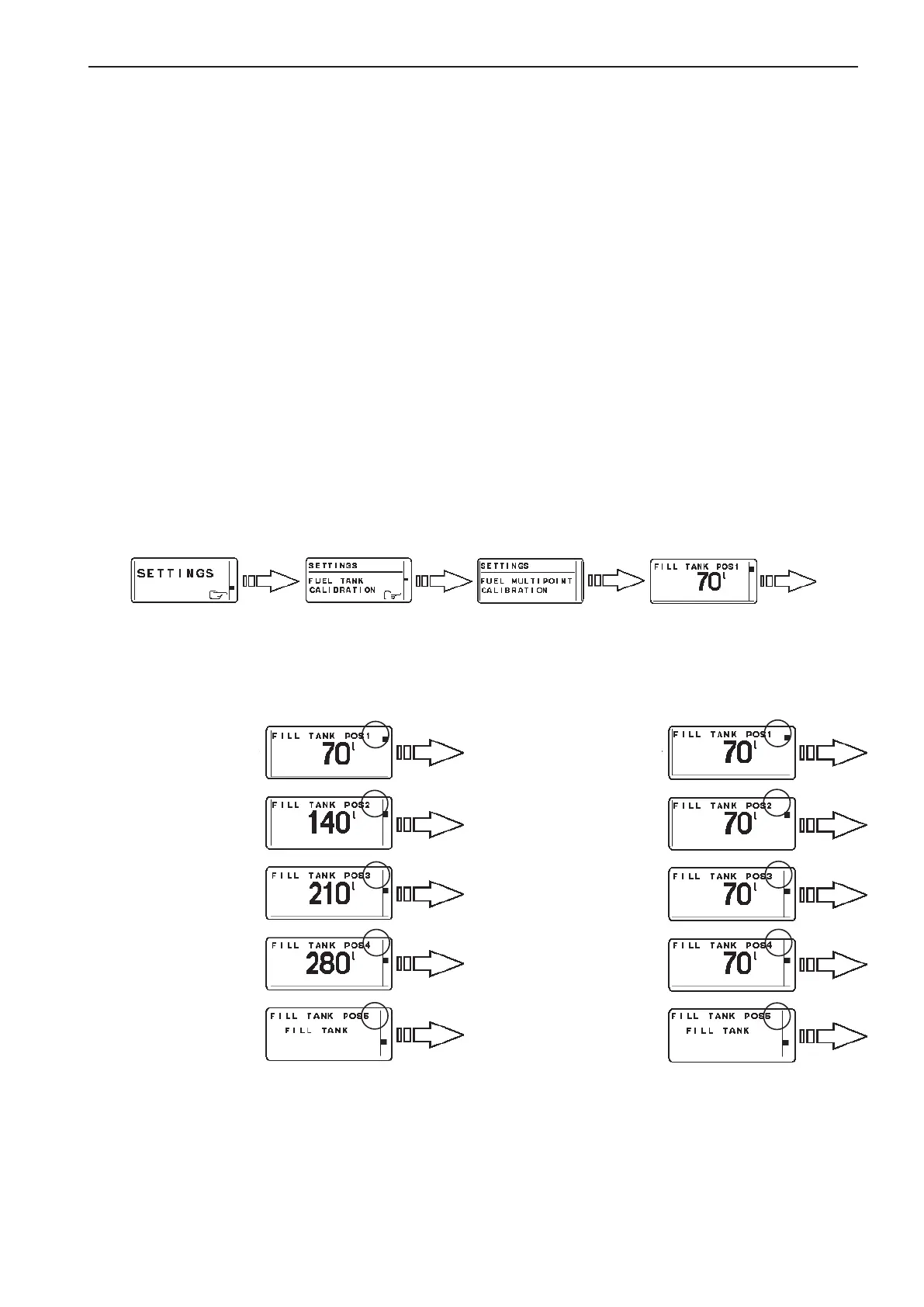
Fuel multipoint calibration
When FUEL MULTIPOINT CALIBRATION is select-
ed, the fuel level sender is calibrated in five equally
divided steps; 20 % full (pos 1), 40 % full (pos 2), 60
% full (pos 3), 80 % full (pos 4), 100 % full (pos 5).
NOTE! TO perform multpoint calibration, fuel tank
must be less than 20% full. If calibration skips POS 1
and goes directly to POS 2, the fuel tank contains too
much fuel and the calibration will not be correct.
1. Activate helm station by pushing the ACTIVE
STATION BUTTON.
2. Select SETTINGS from MAIN MENU by turn-
ing NAVIGATION WHEEL. Push NAVIGATION
WHEEL to enter SETTINGS MENU.
3. Select FUEL TANK CALIBRATION and push
NAVIGATION WHEEL.
4. Select FUEL MULTIPOINT CALIBRATION by
turning NAVIGATION WHEEL. Push NAVIGA-
TION WHEEL to enter FUEL MULTIPOINT
CALIBRATION.
5A. If the number after
“POS” in the dis-
play is flashing:
Fill fuel tank with
displayed volume
(POS 1) and push
NAVIGATION
WHEEL. Add fuel
(do not reset the
pump) up to dis-
played volume for
each POS until the
tank is filled.
6. Push BACK BUT-
TON to return to
SETTINGS MENU.
5B. If the number after
“POS” is not flash-
ing:
Fill fuel tank with
displayed volume
(POS 1) and push
NAVIGATION
WHEEL. Repeat
procedure for each
POS until the tank
is filled.
6. Push BACK BUT-
TON to return to
SETTINGS MENU.
NOTE! The fuel multipoint calibration procedure differs depending on EVC software release:
99
EVC-C Calibration and settings



 To Next Page