PergoTex II/ PergoTex II LED
Instructions for assembly
We reserve the right to make technical changes
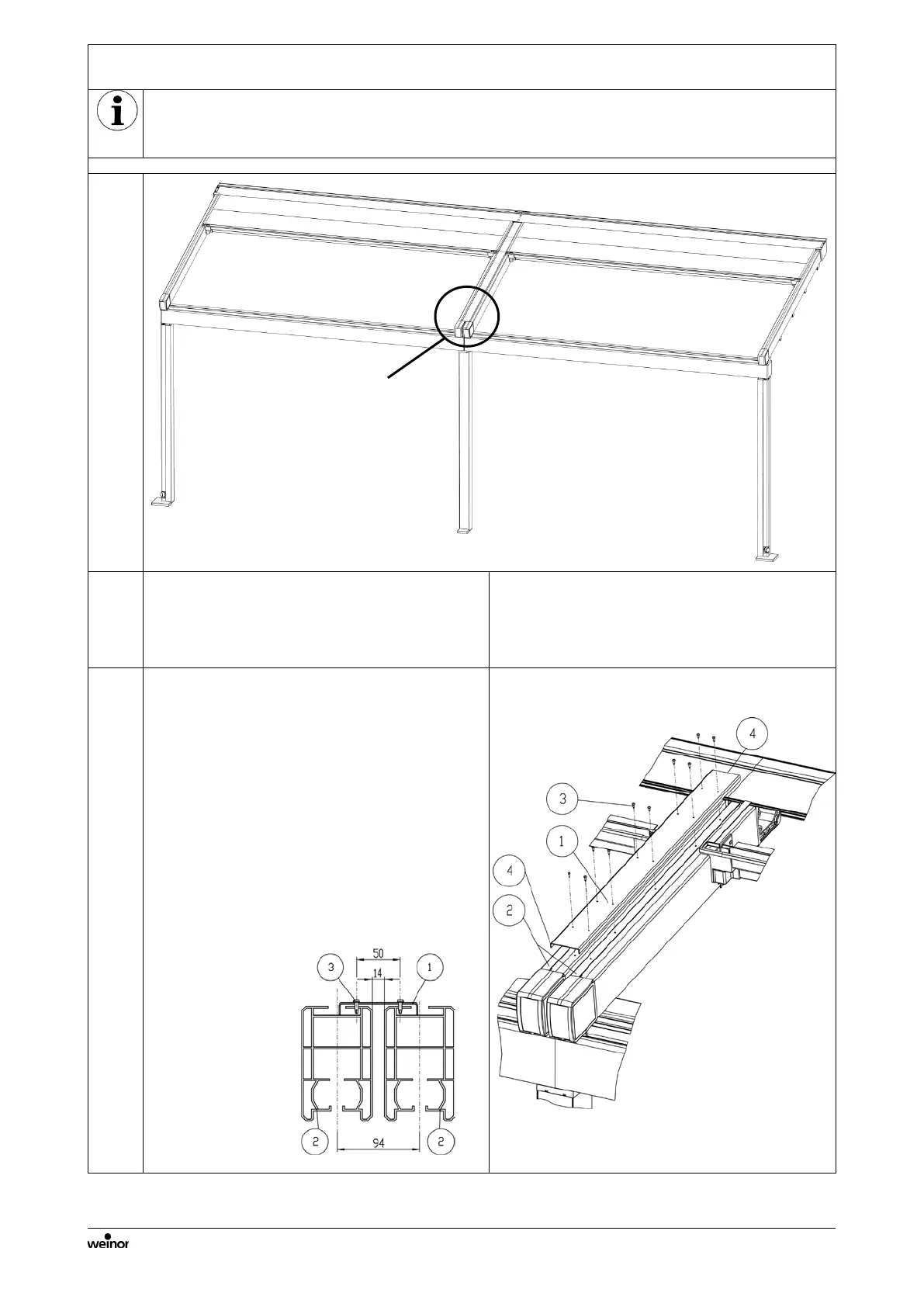
6.3 Installation of the side channels for a multi-section unit
Each of the two construction sections has a separate drive or octagonal shaft and a
separate fabric package. Only the special features of a multi-section unit are described.
All further details can be found in the previous Chapters.
Attaching the side channels in the wall
gap sealing profile
• Bolt the "end cap covers bearing side" on
the insides of the "side channel end caps"
in the centre (see Chapter 5.5).
• Mount the side channels as described in
Installation of the coupling panel
1. Cut the coupling panel (1) according to
the length of the side channels (2).
2. Place on the coupling point or on the
two central side channels (2).
3. Bolt with drilling screws 3.9x13 Torx
(3).
4. Seal the coupling panel on all ends
with adhesive and jointing compound
(4). With constructions with a projection
of more than 3 m all the other coupling
panels must also be sealed
accordingly.



 To Next Page
 Loading...