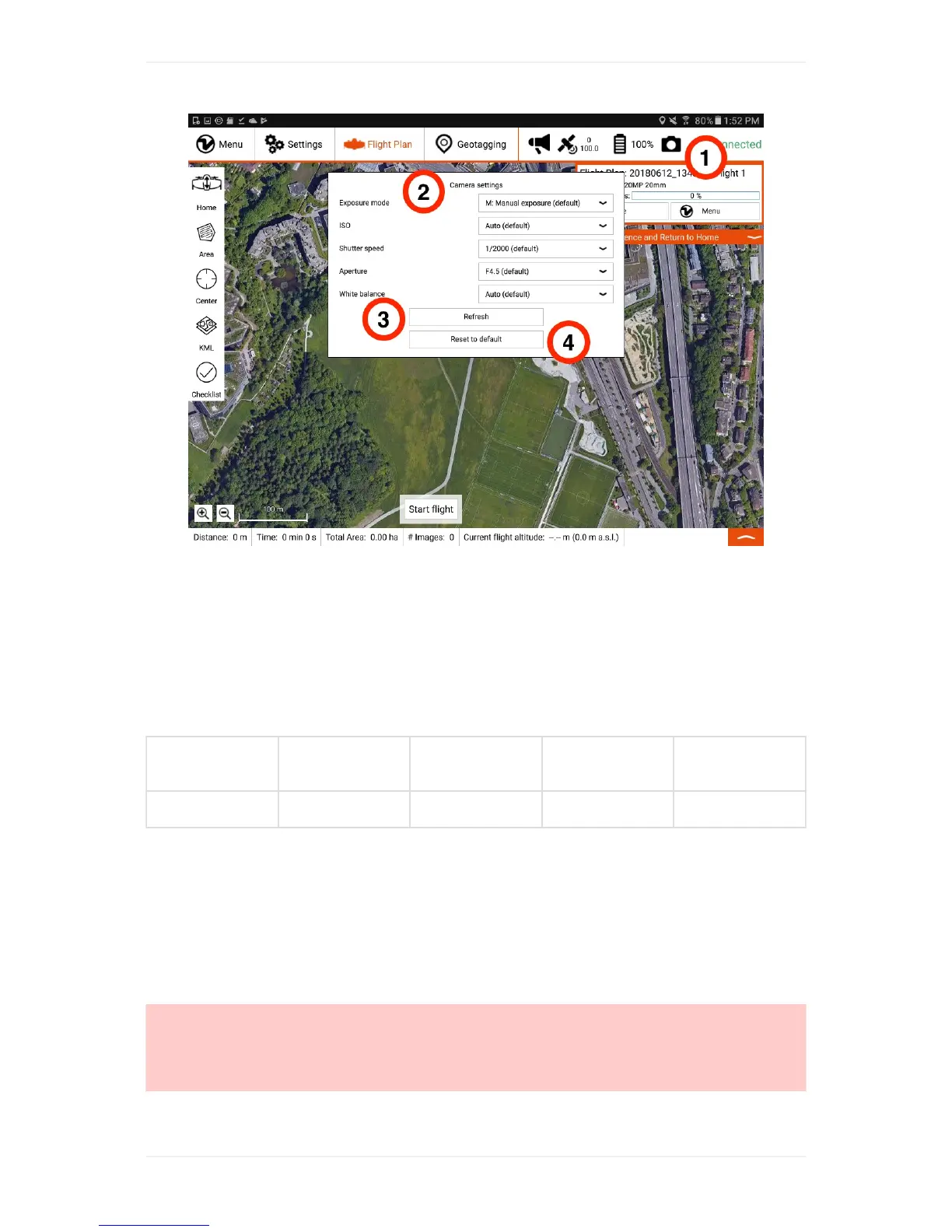
InordertochangethecamerasettingsoftheWingtraOne20MPQX1,youfirstneedtopoweronyour
WingtraOne.ThenopenWingtraPilotonyourtabletandconnectthetelemetry.OncethatWingtraOne
isconnectedtoWingtraPilot,youwillseeacameraiconinthetoprightcornerofWingtraPilot(1).
CreateanewFlightPlan.SelectQX120MPascameraoptionandthecorrectlens.20mmPancake
lensaswellas15mmVoigtländerlensaresupported.
Tochangethecamerasettings,clickonthecameraicon(1)andatabpopsupshownintheimage
above.Hereyoucanfindalistofalltheparametersthatyoucanchange.Youcanclickonevery
parameter(2)andchoosethevaluethatsuitsbestyourneed.Incasetheparametersdonotupdate,
usetherefreshoption(3).Furthermore,youcanresettheparameterstodefaultvalues(4).
Exposure
Mode
ISO
Shutter
Speed[s]
Aperture,
f-Number
White
Balance
M:Manual AUTO 1/2000 F4.5 AUTO
Thedefaultsettingsinthetableabovearevalidforboth,the20mmand15mmlenses,andgivegood
resultsinlargerangeoflightconditions.Incaseofverydarkconditionsyoucanincreaseshuttertime
(donotgobeyond1/1000s).Incaseofverybrightconditionsyoucandecreasetheshuttertime(e.g.
to1/4000s).
FocusoftheQX120mmlensiscalibratedforeverycameraindividuallybeforedelivery.Inthe
unlikelycasethatthelensgetsoutoffocusandyougotblurryimagesafteraflight,WingtraPilotoffers
afocuscalibrationfeature.Forthe15mmlens,youadjustaperturevalueandfocusonthelens.Make
surethatthefocusringonthelensisturnedtoinfinity.
Caution:RemoveQX1with15mmVoigtländerlensfortransport-The15mmVoigtländerlens
protrudesthepayloadcompartmentofWingtraOne.ForWingtraOneoperationthisisperfectlyfine,for
transportitisrecommendedtoremovethecamerafromthedrone.Todoso,unplugthemultiport
connector(4),pressthesafetyringthatholdstheQX1cameraonthepushbutton(2)andremovethe
camera.



 To Next Page