FlightFeedback
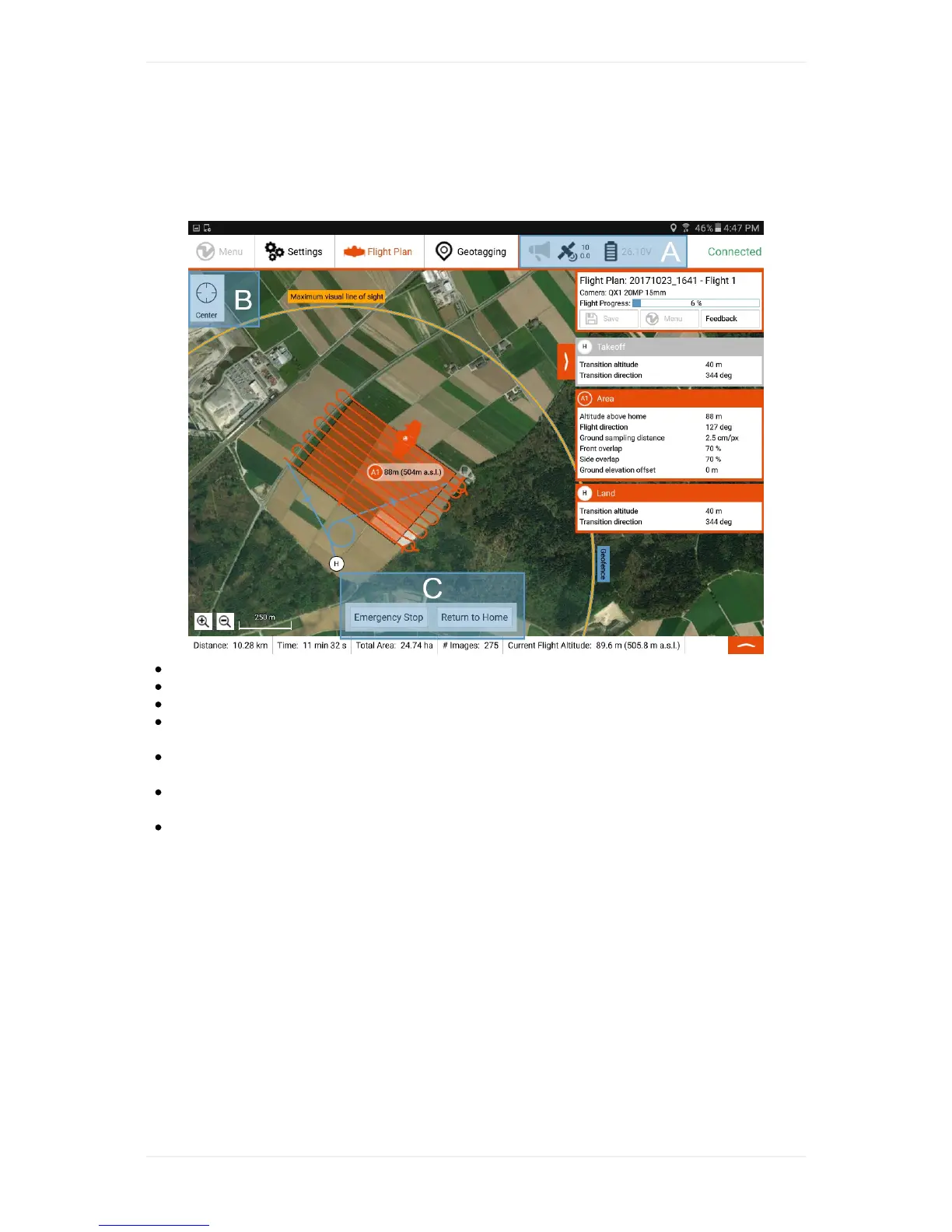
WingtraPilotdisplaysallinformationwhicharerequiredtomonitortheWingtraOneflight.
A:Informationaboutwarnings,GPSquality,andremainingbattery.
B:Changethecenterofthemap
C:Optionstotakeover.FormoredetailsseetheIn-FlightInteractionsChapter.
ThesmallWingtraOneicononthedisplaywhichmovesalongtheflightpathafteryoustartthe
flightshowsyouthecurrentpositionandheadingoftheWingtraOne.
Onthebottomofthescreen,youcanseeinformationabouttheplannedflightandthecurrent
flightaltitude.
ThedefaultoperatingmodeforWingtraOneisAutomode.YouwillbenotifiedbyWingtraPilot
withavoicemessagewhentheoperatingmodeischangingtoRTHorAssistedmode.
AllinformationintheWingtraPilotappareupdatedwithatleast1Hzfrequencyandwithhigh
precisionmeasurement.



 To Next Page