ELECTRICAL SYSTEM
L3301, L3901, L4701, WSM
9-S15
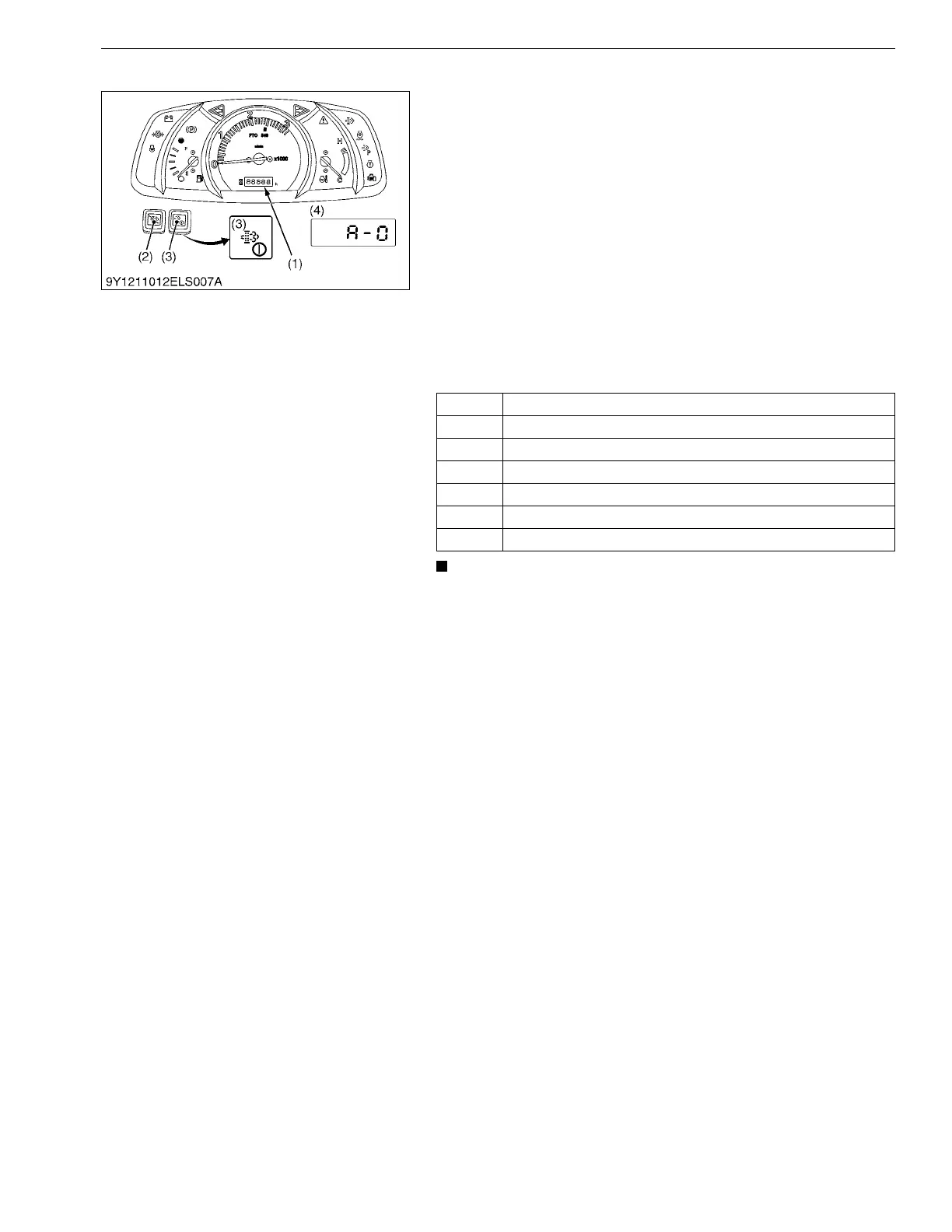
(5) Mode "d" (Tractor Model Select Mode)
1. While holding down both DPF INHIBIT switch (2) and parked
regeneration switch (3), turn key switch to "ON" or "START"
position.
2. Mode selection display is indicated on the LCD (4).
3. Press the parked regeneration switch (3) and the mode
indicated on LCD is changed.
4. If "d" is indicated on LCD, press the parked regeneration switch
(3) for more than 2 seconds.
5. Tractor model select mode is selected.
6. Press the parked regeneration switch (3) to change the
displayed code.
The order is [A-0], [b-0], [A-1], [b-1].....
7. While desired code is displayed on LCD, press the parked
regeneration switch (3) for more than 2 seconds.
8. The expression "OFF" is displayed.
9. Turn off the key switch.
• Choose proper code for the tractor by referring table
above.
9Y1211012ELS0013US0
Code Detail
A-0 L3301 HST Model
b-0 L3301 Manual Transmission Model
A-1 L3901 HST Model
b-1 L3901 Manual Transmission Model
A-2 L4701 HST Model
b-2 L4701 Manual Transmission Model
(1) LCD (Liquid Crystal Display)
(2) DPF INHIBIT Switch
(3) Parked Regeneration Switch
(4) Display Example



 To Next Page