u
Terminal AM/FM Signal Selection
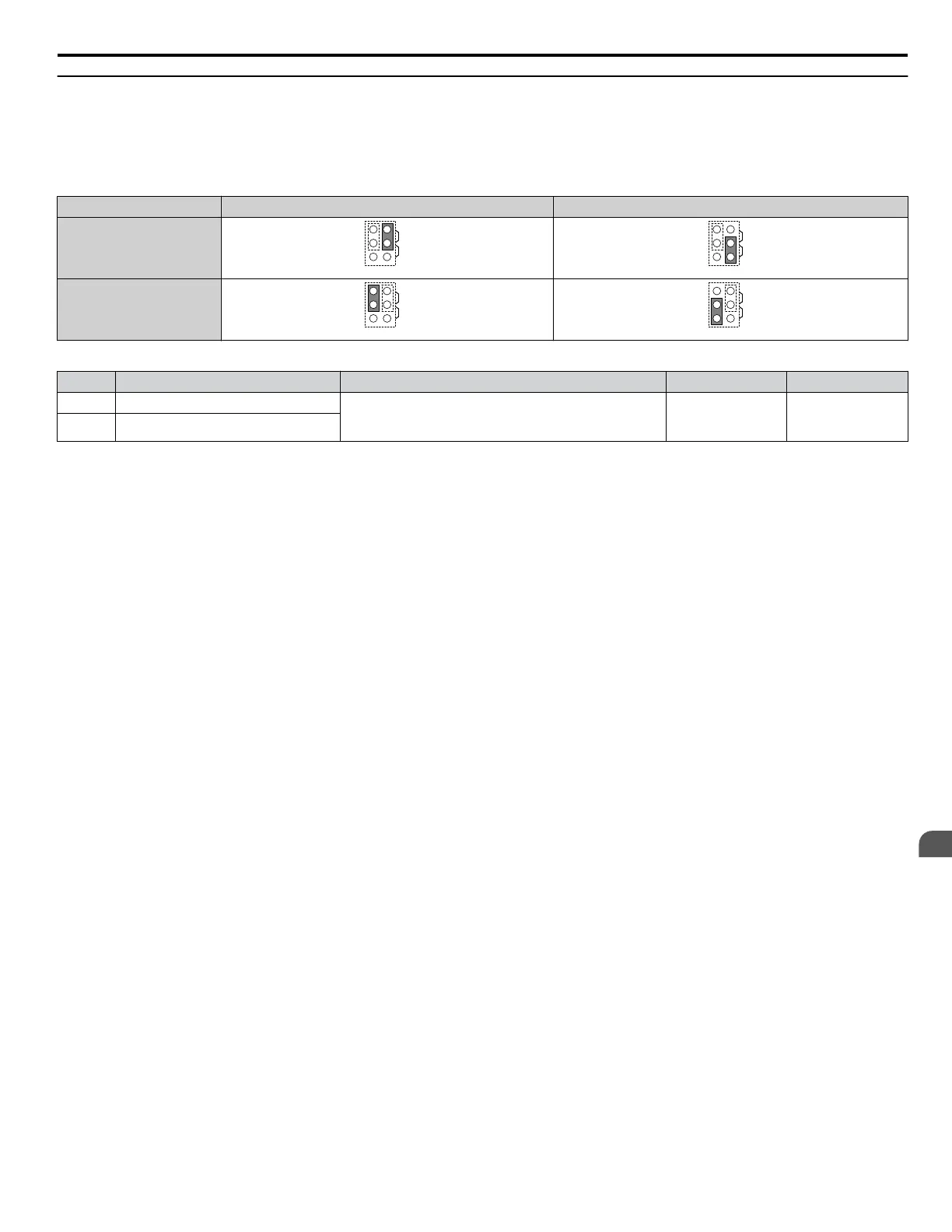
The signal type for terminals AM and FM can be set to either voltage or current output using jumper S5 on the terminal board
as explained in Table 3.15. When changing the setting of jumper S5, parameters H4-07 and H4-08 must be set accordingly.
The default selection is voltage output for both terminals.
Table 3.15 Jumper S5 Settings
Terminal Voltage Output Current Output
Terminal AM
AMFM
V
I
AMFM
V
I
Terminal FM
AMFM
V
I
AMFM
V
I
Table 3.16 Parameter H4-07 and H4-08 Details
No. Parameter Name Description Setting Range Default Setting
H4-07 Terminal FM signal level selection 0: 0 to 10 Vdc
1: -10 to 10 Vdc
2: 4 to 20 mA
0 to 2 0
H4-08 Terminal AM signal level selection
3.9 Control I/O Connections
YASKAWA TOEP YAIP1W 01F YASKAWA AC Drive - iQpump1000 User Manual
129
3
Electrical Installation











 To Next Page