u
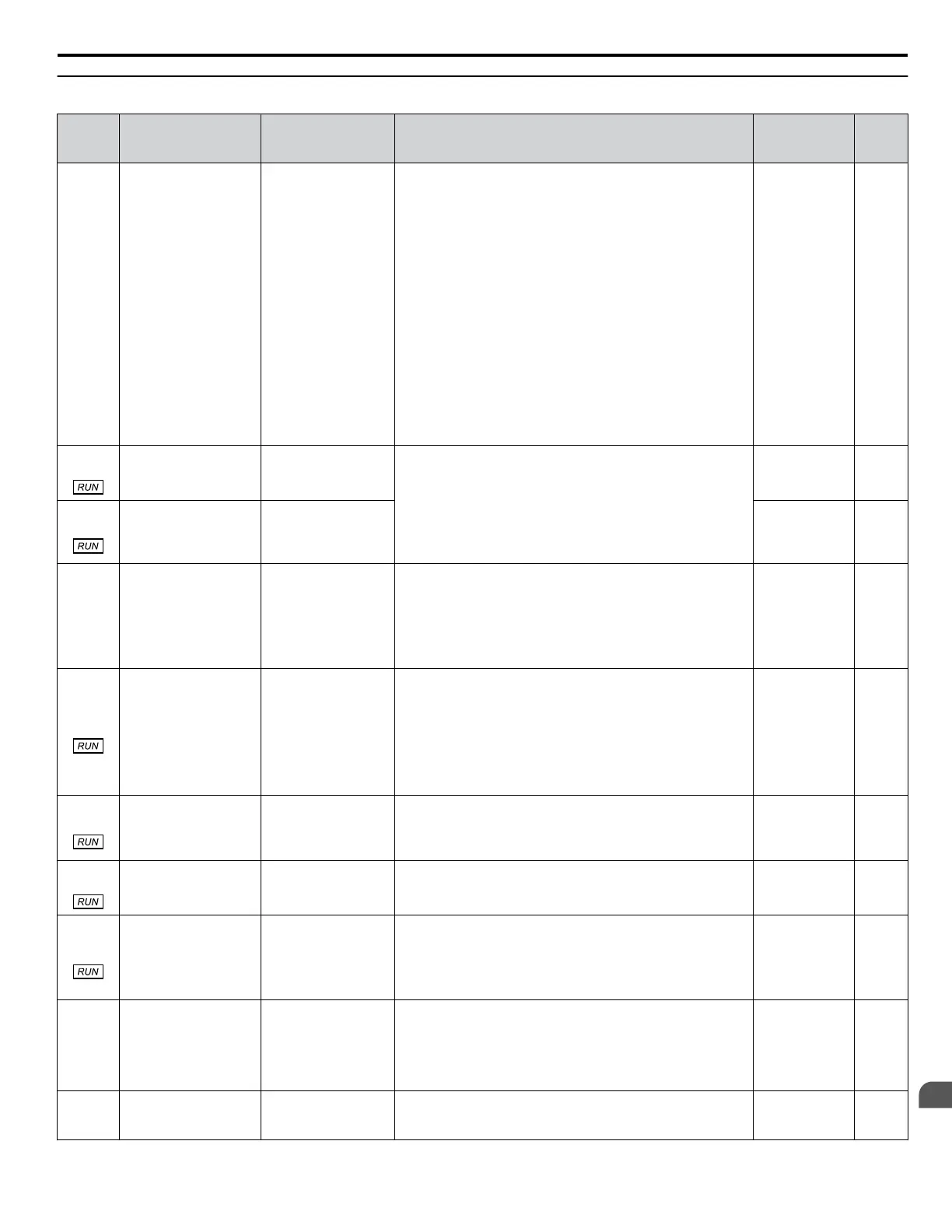
P6: Flow Meter Setup
No.
(Addr.
Hex)
Name LCD Display Description Values Page
P6-01
(0D5E)
Flow Meter Scaling Flow Meter Scale
When an analog input is used for the flow rate, this parameter
performs the following functions:
• Enables and disables flow meter functions. This parameter
must be set to a value greater than 0 to enable flow meter
functions.
• Sets the scaling for the “Flow Rate” analog input.
• Sets the scaling for the “Flow Rate” analog output.
• Sets the display scaling when “Flow Rate” is used as the PID
feedback.
When an pulse input is used for the flow rate, this parameter
performs the following functions:
• Enables and disables flow meter functions. Parameter must
be set to a value greater than zero to enable flow meter
functions.
• Sets the scaling for the “Flow Rate” analog output.
• Sets the display scaling when “Flow Rate” is used as the PID
feedback.
Default: 0.0
GPM
<4>
Min.: 0.0
Max.: 6000.0
–
P6-02
(0D5F)
Turbine Input Scaling
(Coarse)
Turbine Scale 1
Sets the scaling for the turbine in pulses per gallon.
Pulses/Gallon = P6-02 + P6-03
This parameter is internally lower-limited to 0.0001 ppG.
Default: 1 ppG
Min.: 0
Max.: 6000
–
P6-03
(0D60)
Turbine Input Scaling
(Fine)
Turbine Scale 2
Default: 0.0000
ppG
Min.: 0.0000
Max.: 0.9999
–
P6-04
(0D61)
Water Flow Units
Water Flow Units
0: Gal/Min (GPM)
1: Gal/Hr (GPH)
2: Ft3/Min (CFM)
3: M3/Hr (CMH)
4: Acre-Ft/Yr (AFY)
Sets the display units for monitor U1-83, P2-02, P6-06, P6-17,
P9-41, and P9-42.
0: U.S. Gallons / min (GPM)
1: U.S. Gallons / hr (GPH)
2: Cubic Feet / min (CFM)
3: Cubic Meters / hr (CMH)
4: Acre-Feet / yr (AFY)
Default: 0
Range: 0 to 4
–
P6-05
(0D62)
Flow Accumulation
Reset
Flow Accum Reset
Resets the accumulated flow and returns monitors U1-96 and
U1-97 to 0.
0: No reset
7770: Reset accumulation
8880: Set Accumulation (P6-31 to P6-34)
All other settings have no effect.
Note: After this parameter is changed, the setting will
automatically return to “0”.
Default: 0
Min.: 0
Max.: 65535
–
P6-06
(0D63)
Low Flow Level Low Flow Level
Sets the level below which the flow must fall for longer than the
time set in P6-07 to trigger a Low Flow condition.
Setting this parameter to 0.0 will disable the function.
Default: 0.0
GPM
<1> <4>
Min.: 0.0
Max.: 6000.0
–
P6-07
(0D64)
Low Flow Detection
Delay Time When
Already Running
Low Flow Tim Run
Sets the length of time that the flow rate must be below the level
set in P6-06 to detect a Low Flow condition.
Default: 10 s
Min.: 0
Max.: 6000
–
P6-08
(0D65)
Low Flow Detection
Wait Time at Start
Low Flow Time St
Sets the length of time that the drive will wait after coming out
of a zero speed condition before activating Low Flow detection.
Note: This feature is canceled when the Flow Rate rises
above the Low Flow Level for the time set in
P6-21, Low Flow Start Delay Cancel Time.
Default: 0.0 min
Min.: 0.0
Max.: 3600.0
–
P6-09
(0D66)
Low Flow Select
Low Flow Sel
0: No Display
1: Alarm Only
2: Fault
3: Restart (P6-10)
Determines drive response when a Low Flow condition is
detected.
0: No display
1: Alarm only
2: Fault
3: Auto-restart (time set by P6-10)
Default: 1
Range: 0 to 3
–
P6-10
(0D67)
Low Flow Auto-Restart
Time
LowFlow Restart
Set the length of time that the drive will wait before attempting
an auto-restart of the Low Flow fault.
This parameter is effective only when P6-09 is set to 3.
Default: 3.0 min
Min.: 0.1
Max.: 6000.0
–
B.12 P: Pump Parameters
YASKAWA TOEP YAIP1W 01F YASKAWA AC Drive - iQpump1000 User Manual
413
B
Parameter List











 To Next Page