6.16 Vibration Detection Level Initialization (Fn01B)
6-27
6
Utility Functions (Fn)
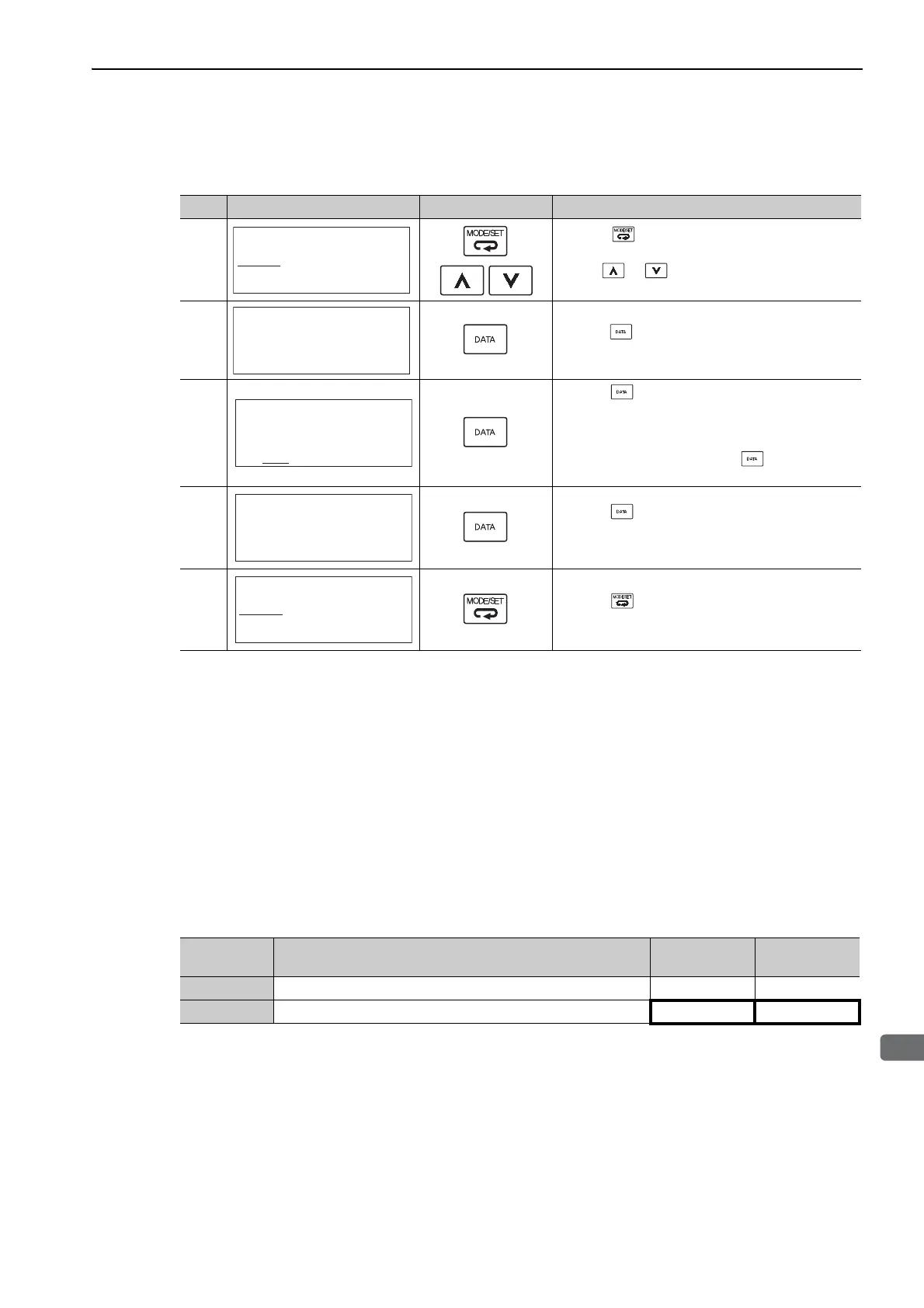
(2) Operating Procedure
Use the following procedure.
(3) Related Parameters
The following table lists parameters related to this function and their possibility of being changed while exe-
cuting this function or of being changed automatically after executing this function.
• Parameters related to this function
These are parameters that are used or referenced when executing this function.
• Allowed changes during execution of this function
Yes: Parameters can be changed using SigmaWin+ while this function is being executed.
No: Parameters cannot be changed using SigmaWin+ while this function is being executed.
• Automatic changes after execution of this function
Yes: Parameter set values are automatically set or adjusted after execution of this function.
No: Parameter set values are not automatically set or adjusted after execution of this function.
Step Display after Operation Keys Operation
1
Press the Key to view the main menu for the
utility function.
Use the or Key to move through the list and
select Fn01B.
2
Press the Key. The display changes to the Fn01B
execution display.
3
Press the Key.
"Init" is displayed flashing, and the vibration level is
detected and initialized.
Note:
Continues initialization until the Key is pressed
again.
4
Press the Key. The display changes from "Init"
to "DONE," for one second and the new setting of
Pn312 becomes enabled.
5
Press the Key. The display returns to the main
menu of the utility function.
RUN − FUNCTION−
Fn014:Opt Init
Fn01B:Viblvl Init
Fn01E:SvMotOp ID
Fn01F:FBOpMot ID
RUN
Vibration Detect
Level Init
Start : [DATA]
Return: [SET]
RUN
Vibration Detect
Level Init
Init
RUN
Vibration Detect
Level Init
D㧻㧺㧱
RUN − FUNCTION−
Fn014:Opt Init
Fn01B:Viblvl Init
Fn01E:SvMotOp ID
Fn01F:FBOpMot ID
Parameter Name
Mid-execution
changes
Automatic
changes
Pn311 Vibration Detection Sensitivity Yes No
Pn312 Vibration Detection Level No Yes



 To Next Page