HFA3 Instructions for Use 2660021166131 Rev. A 2018-11
Go to Contents Troubleshooting
C-5
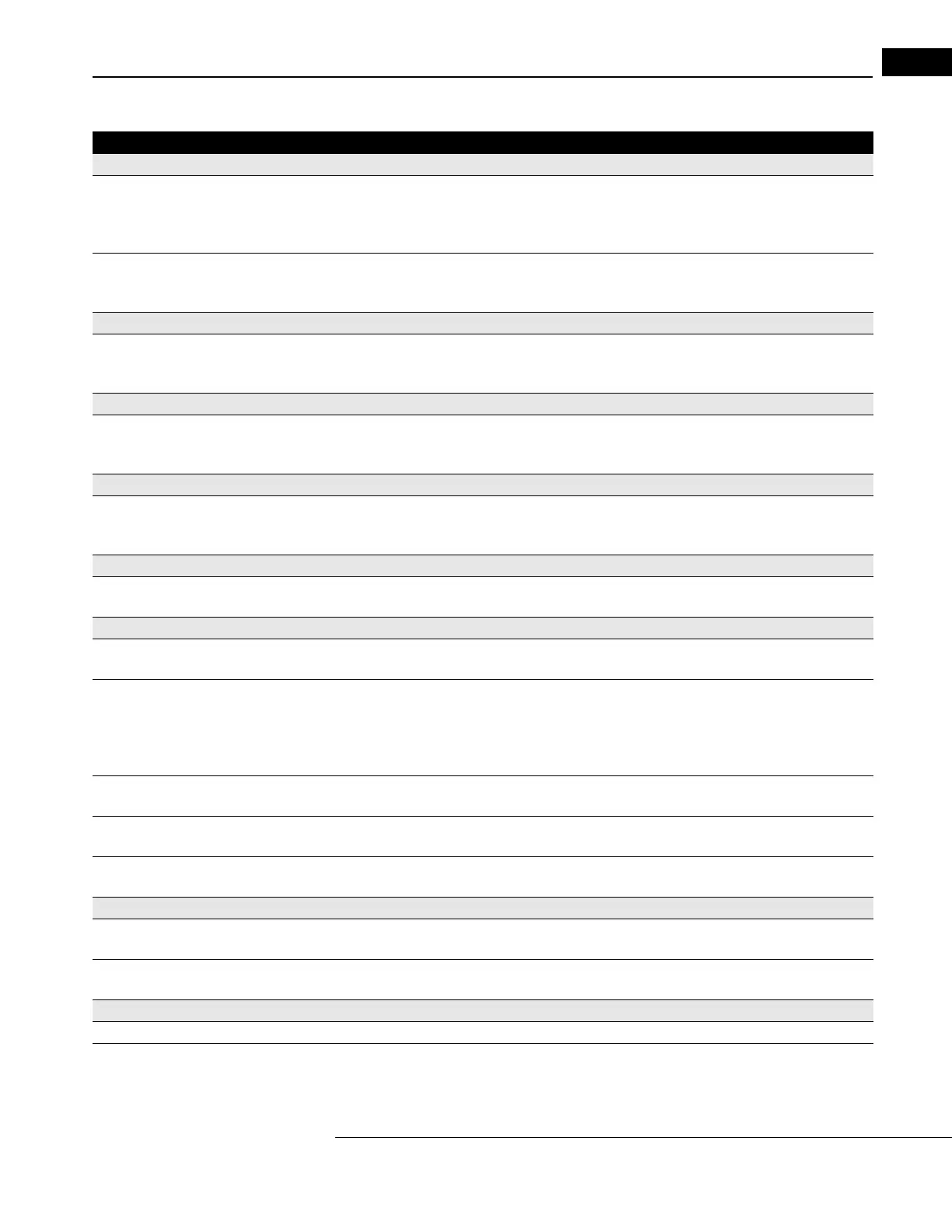
Vertex Monitoring
Vertex Monitoring does not work. • HFA3 not Models 850 or 860.
• Vertex Monitoring not turned on.
• Trial lens holder not in up position.
• Gaze Tracking was not initialized at the start of the test.
Vertex Monitoring alarm beep goes off too often. • Patient moving away from trial lens - reposition patient.
• Vertex Monitoring needs to be reset.
• Turn off Vertex Monitoring.
Pupil Size
Not being automatically displayed on printout or on
screen.
• HFA3 not Models 840, 850, or 860.
• Gaze Tracking was not initialized.
• Auto pupil turned off.
Liquid Trial Lens
Error messages occurring. • Do not move the Liquid Trial Lens when it is being adjusted (icon flashing red).
- To resolve error messages, lower then raise the lens. If errors persist, remove the Liquid
Trial Lens holder completely and then reattach it.
External Keyboard
Does not work. • May not be compatible with HFA3.
- Try another keyboard.
• Not plugged in properly.
Trackpad, Trackball or Mouse
Does not work. • May not be compatible with HFA3.
- Try a different trackball/mouse.
SWAP (Short-Wavelength Automated Perimetry)
SITA-SWAP not available with Blue-Yellow switched
to on.
• Wrong test pattern used.
- Choose a 24-2 Threshold test, then turn Blue-Yellow on.
Grayscale looks very dark. • May be normal for Blue-Yellow. The eye is less sensitive to the blue stimulus.
- Gray scale is the same one used for White-on-White.
- Use Total and Pattern Deviation plots for diagnosis.
• Patient had difficult time recognizing when to respond.
- Re-instruct the patient and repeat the test.
Blind spot monitor reports many Fixation Losses. • Size V blind spot check size may be too easy to see at blind spot.
- Consider using Gaze Track only and turn off Blind Spot.
Blue stimulus is on but bowl is not yellow. • Blue stimulus color was chosen instead of Blue-Yellow parameter.
- Blue Yellow parameter set to On will give yellow bowl and Blue Size V stimulus.
Illumination from yellow lamp at top of bowl
annoying to patient.
• Visor not extended during testing procedure.
Testing Problems
Test completes immediately after Start button is
pressed.
• Simulation Mode is on.
- Turn Simulation Mode off.
Full field test stops before complete. • Trial lens holder in up position for peripheral portion of test.
- Test peripheral field without a trial lens and put holder down.
Hard Disk Problems
Message indicates hard disk failure. • Call Customer Service and mention the error code.
Patient names exist in database without test data. • Test results not saved with patient information.
- Delete patient record.
Table C-2
Problem Possible Cause or Solution



 To Next Page
 Loading...