SensyMaster FMT430, FMT450 THERMAL MASS FLOWMETER | OI/FMT430/450-EN REV. B 127
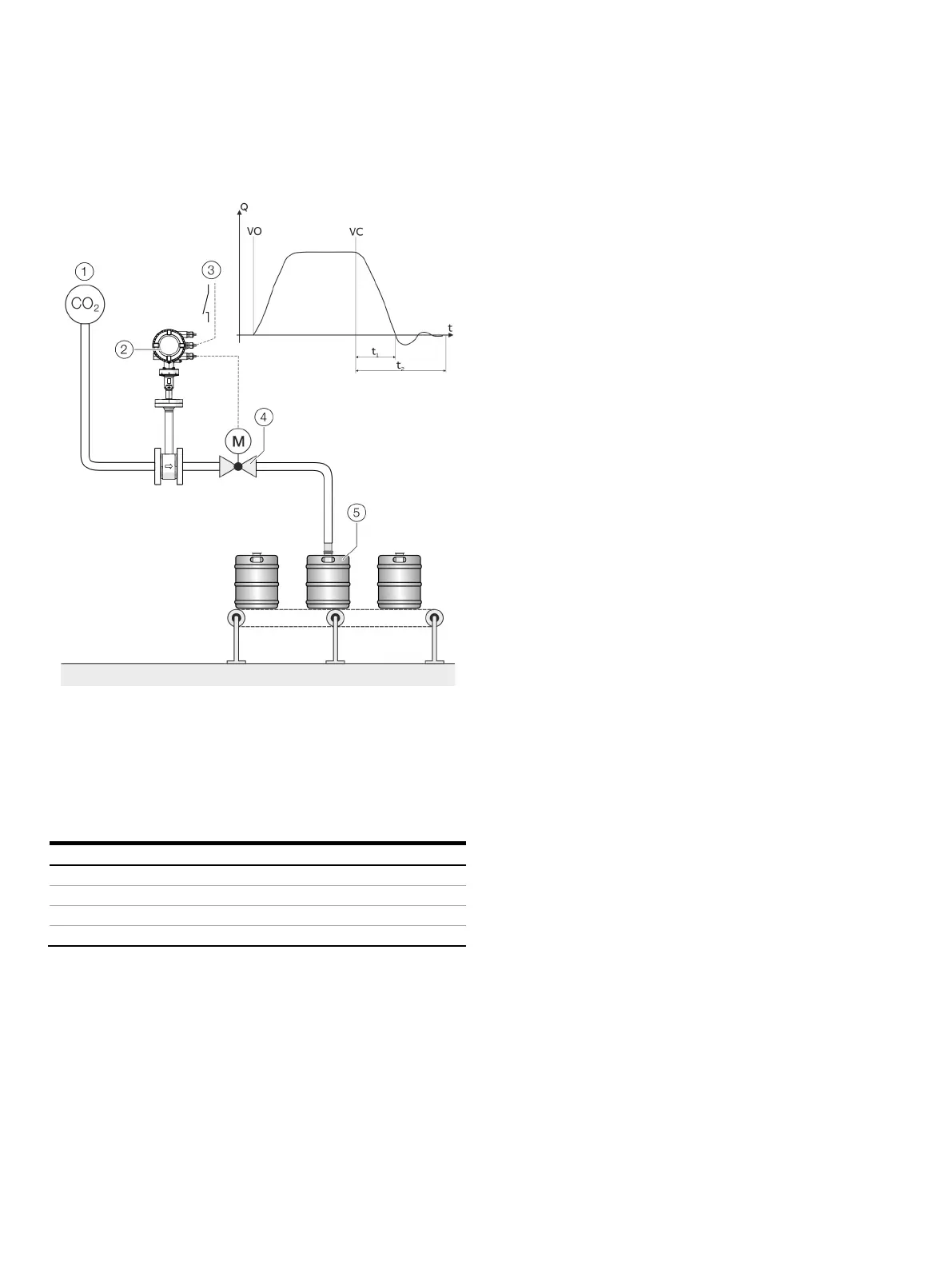
FillMass batch function
Only for FMT450
Gas pipeline (CO
2
)
Sensor
Start / stop fill operation
(via digital input)
Fill valve
Filling tank
Figure 74: FillMass filling function (example CO2 fill)
Valve open (filling started)
Valve closed (fill quantity reached)
The integrated FillMass fill function allows filling operations with
filling times of > 3 s.
For this purpose, the filling quantity is given via an adjustable
totalizer.
The Modbus interface is used to configure and control the fill
function.
The valve is triggered via one of the digital outputs and closed
again once the preset filling quantity is reached.
The transmitter measures the overrun quantity and calculates
the overrun correction from this.
Additionally, the low flow cut-off can be activated if required.
Setup
For the configuration of the fill mass function, the following
steps must be performed:
1. The FillMass function must be active. See also the ‘Device
Setup / ...Transmitter / ...Feature Settings / ...’ menu.
2. One digital output must be configured as a binary output
with the function ‘Batch End’. See also the ‘Input/Output / ...’
menu. As an option, one digital input (plug-in card) can be
configured with the function ‘Start/Stop Batching’ at the
start of the filling process.
3. The parameters for the fill mass function must be
configured. See also the ‘Totalizer / ...FillMass / ...’ menu.
Note
During fast filling processes, the damping should be set to the
minimum value to ensure the greatest possible accuracy of the
fill quantity.
See also the ‘Device Setup / ...Transmitter / ...’ menu.













 To Next Page