74 SensyMaster FMT430, FMT450 THERMAL MASS FLOWMETER | OI/FMT430/450-EN REV. B
… 8 Commissioning
Checks prior to commissioning
The following points must be checked before commissioning the
device:
• Correct wiring in accordance with Electrical connections
on page 54.
• Correct grounding of the device.
• The ambient conditions must meet the requirements set
out in the specification.
• The power supply must meet the requirements set out on
the name plate.
Parameterization of the device
The OI_FMT430_450_EN_B-Draft 1 can be commissioned and
operated via the integrated LCD indicator (option, see
Parameterization via the menu function Easy Setup on
page 76).
Alternatively, the OI_FMT430_450_EN_B-Draft 1 can also be
commissioned and operated via ABB Asset Vision Basic (FEP6xx
DTM).
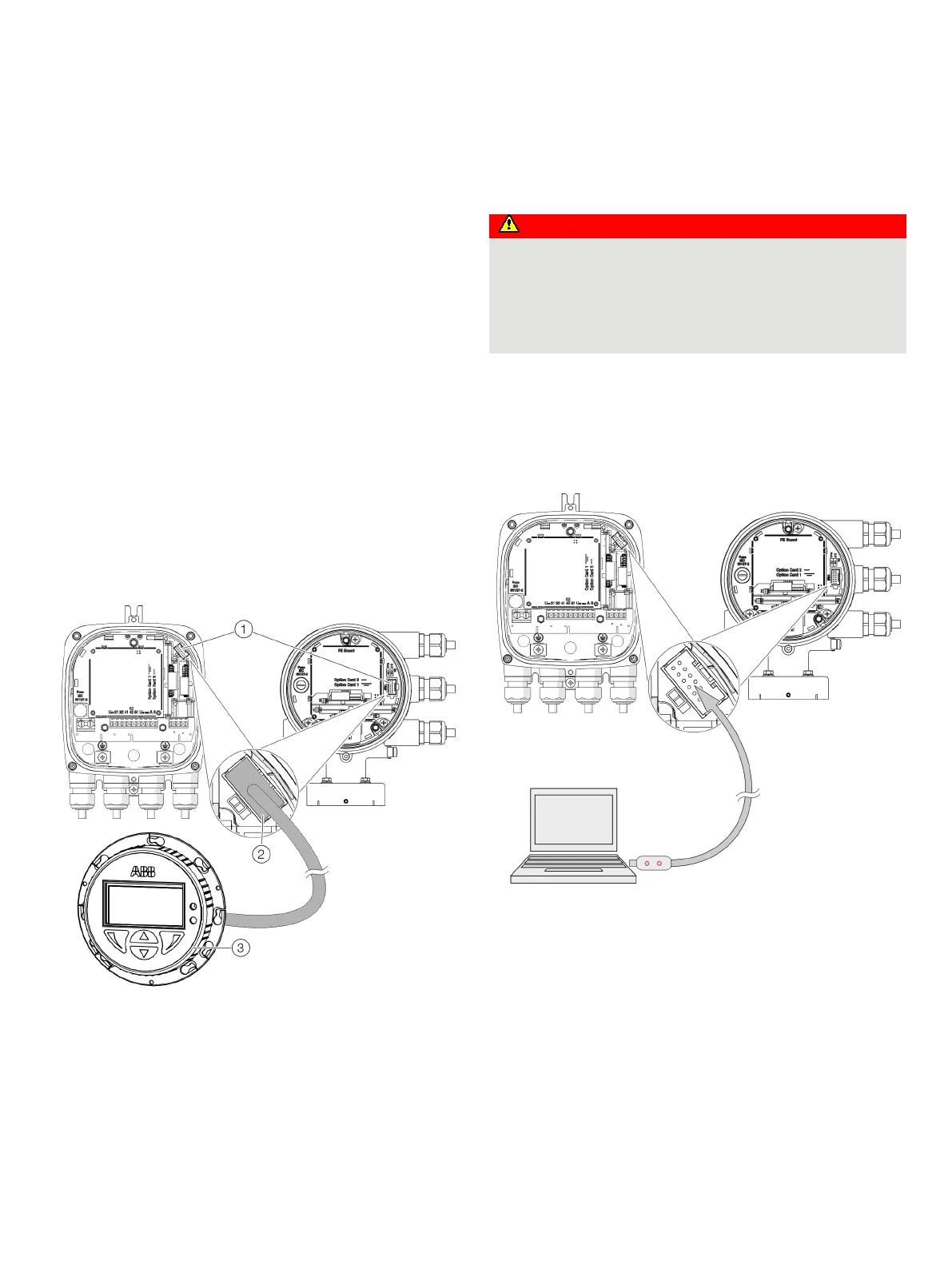
Parameterization with the optional LCD indicator
Local operating interface
Coupler connectors for LCD
indicator
LCD indicator
Figure 68: Optional LCD indicator
For devices without LCD indicator, an optional LCD indicator for
parameterization can be connected.
Parameterization via the local operating interface
Explosion hazard
Risk of explosion during operation of the device with open
terminal box!
• Only perform parameterization of the device via the local
operating interface outside potentially explosive
A PC / Notebook and the USB interface cable are needed to
configure the device via the device local operating interface.
By combining the HART-DTM and the softwareflow available at
www.abb.com/ABB AssetVision, all parameters can also be set
without a fieldbus connection.
Local operating interface
USB-interface cable
PC / Notebook
Figure 69: Connection to the local operating interface
1. Open device terminal box.
2. Connect programming plug to the local operating interface
of the device.
3. Insert USB interface cable into a free USB female connector
on the PC / notebook.
4. Switch on the device power supply.
5. Start ABB AssetVision and perform the parameterization of
the equipment.
Detailed information on operating the software is available in
the relevant operating instructions and the DTM online help.













 To Next Page