48 SensyMaster FMT430, FMT450 THERMAL MASS FLOWMETER | OI/FMT430/450-EN REV. B
… 6 Installation
… Opening and closing the housing
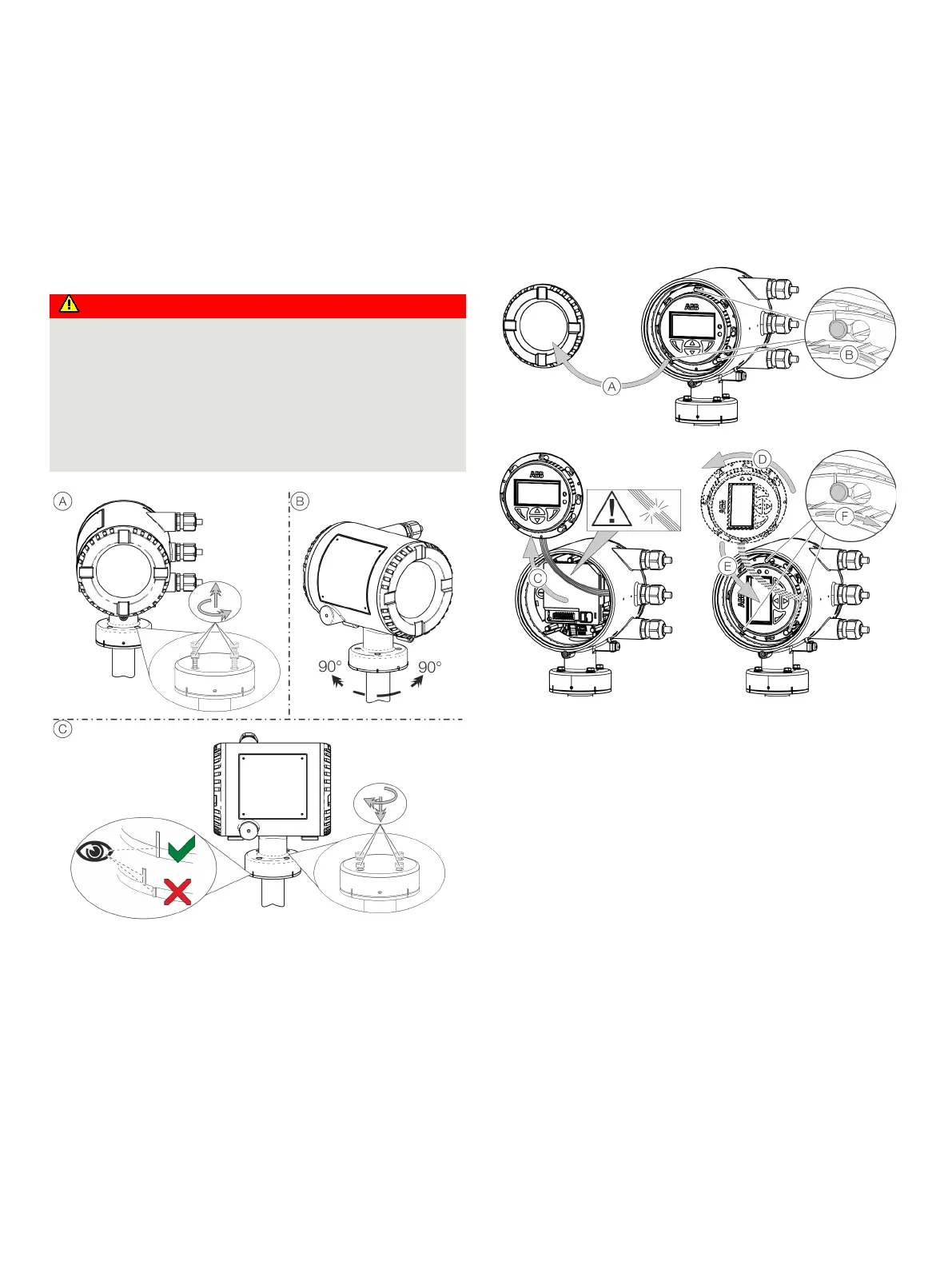
Rotating the transmitter housing and LCD display
Depending on the installation position, the transmitter housing
or LCD display can be rotated to enable horizontal readings.
Transmitter housing
Damaging the device carries a risk of explosion!
When the screws for the transmitter housing are loosened,
the explosion protection is suspended.
• Tighten all screws prior to commissioning.
• Never disconnect the transmitter housing from the
sensor.
• Loosen only the screws indicated when rotating the
Figure 35: Rotate transmitter housing
Rotate the housing:
• Perform steps
A to C.
Rotate LCD indicator – dual-compartment housing
The LCD indicator can be rotated in three increments of 90°
each.
Figure 36: Rotating the LCD indicator
Turn the LCD indicator:
1. Open housing
A, see Opening and closing the housing
on page 47.
2. Perform steps
B to F.













 To Next Page