SensyMaster FMT430, FMT450 THERMAL MASS FLOWMETER | OI/FMT430/450-EN REV. B 141
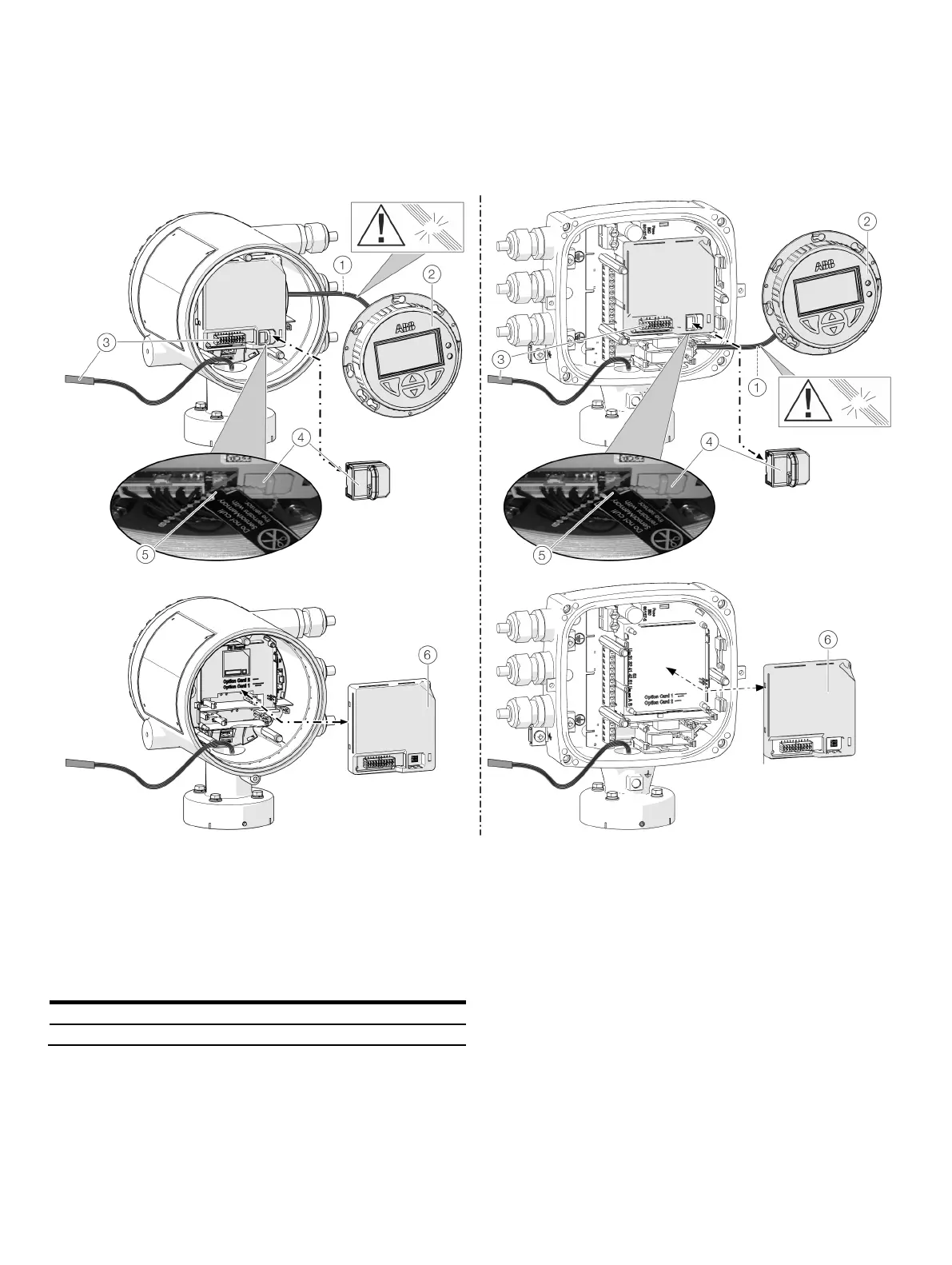
Replacing the slide-in
Integral mount design
LCD indicator cable harness
LCD indicator
Sensor cable harness
SensorMemory
Cable retainer
Frontend board
Figure 78: Replacing LCD indicator and frontend board (example)
In the event of a fault, the frontend board can be replaced on
flowmeters with an integral mount design.
Replace the frontend board as follows:
1. Switch off the power supply.
2. Unscrew / remove the cover.
3. Remove the LCD indicator. Ensure that the cable harness is
not damaged.
4. Pull the connector out of the sensor cable harness.
5. Pull out the SensorMemory.
Note
The SensorMemory is assigned to the sensor. The
SensorMemory is therefore fastened to the sensor cable harness
with a cable retainer.
• Make sure that the SensorMemory remains with the sensor
and cannot be lost!
6. Pull the faulty frontend board out forwards.
7. Insert new frontend board.
8. Attach connector from the sensor cable harness.
9. Attach the SensorMemory.
10. Insert the LCD indicator and screw on /replace the cover.













 To Next Page