SensyMaster FMT430, FMT450 THERMAL MASS FLOWMETER | OI/FMT430/450-EN REV. B 75
Parameterization via the infrared service port adapter
Configuration via the infrared service port adapter on the device
requires a PC / notebook and the FZA100 infrared service port
adapter.
By combining the HART-DTM and the software ‘ABB AssetVision’
available at www.abb.com/flow, all parameters can also be set
without a HART connection.
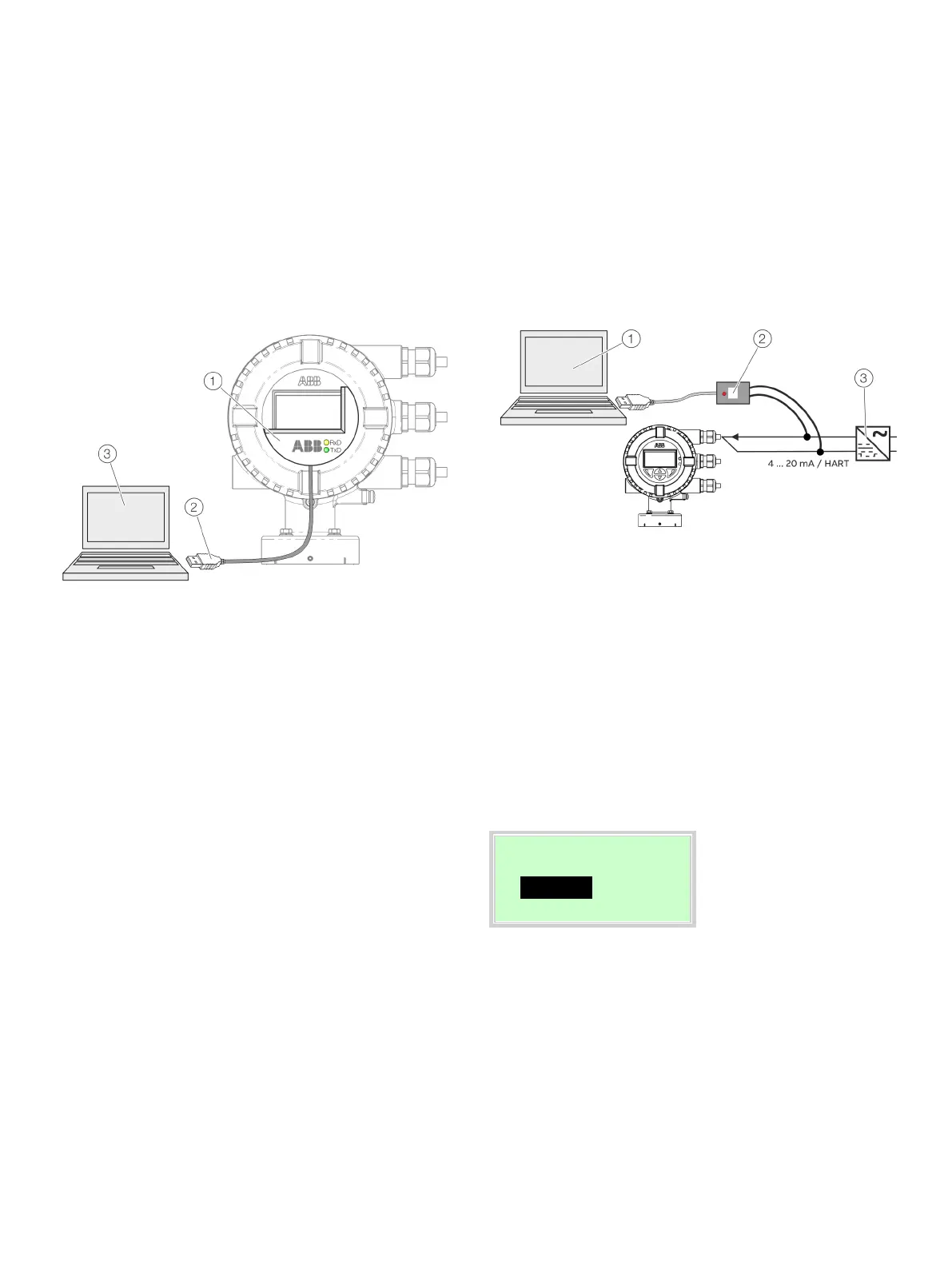
Infrared service port adapter
USB-interface cable
PC / Notebook running ABB
AssetVision and HART DTM
Figure 70: Infrared service port adapter on the transmitter (example)
1. Position the infrared service port adapter on the front plate
of the transmitter as shown
2. Insert USB interface cable into a free USB female connector
on the PC / notebook.
3. Switch on the device power supply.
4. Start ABB AssetVision and perform the parameterization of
the equipment.
Detailed information on operating the software is available in
the relevant operating instructions and the DTM online help.
Parameterization via HART®
Configuration via the HART interface of the device requires a
PC / Notebook and a suited HART® Modem.
All parameters can also be set via the HART protocol, using the
HART DTM available at www.abb.com/flow and the ABB
AssetVision software.
PC / Notebook running ABB
AssetVision and HART DTM
HART modem
Power supply unit
Figure 71: HART Modem on the transmitter (example)
For more detailed information on operating the software and
the HART modem, please refer to the relevant operating
instructions and the DTM online help.
Switching on the power supply
• Switch on the power supply.
The LCD display shows the following display during the startup
process:
Processing
The process display is displayed after the startup process.













 To Next Page