Installation and Commissioning Guide
Split Tri-Capacity
29
Installation and Commissioning Guide 500-700 Tri-Capacity Split Ducted
Doc. No.0525-098 Ver. 2 210330
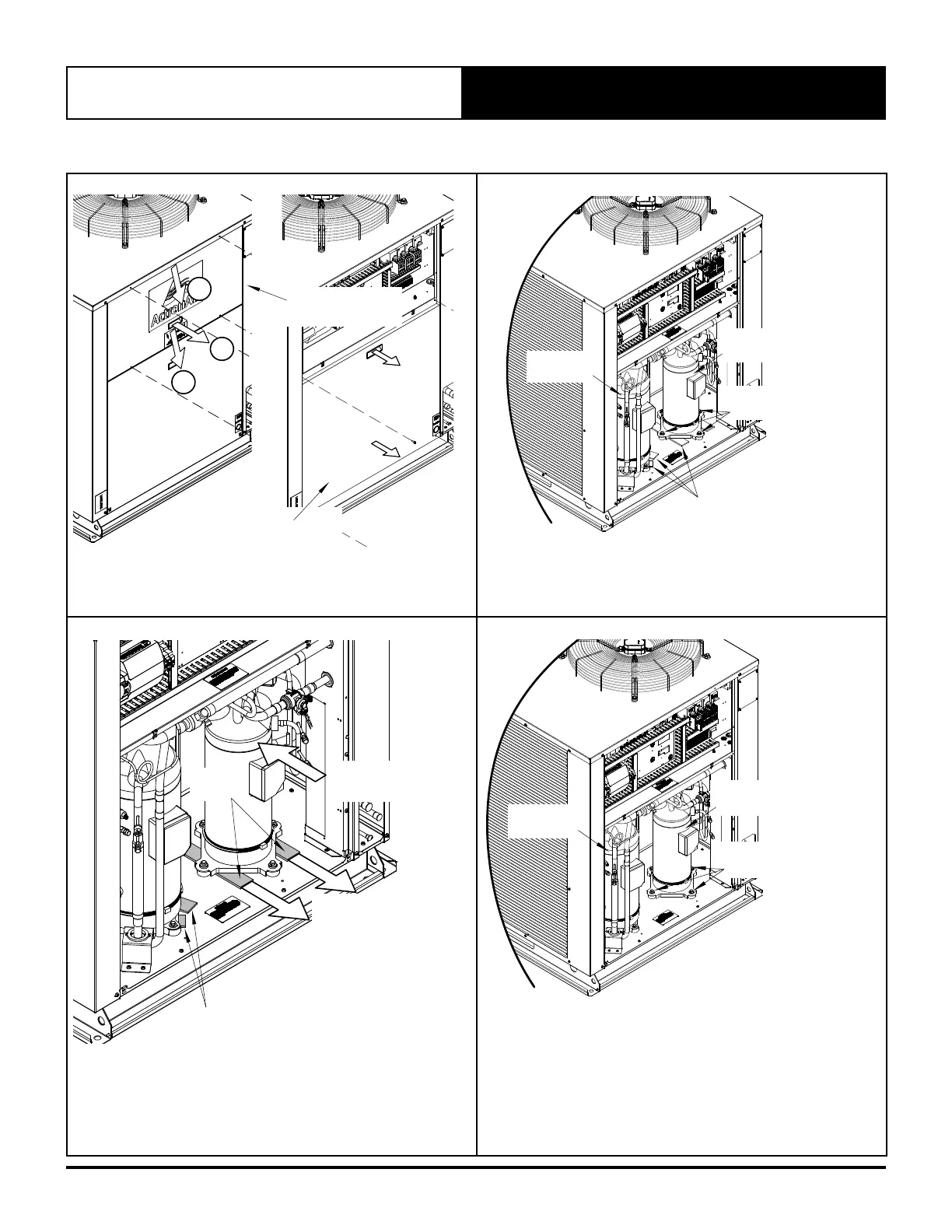
13.02. Compressor Shipping Blocks Removal
A
B
B
Remove First the
Access Panel - Electrical
Remove the
Access Panel - Compressor
1. Remove Access Panel-Compressor
• Remove the Access Panel - Compressor by following the
Access Panels removal procedure from previous page.
Small
Compressor
Loosen Bolts
(4-pcs / Comp.)
Shipping
Blocks
Large
Compressor
2. Loosen the Bolts - Compressor Mounting
• Loosen the bolts that hold the compressors down onto the
unit (4 pcs. each).
Push back the
Compressor
Pull away the
Shipping Blocks
Shipping
Blocks
Shipping
Blocks
3. Remove the Shipping Blocks
• Push the Compressor back, taking care not to exert too much
force that may cause damage to the pipes.
• Remove the Shipping Blocks by pulling them away.
• Repeat the same procedure for the 2nd compressor.
Small
Compressor
Tighten Bolts
(4-pcs / Comp.)
Large
Compressor
4. Tighten Back the Bolts
• Firmly tighten the bolts to secure back the compressors onto
the unit. Recommended torque is 131 Nm. It is critically
important for the grommet not to be compressed.
• Check to make sure that there are no damage to the piping
systems.



 To Next Page