Installation and Commissioning Guide
Split Tri-Capacity
41
Installation and Commissioning Guide 500-700 Tri-Capacity Split Ducted
Doc. No.0525-098 Ver. 2 210330
16. CONTROL MENU
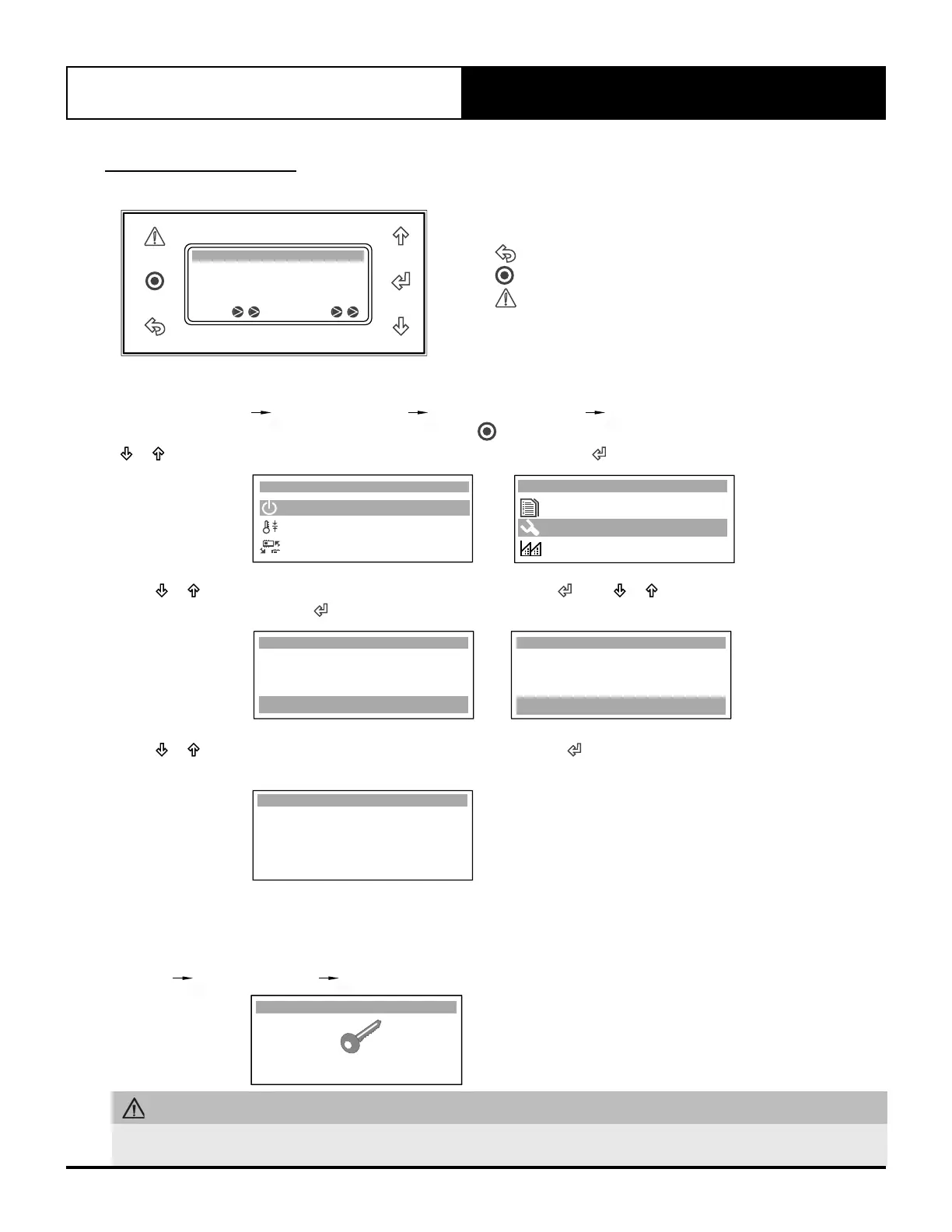
16.01. Menu Navigation
Room T.:
19.2
o
C
16.4
o
C
Supply T.:
Comp Rev Vlv
10:20 Unit: Unit On
Example below will show the navigation to screen Gfc2. Thermoregulat.
G. Service Gf. Service settings Gfc. Thermoregulation Gfc2. Thermoregulat.
1. To get into the main menu in the control interface, press . The display will show the list of available submenus. Press
or button to scroll through the sub menus and select G. Service. Press to enter the submenu.
A. On / O Unit
B. Setpoint
Main Menu A
C. Mode of Operation
G. Service
F. Alarm History
Main Menu G
H. Manufacturer
2. Press or button to scroll to menu Gf. Service settings then press . Press or button to scroll to menu Gfc.
Thermoregulation then press .
Service Menu Gf
d. Working hours
f. Service settings
e. Communicate cong.
a. Working hour set
b. Probe adjustment
c. Thermoregulation
Service Menu Gfc
3. Press or button to scroll to menu Gfc2 Thermoregulat. then press . Set the fields based on desired
configuration.
Thermoregulat. Gfc2
13.8
O
C
25.4
O
C
13.8
O
C
Room Temp. :
Wall Cont Temp. :
Control Value :
Room Temperature
use OUTDOOR sensor
After Hours SW & Temp
Probe weight Value : 0
Pressing at anytime will bring the menu back one level up.
Pressing at anytime will bring back the main menu.
Pressing will display an active alarm (if any).
Button will blink if any system alarm is active.
16.02. Service Password
To access the Service Settings pages a password is required: 7378
G. Service Gf. Service settings Change password to 7378
Service Password is shown.
Service Password
Insert service
password (PW1) : 7378
WARNING
Unauthorized access to Service Menu and inadvertent changes to the settings can cause damage to the air conditioning
system which will render ActonAir warranty null and void.



 To Next Page