20 System functions and displays
fabian Therapy evolution | SW 5.1.x
Ref: 121003.EN / Date 2020-01-22
4.2.2 Display screen
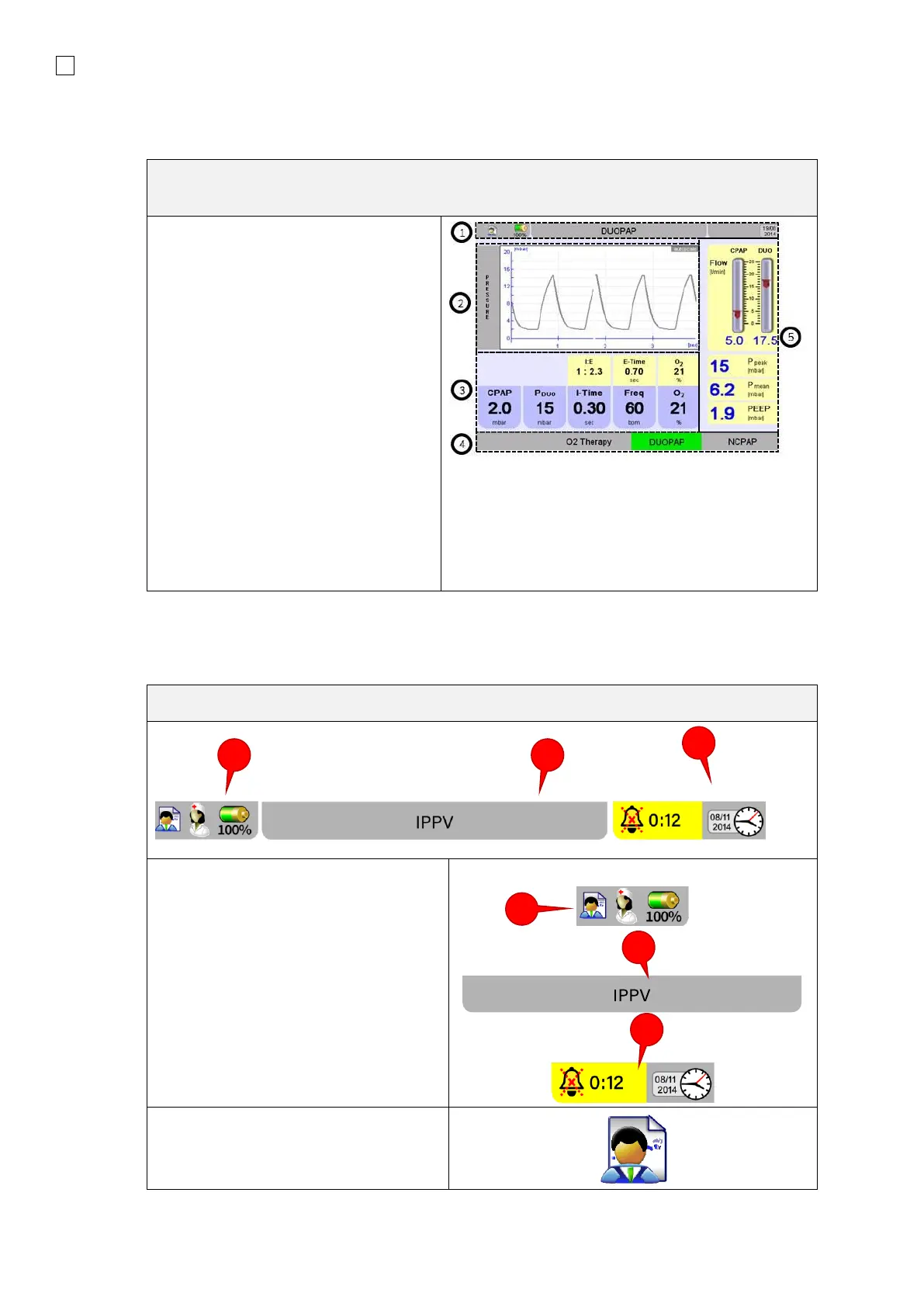
The Display screen shows various information, setting and display fields depending on
the display settings or menu:
1. Information bar indicating:
• Battery status,
• Time/date,
• Status information,
• System and alarm information
2. Graphics field
3. Function field
4. Selection or display of the
Operating mode
5. Numeric field alarm limits
Depending on the Display mode
selected, individual fields can be shown
hidden.
Display field options will be described
later.
The Information bar displays from general information to displaying alarms. It is divided into 3
sections.
The Information bar indicates the
following among other things:
1. Patient data available
Nurse call active / inactive
Battery charge status
2. Ventilation mode, information and
alarm message display
3. Alarm Mute (time remaining until
alarm reactivates) Time / Date
The Patient symbol indicates patient
data associated with the current
ventilator operation is saved to the
device.



 To Next Page