EasyManua.ls Logo

ACUTRONIC fabian Therapy evolution - Configurations Menu

ACUTRONIC fabian Therapy evolution
106 pages
Print Icon
To Next Page IconTo Next Page
To Previous Page IconTo Previous Page
Loading...
Configurations menu 35
fabian Therapy evolution | SW 5.1.x
Ref: 121003.EN / Date 2020-01-22
6 Configurations menu
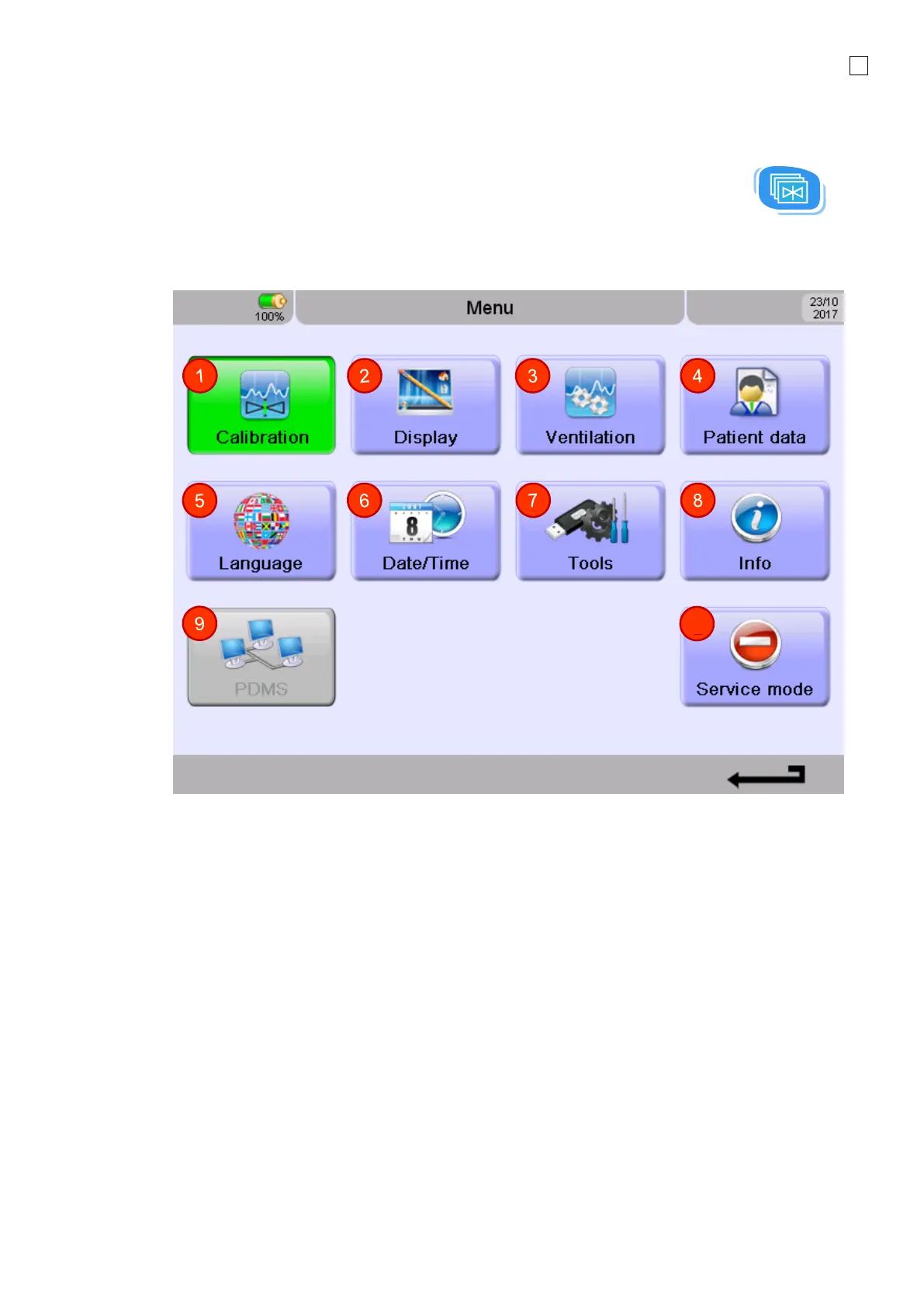
The Configurations menu can be accessed by pressing the Menu Calibration button on
the keypad. Depending on the hardware state of the device, the configuration menu can also contain
the sensor related submenus.
Configurations menu in Therapy WITH flow sensor connector

1. Calibration menu
2. Display
3. Ventilation
4. Patient Data
5. Language
6. Date / Time
7. Tools
8. Information
9. PDMS (optional)
10. Service Mode
10
6

Table of Contents

Related product manuals