46 Configurations menu
fabian Therapy evolution | SW 5.1.x
Ref: 121003.EN / Date 2020-01-22
6.5 Language
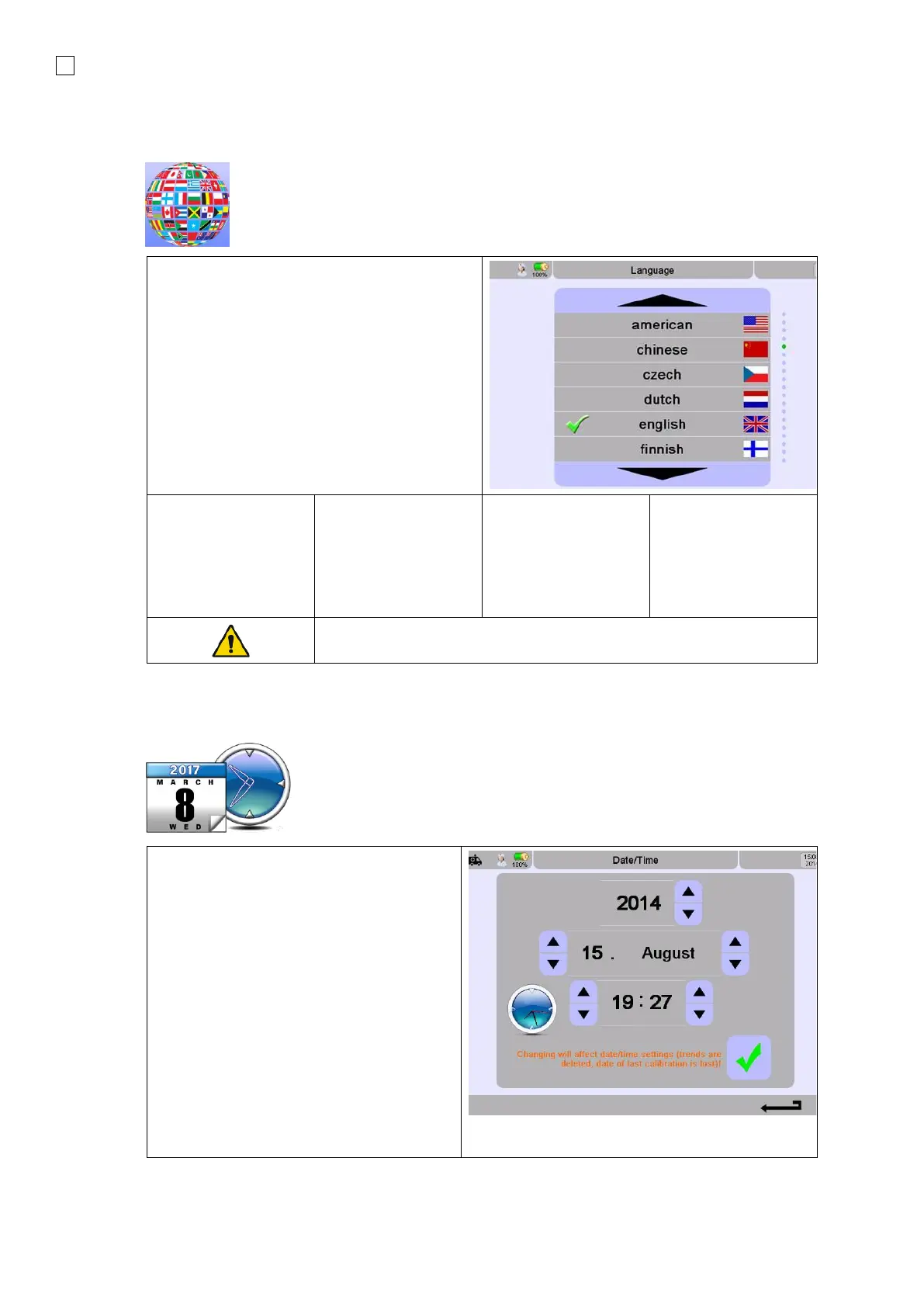
1. Selecting the operator Language.
Choose the required language bydirect with
touching the language name. Use the up and
down arrows to scroll to see the rest of the
list.
2. Restart the device after selecting a new
language.
• American
• Chinese
• Czech
• Danish
• Dutch
• English
• French
• Finnish
• German
• Hungarian
• Italian
• Japanese
• Norwegian
• Polish
• Portuguese
• Russian
• Slovak
• Spanish
• Swedish
• Turkish
Only select a new language when the device is NOT connected to a
patient.
NOTE:
Changing the date or time will delete all
Trend data.
Changing the Date and Time:
1. Use the Up and Down arrows to set
the date and time.
2. After the time or date has been
changed, the confirmation check mark
changes colors.
3. The new information is applied after
confirmation.


 To Next Page