75 Ag Leader PN 4003964-ENG Rev. P
GPS
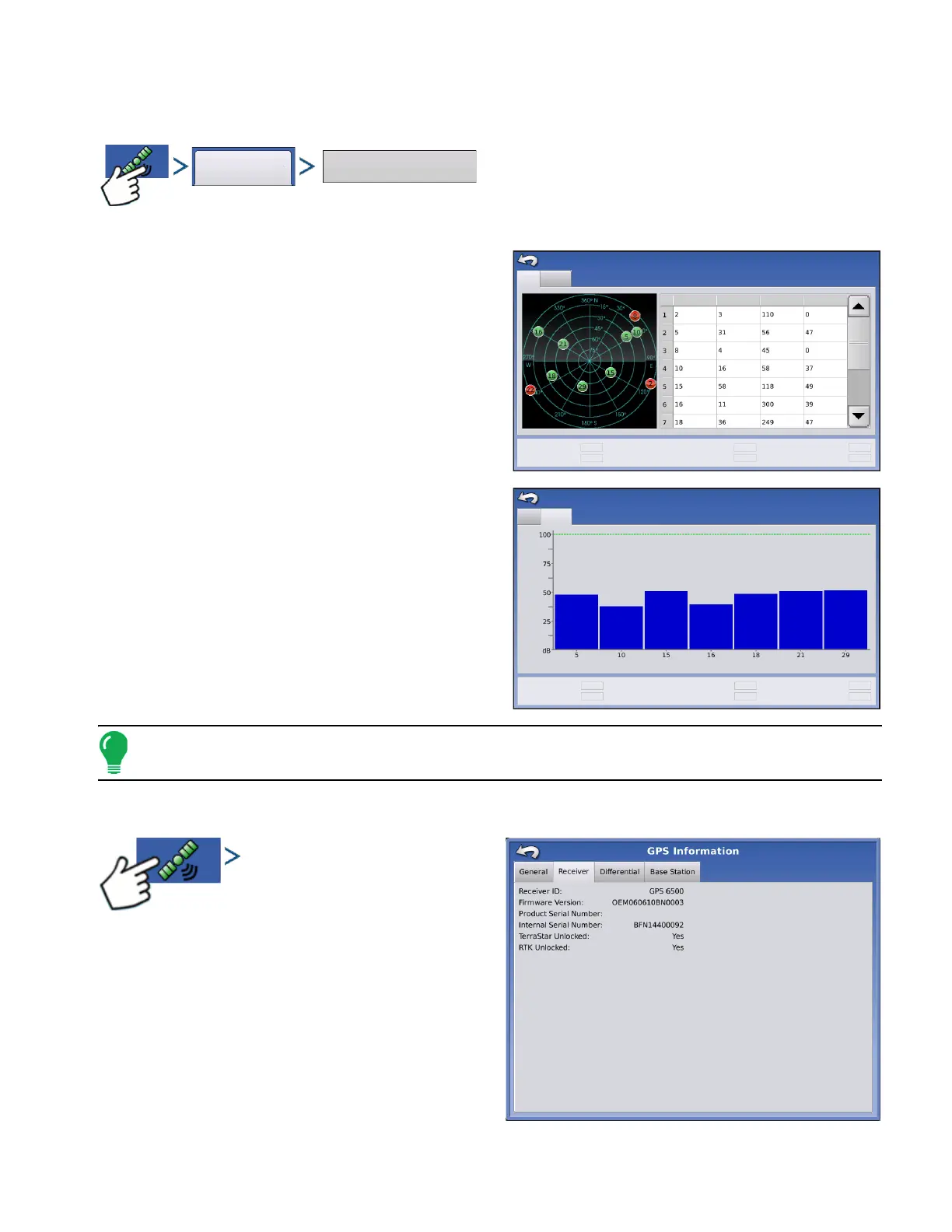
SATELLITE PLOT
Press: GPS (satellite) button > General tab > Satellite Plot button
The Satellite Plot feature can display either as a plot
or a graph. The information on these screens is used
as an advanced diagnostic tool for GPS satellite
availability. In the event of GPS availability issues,
technical support may request you to view these
screens.
Satellite Plot - Graph
Satellite Plot requires GSV and GSA NMEA
messages to be turned on from the GPS receiver.
Note: In order to use Differential GPS, you must have at least four available satellites. In order to use RTK
differential sources, you must have at least five available satellites.
GPS INFORMATION - RECEIVER TAB
Press: GPS (satellite) button > Receiver tab
• Receiver ID
• Firmware Version
• Product Serial Number
• Internal Serial Number
• TerraStar Unlocked
• RTK Unlocked
Plot
Graph
PRN
Elv
Azm
SNR
Satellites in View
10
Satellites Tracked
7
Corrections Age (sec)
7.40
VDOP
2.40
HDOP
1.50
PDOP
2.80
Satellite Plot
Plot
Graph
Satellites in View
10
Satellites Tracked
7
Corrections Age (sec)
7.40
VDOP
2.40
HDOP
1.50
PDOP
2.80
Satellite Plot
SNR
PRN



 To Next Page