A programmed key may be dedicated to seize of a specific external trunk group. The attendant
presses this key before dialing the number of the external called party.
2.2.4 Dial (call) by name
This feature is used to select an internal (or external) user by name. "Dial by name" can be
requested either from the idle state or during a consultation call.
When the attendant uses the "Dial by name" feature, the system searches the system
directory, then, if the search is unsuccessful, a standard LDAP directory (if there is one). If the
attendant wants, the LDAP directory can be searched directly.
Pressing any key on the alphabetical keyboard switches the attendant set to Dial by name
mode.
The attendant can select the called user either:
- By last name or part of the last name.
- By last name and first name.
- By initials.
The attendant selects the called user by name
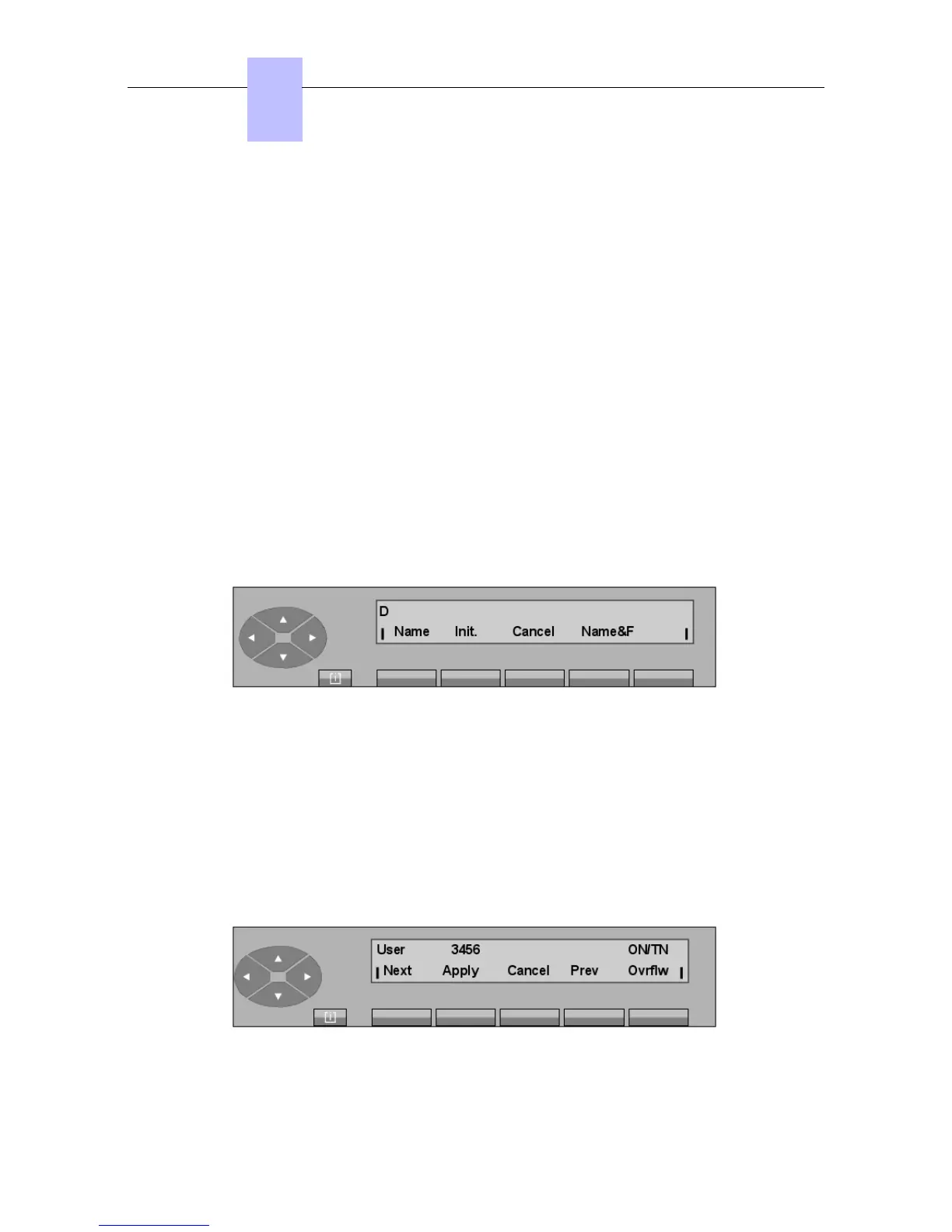
When the first letter of the name is entered ("D", for example), the screen displays the following
functions:
The attendant can confirm the selection when the second character is displayed or wait and enter
additional letters.
Name To indicate that attendant choice is selection by name or part of the
name.
Init. To indicate that selection is by initials.
Name&F To indicate that selection is by name and first name.
The Cancel key is used to cancel the current selection.
After entering the name of the called user, the attendant confirms this choice by pressing the
Name key.
The system accesses the name table and displays the first name in the list (if there is one):
Chapter
2
! &$
2-4














 To Next Page