94
SECTION 9: REMOTE ACCESS
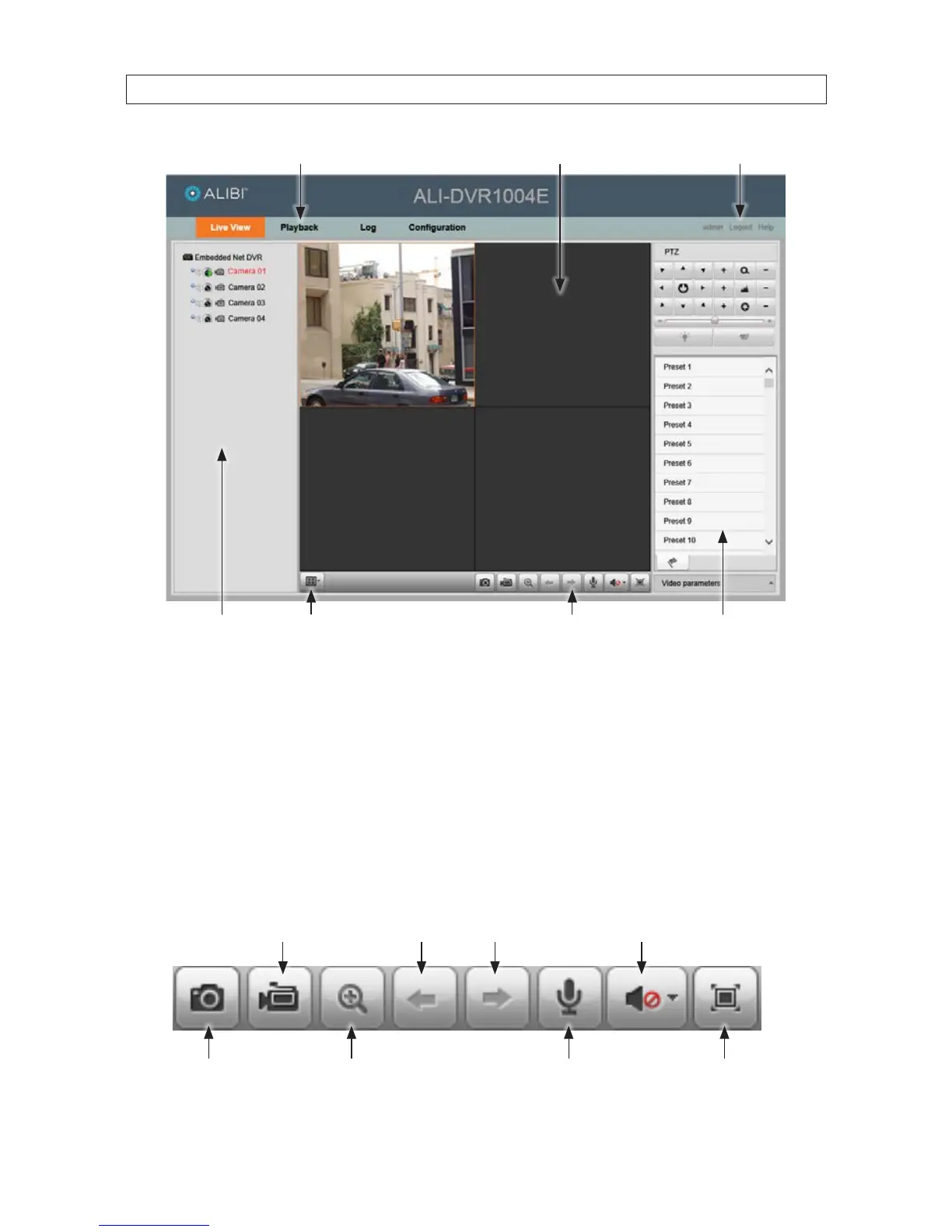
Multi-screen mode selectCamera list
PTZ camera controls*
Screen select tabs
Remote Live View toolbar
Logout buttonChannel viewing frames
* PTZ (Pan, Tilt, Zoom) camera features are not supported by the ALI-DVR1004E DVR.
To view video from a camera in the Live View screen:
— Click a viewing frame to select it. When selected, the frame is surrounded by a bright box.
— Click the camera channel you want to see.
— To expand the image to full frame, double click the image in the viewing frame. To return to normal viewing mode, press
ESC (keyboard escape key).
• You can control many Live View functions quickly with the Live View toolbar. The function of the toolbar icons are similar to
those on the DVR channel viewing frame.
Start/stop all
camera recording
Previous - Next screens
Enable/disable PTZ Start/stop 2-way audio
Full screen image
Capture
Enable/mute audio
Remote Live View toolbar











 To Next Page