SECTION7
Network Settings
7.1 Conguring General Settings
Network settings must be properly congured before you connect the DVR to cameras on network, or access it remotely.
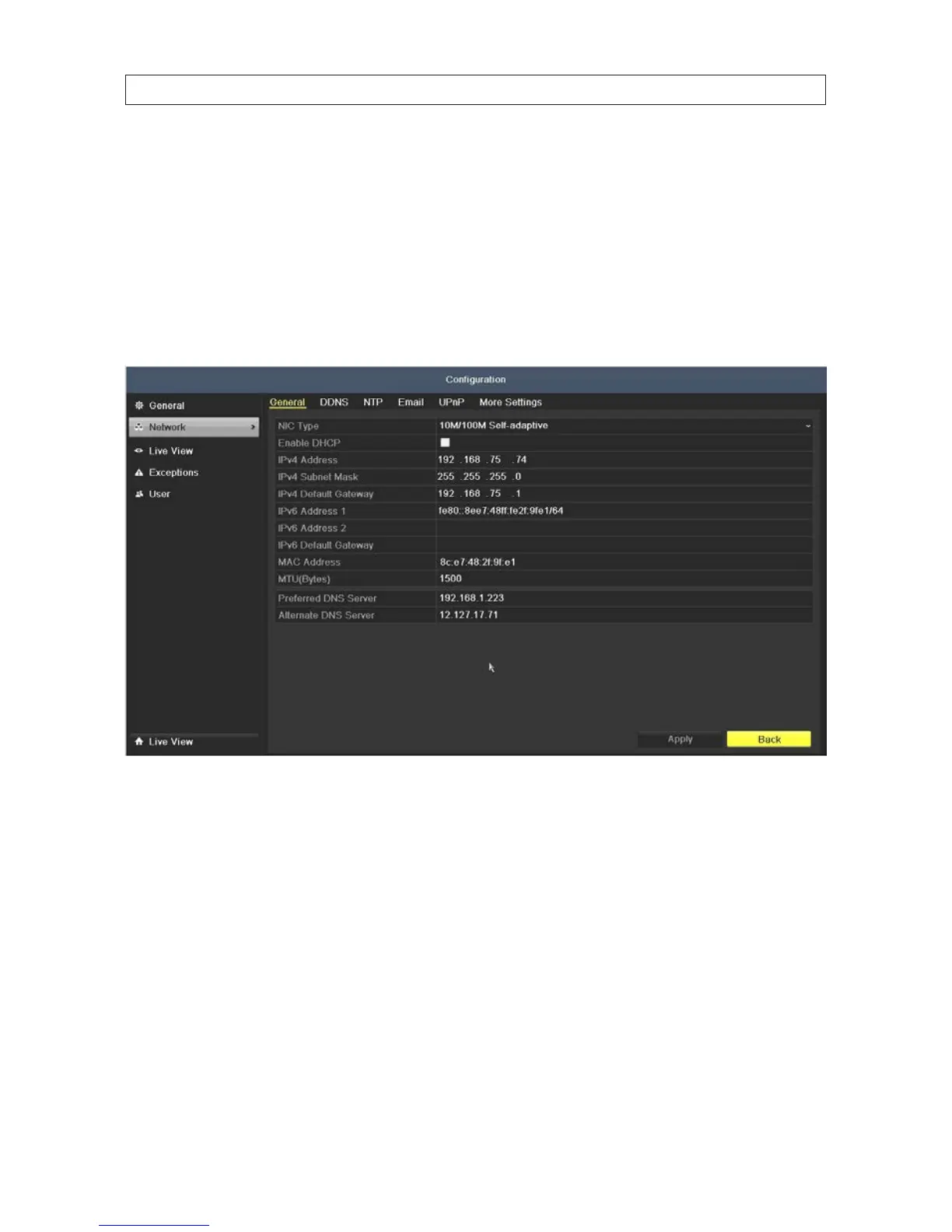
1. Open the Network Settings menu. Go to Menu | Conguration | Network
2. In the General Settings menu, select or enter the following parameters: NIC Type, IPv4 Address, IPv4 Gateway, MTU and DNS
Server. If the DHCP server is available, you can check the Enable DHCP box to automatically obtain an IP address and other
network settings from the network DNS server. NOTE: The valid MTU range is 500 .. 1500.
3. Click Apply to save your settings.
7.1.1 ConguringDDNS
You can congure your DVR to use Dynamic DNS (DDNS). DDNS is especially useful for access to your DVR from outside the local
network (i.e., the Internet), and you use DHCP to congure your DVR network settings. To congure the DVR to use DDNS:
1. Open the Network Settings menu. Go to Menu | Conguration | Network
SECTION 7: NETWORK SETTINGS











 To Next Page