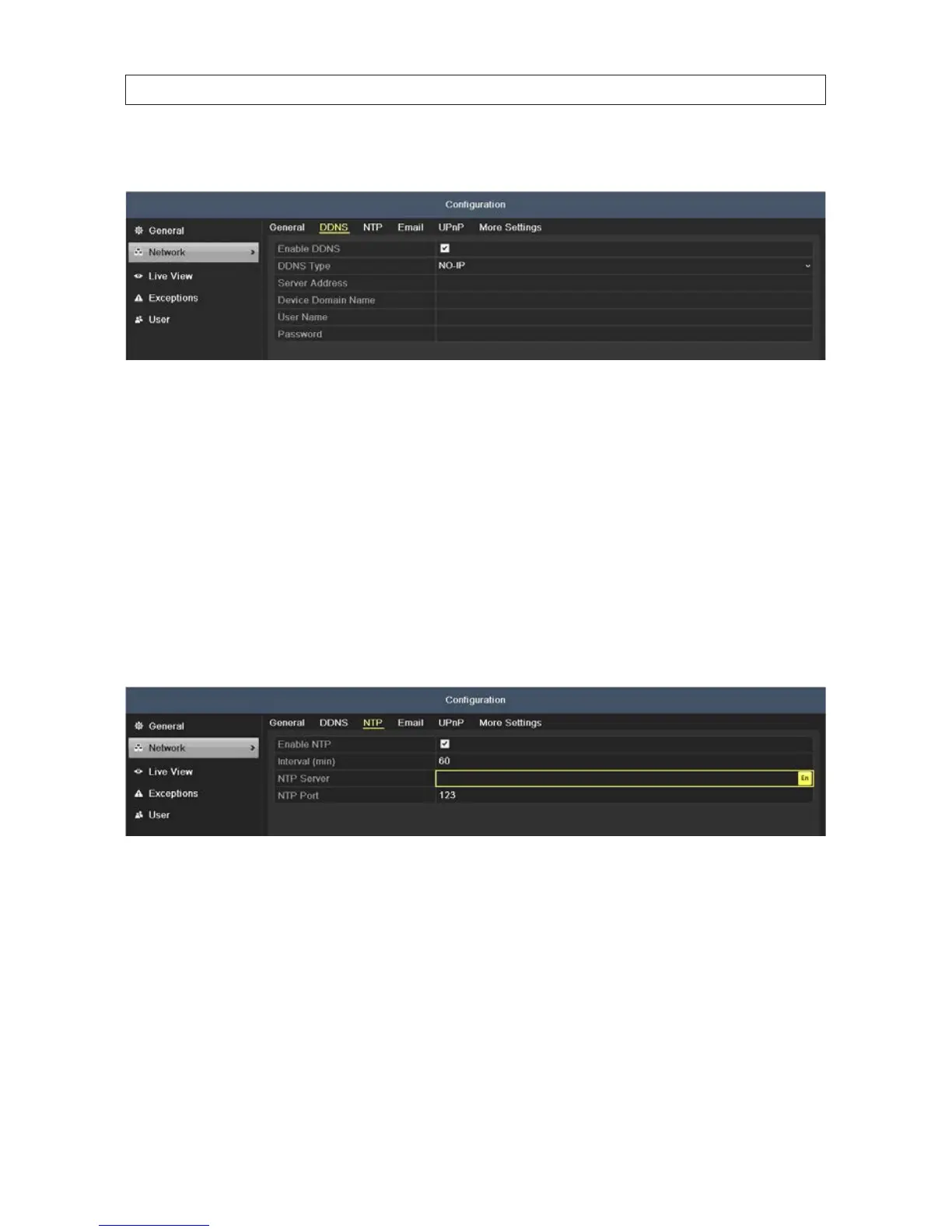
— NO-IP: Enter the account information in the corresponding elds. Refer to the DynDNS settings.
i. Enter Server Address for NO-IP.
ii. In the DVR Domain Name text eld, enter the domain obtained from the NO-IP website (www.no-ip.com).
iii. Enter the User Name and Password registered in the NO-IP website.
7.1.2 ConguringNTPServer
A Network Time Protocol (NTP) Server can be congured on your DVR to ensure the accuracy of system date/time.
1. Open the Network Settings menu. Go to Menu | Conguration | Network
2. Click the NTP tab to open the NTP settings menu.
3. Check the Enable NTP box to enable this feature.
4. Select the following NTP settings:
— Interval: Interval in minutes between the two synchronizing actions with an NTP server.
NOTE: The synchronization time interval can be set from 1 to 10080 minutes. The default value is 60 min. If the DVR
is connected to a public network, use an NTP server that has a time synchronization function, such as the server at the
National Time Center (IP Address: 210.72.145.44). If the DVR is setup in a more customized network, NTP software can be
used to establish a NTP server used for time synchronization.
— NTP Server: IP address of NTP server
— NTP Port: Port of NTP server
SECTION 7: NETWORK SETTINGS











 To Next Page