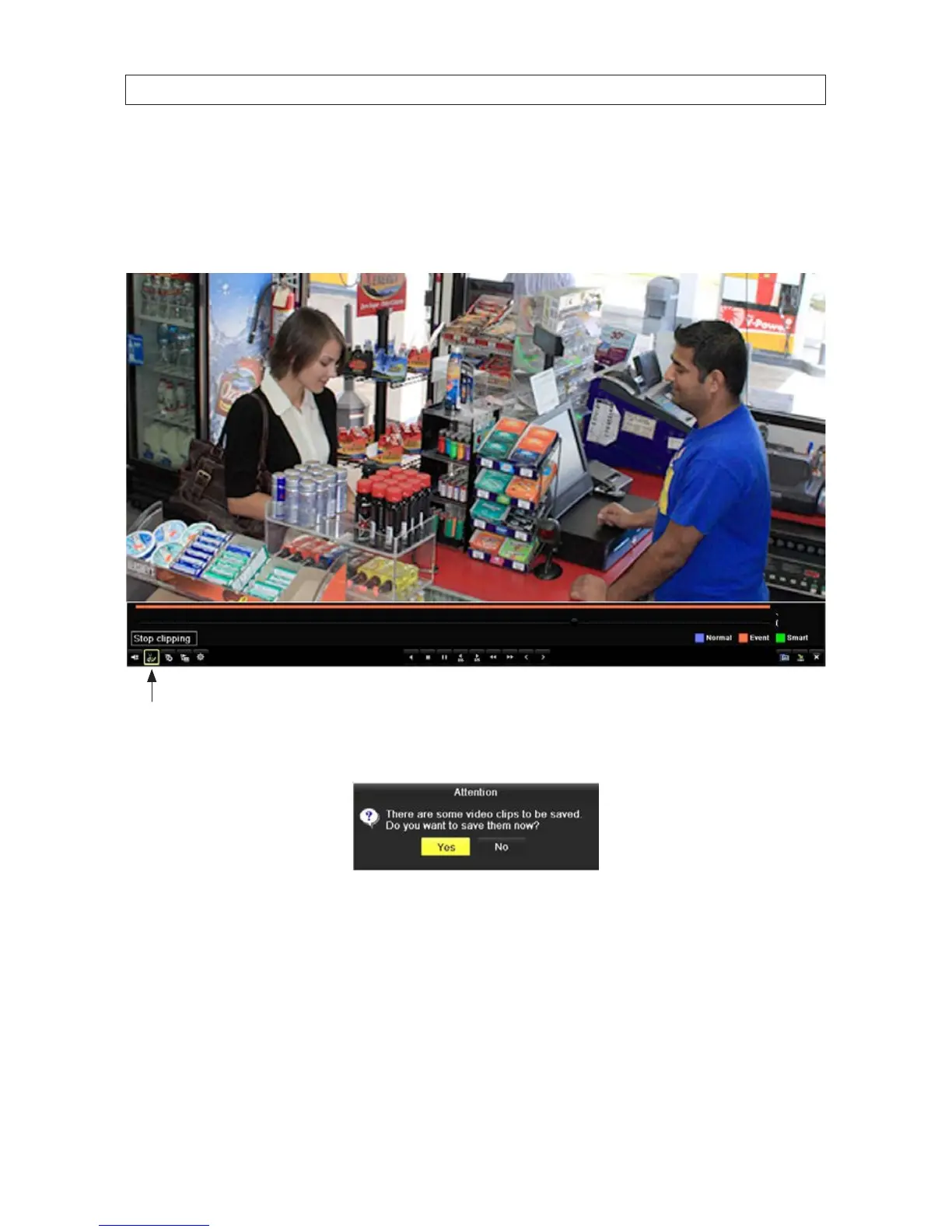
3. Advance the le playback to the start of the segment you want to export, then click the Clip icon (Start clipping scissors) at
the bottom of the screen to mark the start of the clip you want to save.
4. Advance the le playback to the end of the segment you want to export, then click the Clip icon (Stop clipping scissors)
again to mark the end of the clip you want to save.
Clip (Stop clipping) icon
5. Right click anywhere in the video window, then select Exit. The Attention pop-up window shown below will appear.
6. Click Yes to save the video clip you marked.
7. In the Export window, select the directory where you want to save the le if available, or just click Export, then click Quick
Export. A pop-up window will open showing the le structure of your external storage device. If your USB device is not
shown in the Device Name eld, click the Refresh button. NOTE: Some USB devices types include the New Folder and
Format options, other types include only an Erase option.
SECTION 5: RECORD, PLAYBACK AND VIDEO BACKUP



 To Next Page