30 Rev. 2
Operation
Using the Model 1700 Menus
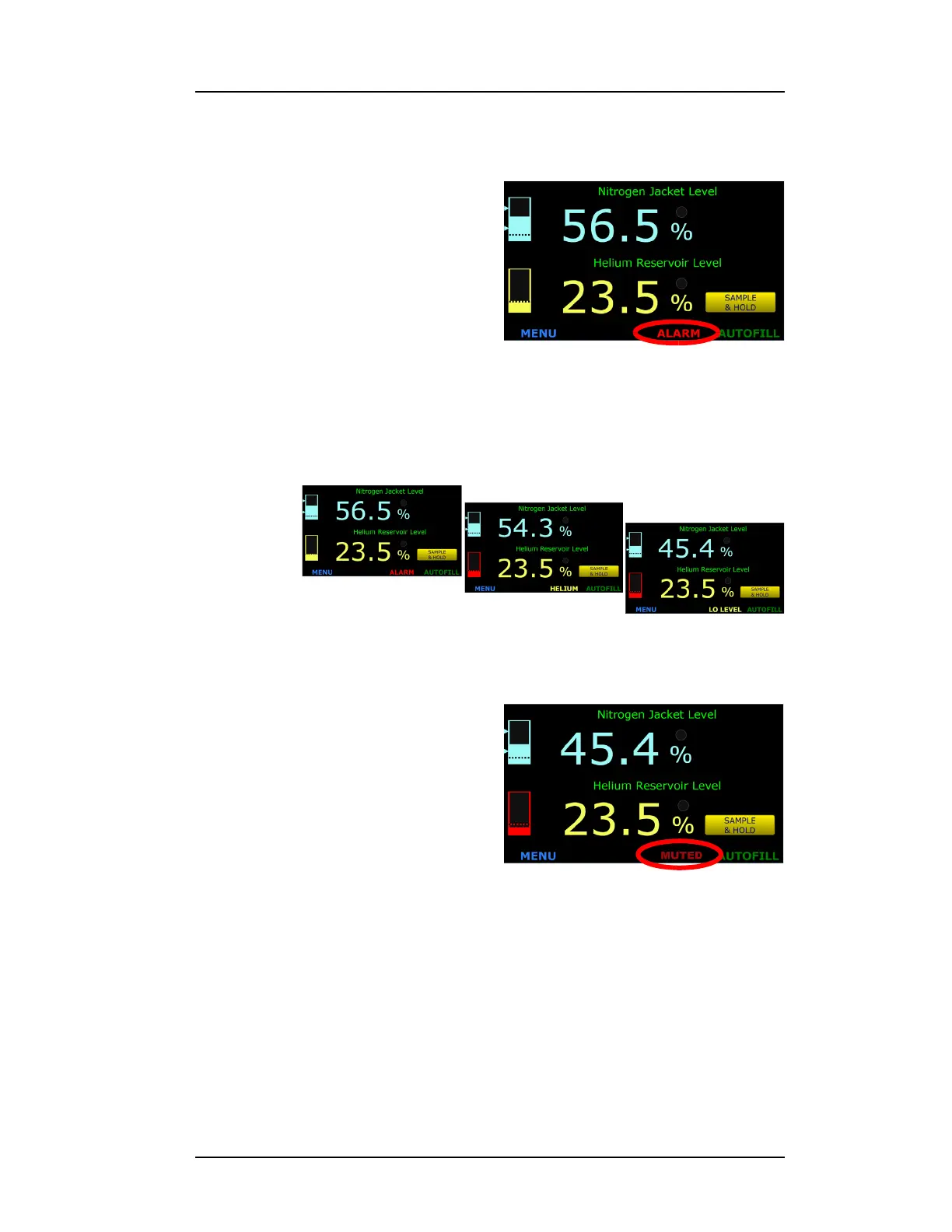
1. When an alarm is initiated, several things will occur:
a. The bar-graph level display
that is causing the alarm
condition as well as the
sensor name will flash red.
b. The ALARM button in the
footer will indicate what the
alarm condition is, either by
showing LO LEVEL, HI
LEVEL, or TIMEOUT.
c. An audible alarm will be energized.
2. For example, a helium low level alarm will flash the following three
displays in a repeating fashion:
3.5.4 Muting an Alarm
The audible alarm can be muted by
pressing the ALARM button in the
footer. As long as the alarm condition
occurs with muting enabled, the
ALARM button in the footer will alter-
nate between the alarm conditions
(Figure 3-17) and MUTED.
3.5.5 Resetting the Autofill Timeout Alarm
1. Press the red T-CLOSED text in the right side of the footer twice
until M-CLOSED is displayed.
2. Press SAVE.
3. To restart the autofill process, Press the M-CLOSED annunciator
once and the AUTOFILL annunciator will be displayed. Press
SAVE and the autofill sequence will be enabled.
Figure 3-16. Alarm Annunciator
Figure 3-17. LO LEVEL Alarm Condition Footer Displays
Figure 3-18. Muted Alarm Condition



 To Next Page