Rev. 2 33
Operation
Using the Model 1700 Menus
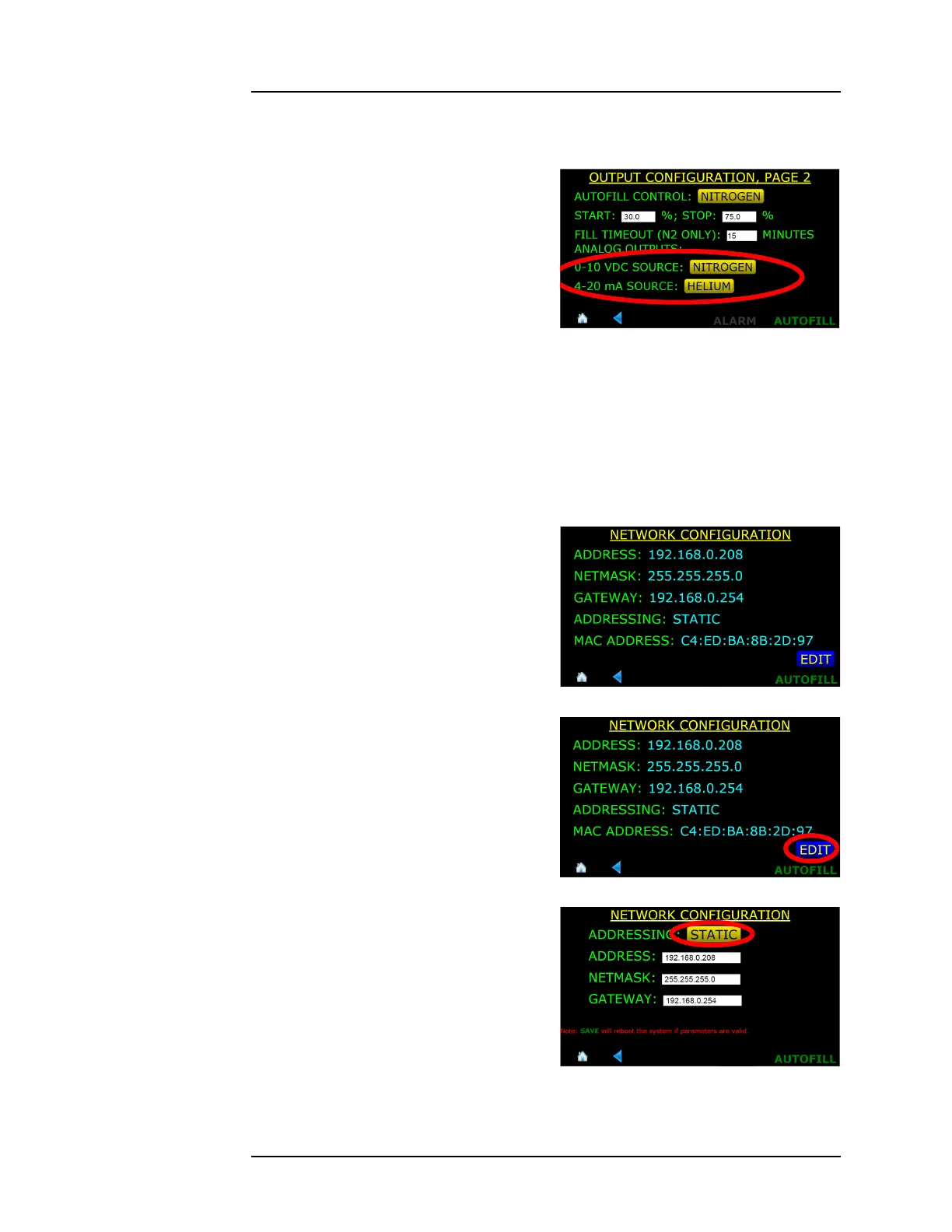
3.8.2 Configuring the Analog Outputs
1. From the MENU screen, choose
OUTPUTS, then Page 2.
2. If necessary, choose the source
for the 0-10 VDC output and 4-
20 mA output.
3. Press the SAVE button to save
the choice (or CANCEL to quit
without making a change).
4. Press the home icon to go back to the home screen.
3.9 Ethernet Connectivity
3.9.1 IP Addressing Scheme
1. From the MENU screen, choose
NETWORK. The current
settings will be displayed.
2. To change the settings, choose
EDIT.
3. In the ADDRESSING: button,
choose STATIC, DYNAMIC, or
DISABLED as appropriate.
4. If STATIC is chosen for the
addressing scheme, enter IP
ADDRESS, NETMASK, and
GATEWAY addresses that are
appropriate for the connected
Figure 3-23. Analog Outputs Source
Selection
Figure 3-24. Network Selection
Figure 3-25. Editing Network Selection
Figure 3-26. Editing Network Settings



 To Next Page