54 Rev. 2
Calibration
Capacitance-Based Level Calibration : Closed Dewar Calibration Procedure
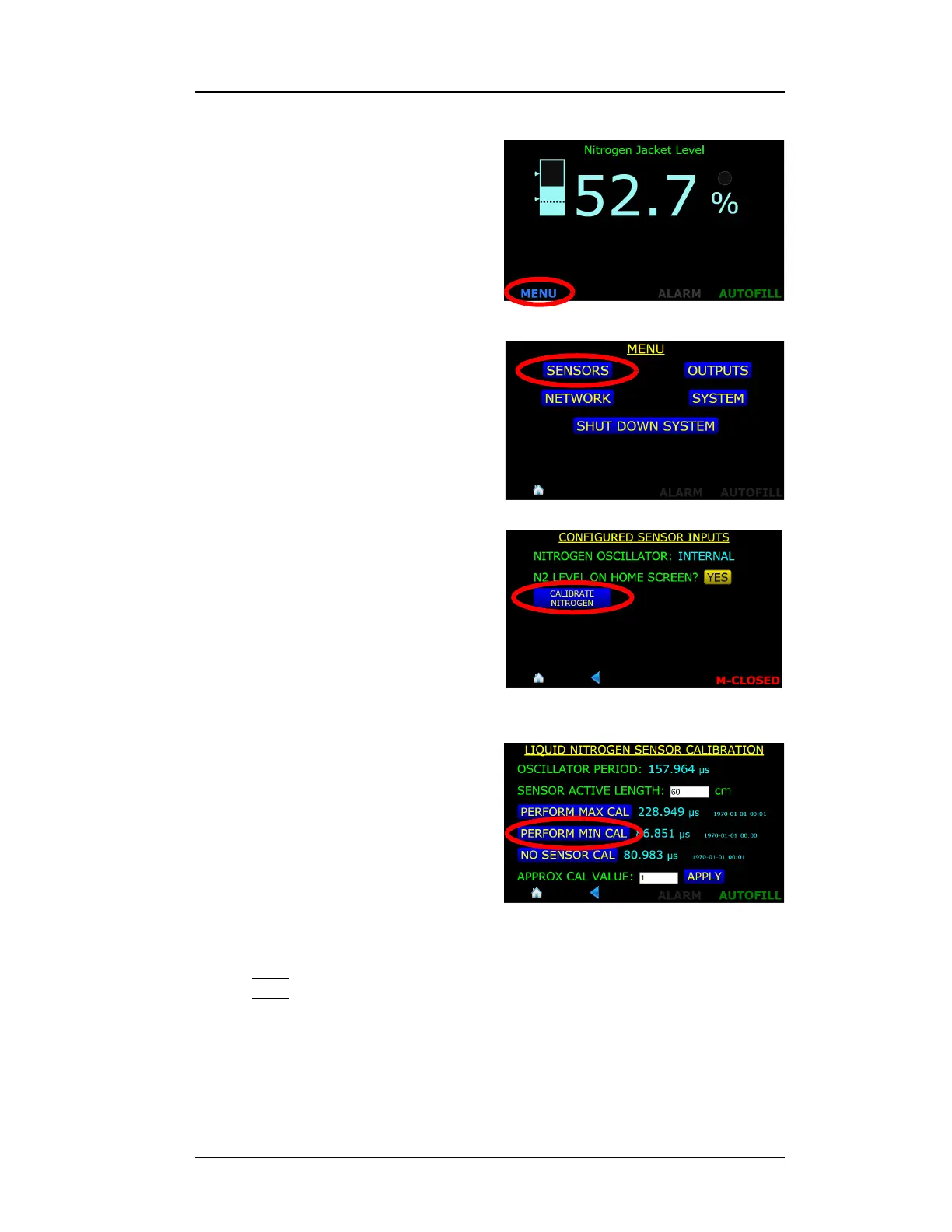
2. Press the MENU button in the
lower left corner of the display
screen.
3. Choose the SENSORS
selection from the MENU
screen.
4. Press the CALIBRATE
NITROGEN button
5. Press the PERFORM MIN CAL
button.
6. After several seconds of
displaying “CALIBRATING...”,
the instrument will complete
the calibration process. Press
the SAVE button to save the
new calibration set point.
Note
Note that the frequency listed to the right of the PERFORM MIN CAL
button is updated as well as the date and time stamp of the
calibration point.
Figure 4-35. MENU Selection Button
Figure 4-36. SENSORS Selection
Figure 4-37. CALIBRATE NITROGEN
Selection Button
Figure 4-38. PERFORM MIN CAL.
Selection Button



 To Next Page