Rev. 2 31
Operation
Using the Model 1700 Menus
3.6 Configure the Autofill Function
3.6.1 Autofill overview
There are several variables that must be addressed to set up an autofill
system. These include the level indication that will be used to control auto-
fill, the Fill Start level (A), the Fill Stop Level (B), and the fill timeout
interval.
3.6.2 Setting the autofill parameters
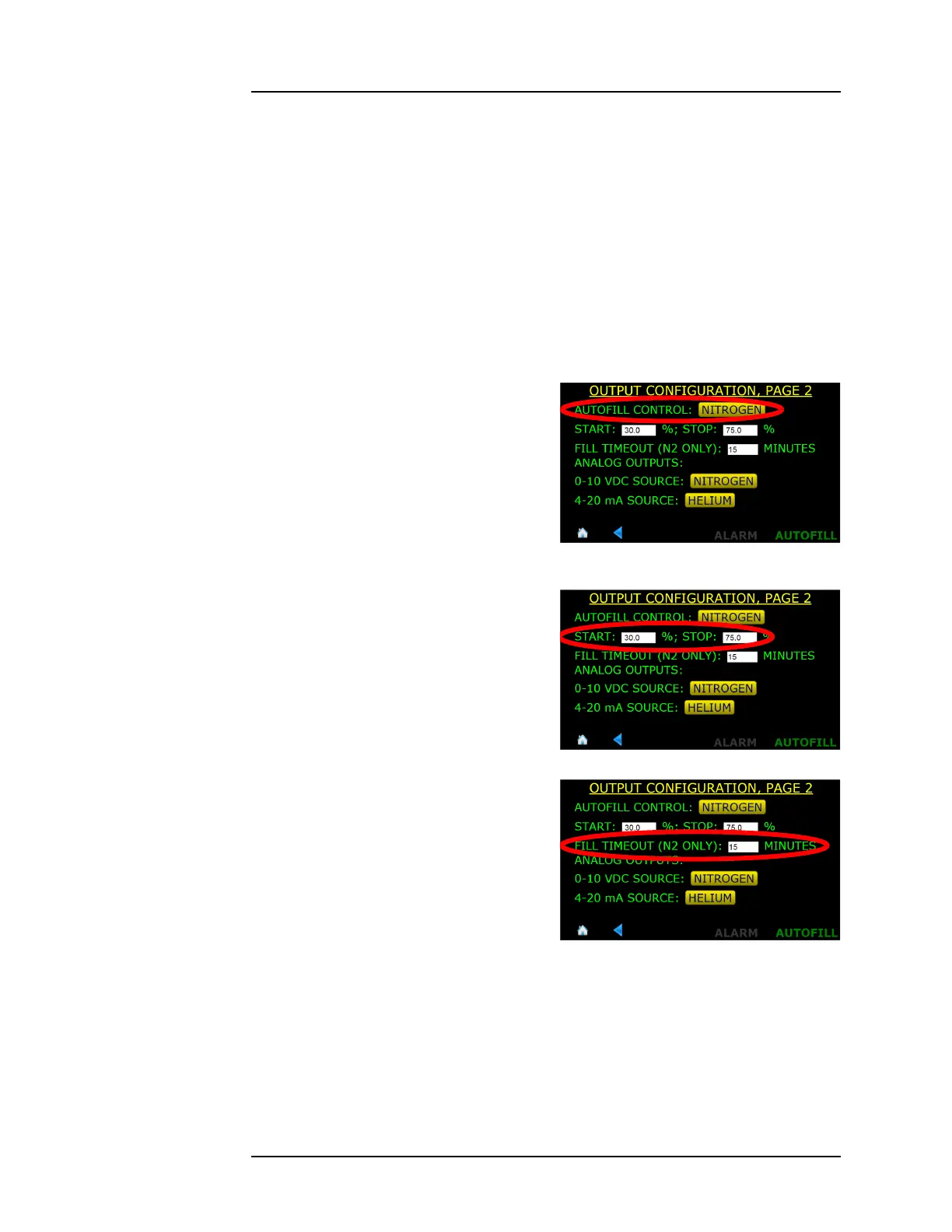
1. From the Menu screen, choose OUTPUTS and then choose PAGE 2.
2. Toggle the AUTOFILL
CONTROL button until
NITROGEN is displayed.
3. Enter the Fill START and STOP
levels.
4. Enter the FILL TIMEOUT (N2
ONLY) interval. Refer to
section 3.6.2 on page 31 for a
description of the Autofill
timeout function.
5. Press HOME in the footer to
return back to the level display.
3.6.3 Enable the Autofill function
The autofill function must be enabled from the front panel of the instru-
ment. After the autofill control loop has been configured (steps in section
3.6) the instrument will be left in the valve manually-closed state.
Figure 3-19. Autofill Level Control
Selection
Figure 3-20. Autofill Level Start Setting
Figure 3-21. Autofill Timeout Setting



 To Next Page